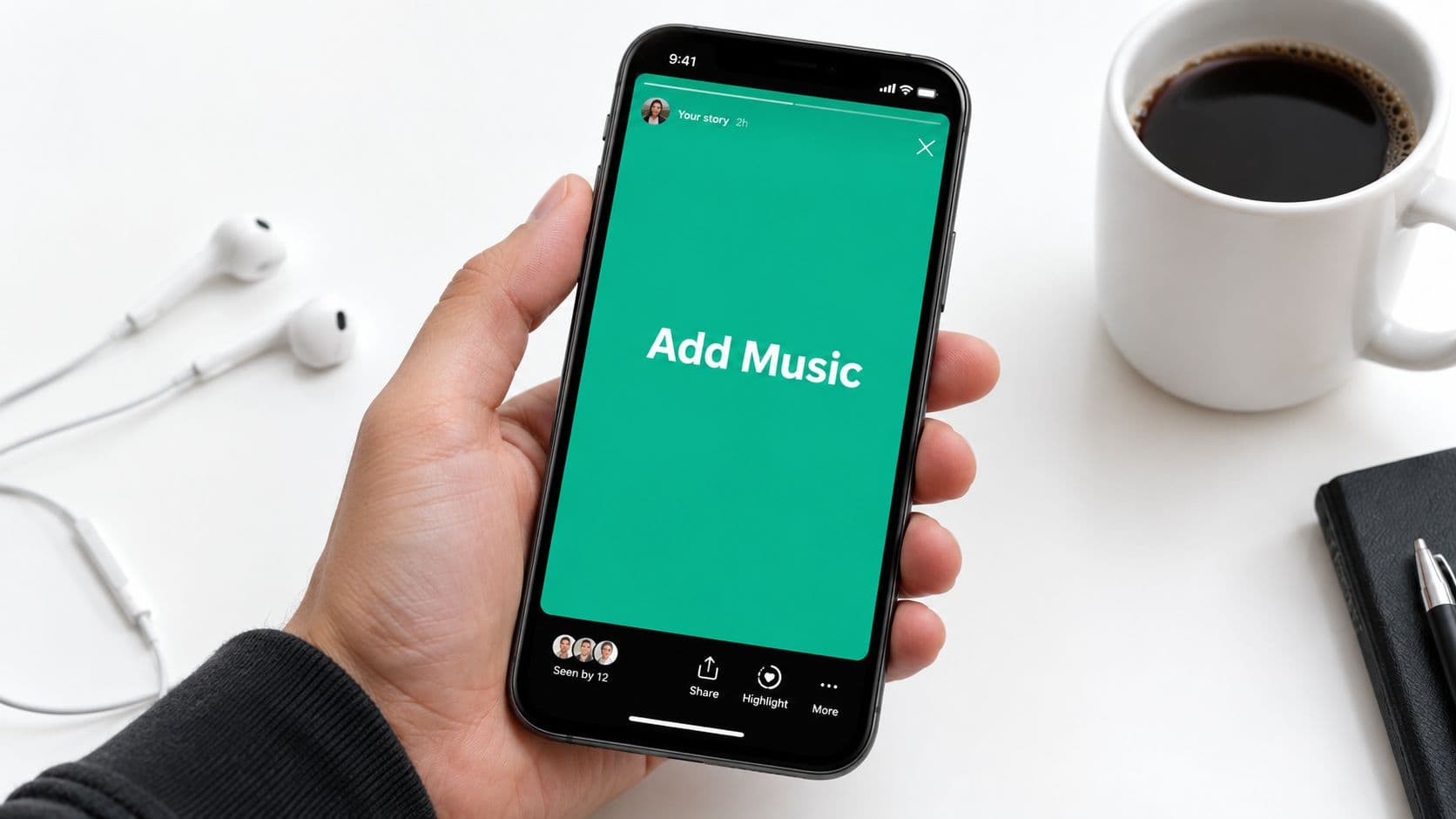
Why Music Makes Instagram Stories More Engaging
A Story without sound can still work, but the right track gives it a point of view. A product clip with a clean beat feels sharper. A casual selfie with a lyric line feels more personal. A travel photo with a soft melody feels like a memory, not just a post.
Instagram built Music into Stories as a core feature from the start, not as a decorative extra. When the feature launched in 2018, Stories already had 400 million daily users, which gave music immediate reach inside a huge short-form format. The story camera became more than a posting tool, it became a place where mood, pacing, and branding could all happen in one swipe. TechCrunch's report on the 2018 launch makes that scale clear.
Where music does the most work
Music helps most when the visual is simple and needs energy. A quick packaging reveal, a “day in the life” moment, a team lunch, or a product close-up can all feel stronger with the right audio. It also helps when you want the viewer to feel something before they read anything.
Practical rule: if the first second of the Story feels empty, music can carry the mood before your text or voiceover lands.

There's also a brand-side reason to use it. Music gives recurring Stories a recognizable rhythm, so people start to know what kind of post they're about to get. That's useful whether you're posting daily or just trying to make one promo slide feel less static.
How to Add Music to Your Instagram Story on iPhone and Android
Open the Story camera, then capture a new photo or video, or upload one from your camera roll. Tap the sticker icon, choose Music, and search by song, artist, mood, genre, or popular tracks. On iPhone and Android, the native flow is the same, so the main job is picking the clip that fits the post.
The song picker shows the track name, artist, and a slider for choosing the exact segment. Search is useful when you know the vibe more than the title, but the result list still depends on what Instagram licenses in your region and on your account type. If the sticker is missing or the song library looks thin, that usually points to availability, not a mistake in the steps.
What the screen flow feels like in practice
The process is fast once you've done it a few times. Capture your media, or upload it, then open the sticker tray. The Music sticker usually sits with the other interactive stickers, and once you tap it, you're inside the song browser. From there, pick a track and drag the slider to the part that fits your clip.
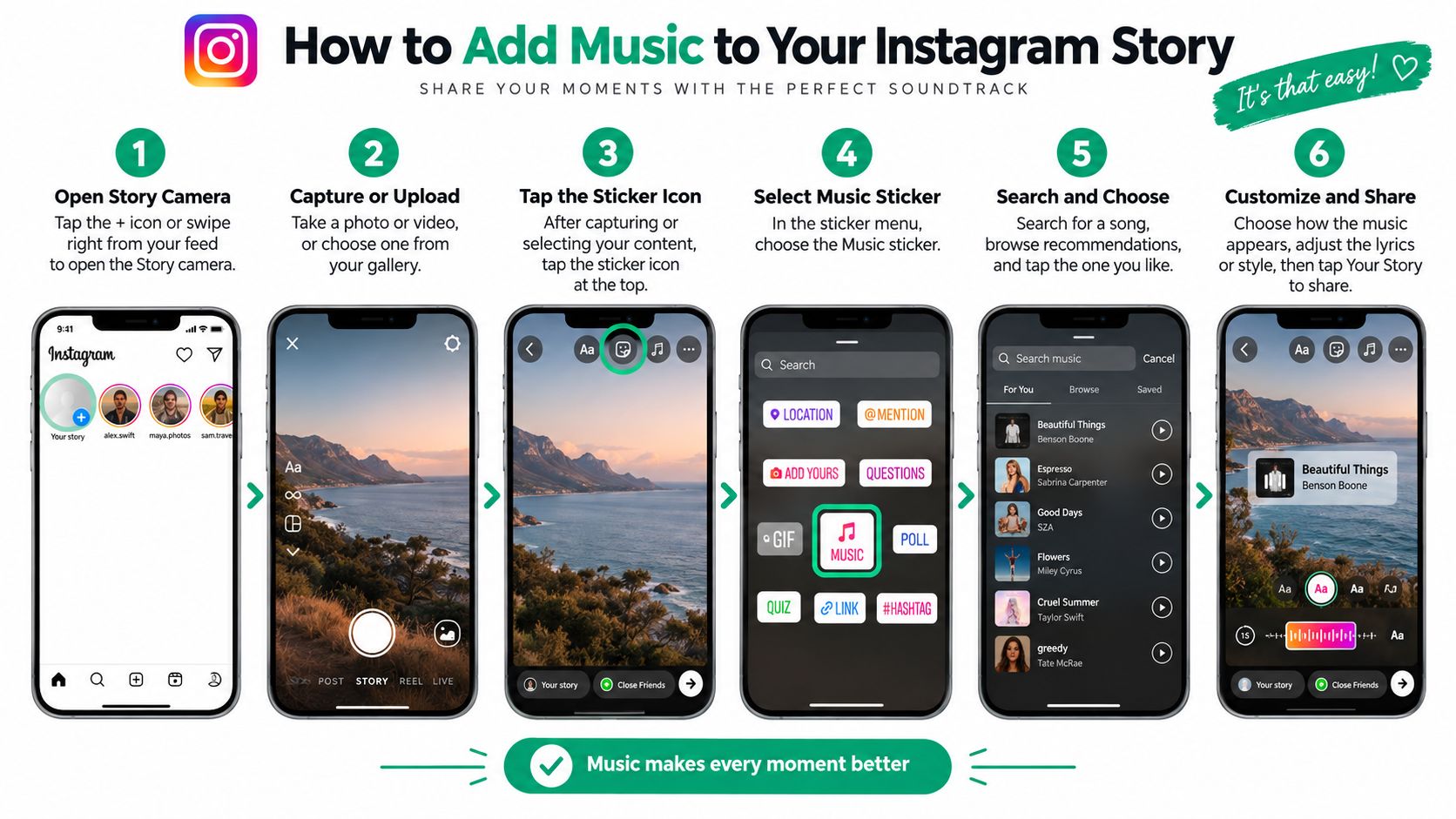
The main difference between devices is layout, not capability. On some phones, the sticker tray opens a little differently, and app updates can move the buttons around, but the steps stay stable. If one device works and another feels off, it is usually an app version issue, not an iPhone-versus-Android rule.
Instagram's search filters behave a bit differently depending on what you type. If you start with a song title, you'll usually get exact matches first. If you search by mood or genre, the results are broader, which helps when you want a sound that matches the visual but do not care about the artist.
Open the clip first, then choose the music. It is easier to match the beat to the visual than to force the visual to fit a random track.
A few habits make the native flow smoother. Keep your first frame strong, because the song starts supporting the visual immediately. Use the preview before posting, especially if your Story has text or a face close to the top or bottom of the screen. That small check keeps the sticker from covering something important.
The segment slider usually lands near the strongest part of the track, often the chorus or another recognizable hook. If the default cut feels too busy, drag it to a calmer section for product shots or slides with a lot of text. On shorter clips, choose a snippet that starts quickly so the audio matches the pacing of the Story.
Customizing Lyrics, Album Art and Timing for Your Story
Once the song is selected, the Story can look polished or clunky depending on how you style it. Instagram lets you switch between animated lyrics, album art, and a minimal label. Each version changes the tone, so the choice should match the kind of Story you're posting, not just whichever layout appears first.
Lyrics work well when the line itself carries the message. Album art fits when you want the track to feel more like a music recommendation. The compact label is the quietest option, which is useful when the visual already has a lot going on, and you don't want the sticker to compete with it. If you want to dig deeper into lyric overlays, this guide on song lyrics as captions is a useful companion.
Make the sticker part of the design
Drag the sticker so it doesn't cover faces, product details, or on-screen text. Resize it until it feels like a design element instead of a banner. If the Story includes a talking head, keep the lyric block away from the mouth area so the screen still feels clean.
The timing slider matters just as much. Use it to land on a lyric or beat that matches the moment in the clip. A punchy visual change needs a sharper section of the track, while a static image usually works better with a calmer slice.
For a shorter video, choose a snippet that starts quickly. For a photo Story, you have more room to let the audio breathe, so a slower build can work. The goal is simple, the music should feel like it was chosen for that frame, not pasted onto it after the fact.
Design rule: if the sticker blocks the eye path, it's too big. If the lyric doesn't help the mood, switch to album art or a minimal label.
Adding Music From Spotify and Other External Sources
Native Story music and Spotify sharing solve different problems, so choose based on the job you want the Story to do. The built-in Music sticker gives you direct control over the snippet, display style, and on-screen placement. Spotify's newer share-with-sound behavior is better when you want to point people to a specific song and signal taste quickly.
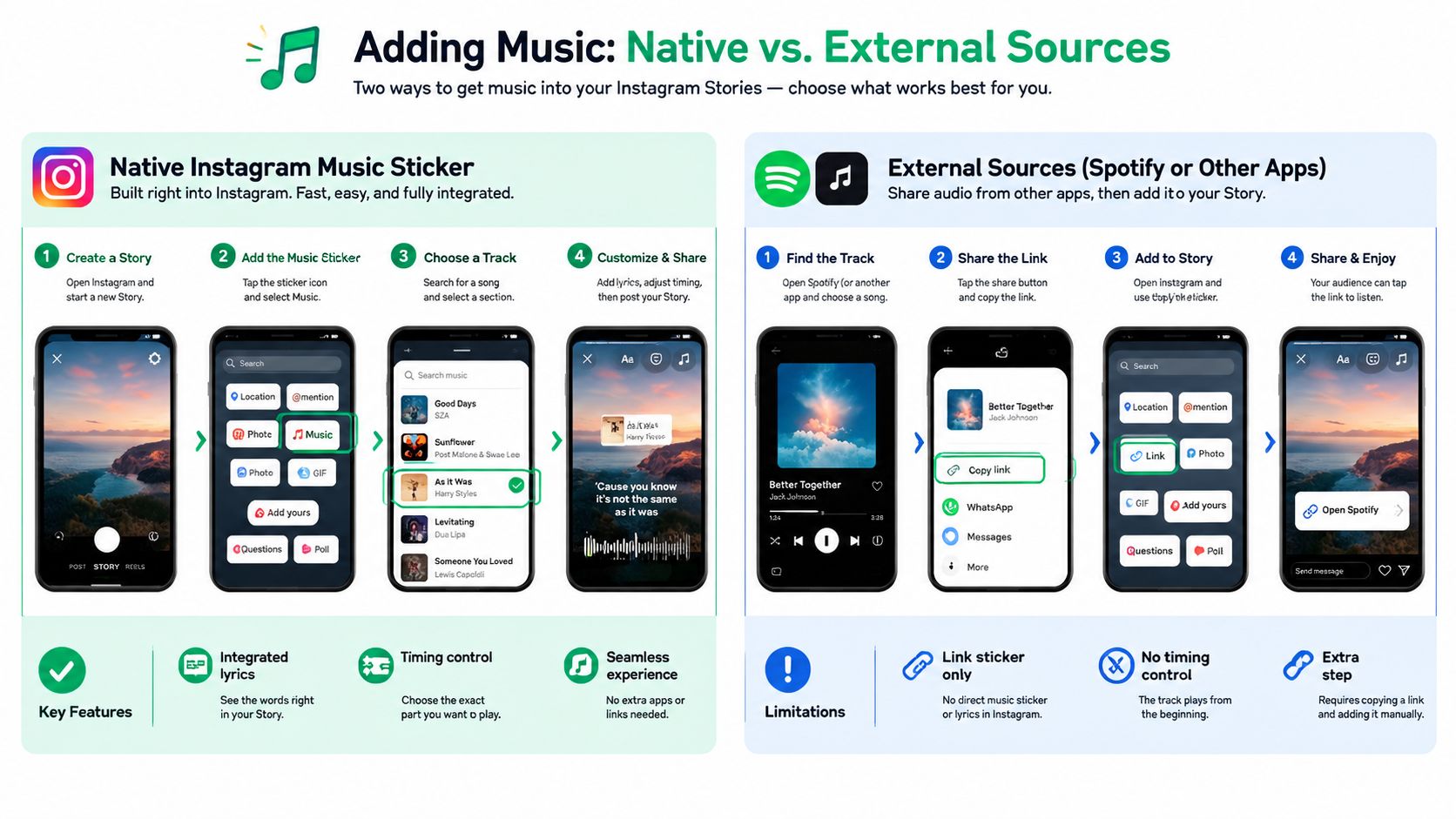
Instagram's 2025 update report says Spotify songs can now be shared with sound in Stories, which changes the workflow a bit for creators who've relied on screenshots or silent previews. In other words, you're no longer limited to the classic sticker if the goal is song discovery. This update note on Spotify sharing in Stories is the clearest reference for that shift.
Choose the right source for the job
Native music is better when you want the Story to feel fully built inside Instagram. Spotify works better when the point is “this is the song I'm listening to,” not “this track is part of the visual edit.” If you're trying to repurpose existing video with audio you control, tools for downloading Instagram Reels audio can help you manage sound from your own content workflow before you bring it back into Stories.
If you're also tracking trend direction, it helps to look at what's getting reused in the app before choosing a track. This guide to finding trending audio on Instagram pairs well with the native sticker flow, especially if you post often.
A simple way to think about it, use the Music sticker for styling and in-Story playback, use Spotify sharing for discovery and taste signaling, and use external editing only when you need full control over the final video file. That keeps the workflow efficient and stops you from expecting Spotify to behave like the native library.
Why Your Music Sticker Is Missing and How to Fix It
When the Music sticker or a specific song disappears, the problem is usually not random. Recent explainers keep pointing to the same three causes, account type, territory, and licensing. That matters because the fix is often a setting change, not an app reinstall.
Business accounts are the most common place where people hit the wall. Newer guides note that Business profiles can lose access to parts of the music sticker, while Creator and Personal accounts tend to have broader access. If the account is tied to a brand and the library looks limited, switching account type may restore the feature, though you give up some business tools in the process. This troubleshooting guide on regional music limits highlights that account-type restriction clearly.
What to check before you keep tapping around
Start with the obvious but don't stop there. Make sure the app is updated, then check whether the track is missing for everyone in your region or only on your account. Music libraries can differ by country, and even when Instagram music works for others, a particular song may still be unavailable in your territory.
Confirm account type: Business accounts can have tighter music access than Creator or Personal profiles.
Check your region: The song may be licensed elsewhere, but not where you're posting from.
Test the exact track: Search by artist and title, then try a few variants to rule out a search issue.
Review your network setup: VPNs can create false location signals that affect the library.
Switch profiles if needed: A Creator or Personal account can be the practical fix when the business library is too limited.
If the music appears for one account and not another, that's a strong signal the issue isn't the app itself. It's the account permission or market catalog. That's why “update Instagram” alone often disappoints people.
For creators and small teams, the key takeaway is simple. Don't assume every missing song is a bug, because licensing rules can look like bugs from the outside. Once you check the account type and region first, you stop wasting time on fixes that never had a chance to work.
Pro Tips to Boost Engagement While Staying Copyright Safe
The best Stories with music feel matched, not overloaded. Use a track that fits the intent of the post, then keep the rest of the frame easy to read. If the slide already has a voiceover, lower the music so the words don't fight the beat. If the slide depends on text, don't pick a song that pulls attention away from the message.
Business accounts should lean on the licensed library whenever they can. That keeps the workflow safer, especially when the same content might be reused in different markets where availability changes. It also reduces the chance that an otherwise good Story gets muted after posting.
A quick pre-post checklist
Match mood to message: Fast music for attention, calmer music for explanation.
Keep text readable: Lyrics can help, but they still need space.
Use the sticker lightly: The visual should support the Story, not crowd it.
Test with volume: Voiceover and music should feel balanced, not competitive.
Think regionally: A track available for one audience may not be available for another.
If you want more engagement habits beyond music, this Instagram Story engagement guide is a useful companion. The key is to treat music as one part of the Story, not the entire strategy.
One more useful habit is to reuse what already worked. If a particular song style matched a product launch or testimonial last week, keep notes on that pattern and reuse the same energy for similar posts. That kind of consistency makes your Stories easier to produce and easier for viewers to recognize.
Gainsty helps creators and brands build Instagram growth systems that are focused on organic engagement, not bots or fake followers. If you're tightening up Story performance and want a cleaner way to grow around music-heavy content, visit Gainsty and see how its Instagram growth tools fit into your workflow.