Why Agencies Need Specialized Social Media Software
Think about what it takes to manage just one client manually. Now multiply that by five, ten, or twenty. You're bouncing between logins, drowning in spreadsheets, and chasing down approvals in a dozen different email threads.
It’s not just inefficient; it’s a recipe for disaster. This manual, piecemeal approach is where mistakes happen, growth stalls, and client relationships start to fray.
The Dangers of Manual Management
Without a dedicated platform, agencies are walking a tightrope. One wrong step can lead to major issues that specialized software is designed to prevent:
Brand Inconsistency: When your team is posting across various accounts without a unified system, keeping each client's unique tone and visual style straight becomes a guessing game.
Security Nightmares: Sharing login credentials via spreadsheets or team chats is a huge security risk. It’s an open invitation for unauthorized access or accidental changes that can damage a client's reputation.
Workflow Bottlenecks: The endless back-and-forth of emailing content drafts and chasing approvals over Slack creates painful delays. It frustrates your team and leaves clients wondering what’s taking so long.
Reporting Headaches: Manually pulling data from every social platform to build client reports is a soul-crushing, time-consuming task. It's also riddled with opportunities for human error, making it tough to prove your agency's real impact. For a deeper look at other essential tools, check out our guide on essential social media agency tools.
An agency's ability to scale is directly tied to its operational efficiency. Specialized software isn't a luxury; it's the foundational infrastructure that allows you to deliver consistent, high-quality results for every client, every time.
The market stats back this up. The demand for social media management software for agencies is exploding, jumping from $24.4 billion to $28.58 billion with a 17.1% growth rate. It’s on track to hit a staggering $53.29 billion by 2029, according to Research and Markets. This surge is happening because agencies desperately need centralized tools to manage everything from Instagram Reels to complex LinkedIn campaigns.
Ultimately, adopting the right software shifts your agency from constantly putting out fires to proactively executing winning strategies. And it's not just about social media—optimizing your entire operation is key. In fact, understanding how effective time tracking for agencies can boost productivity and profitability reveals just how much well-chosen tools can impact your bottom line.
Core Features Every Agency Platform Must Have
Choosing social media management software for your agency isn't like picking a tool for a single business. It’s the difference between a handy multi-tool and a professional mechanic's entire roll-away toolkit. Sure, both can tighten a screw, but only one is built for the complexity, scale, and high-stakes pressure of agency life.
The right platform is more than a scheduler; it's your agency's operational backbone. It needs to be tough, secure, and designed from the ground up to handle dozens of clients at once—each with their own brand voice, goals, and stakeholders.
Multi-Account and Multi-Client Management
Let's start with the absolute deal-breaker: you have to be able to manage every client account from one dashboard, without the soul-crushing cycle of logging in and out all day. Think of it as a master control room where each client has their own secure, soundproof booth. This setup is your first line of defense against the ultimate agency nightmare: cross-posting a meme for Client A onto Client B's very serious corporate account.
This separation is all about brand safety and data integrity. Every client's assets, analytics, and content calendars are kept in their own digital silo. It gives your team—and your clients—total peace of mind. A well-designed system makes jumping between client worlds feel effortless, which is a massive win for your team's day-to-day efficiency.
The chart below really hits home on the pain points that a specialized tool is meant to solve, turning the chaos of manual management into a scalable, efficient operation.
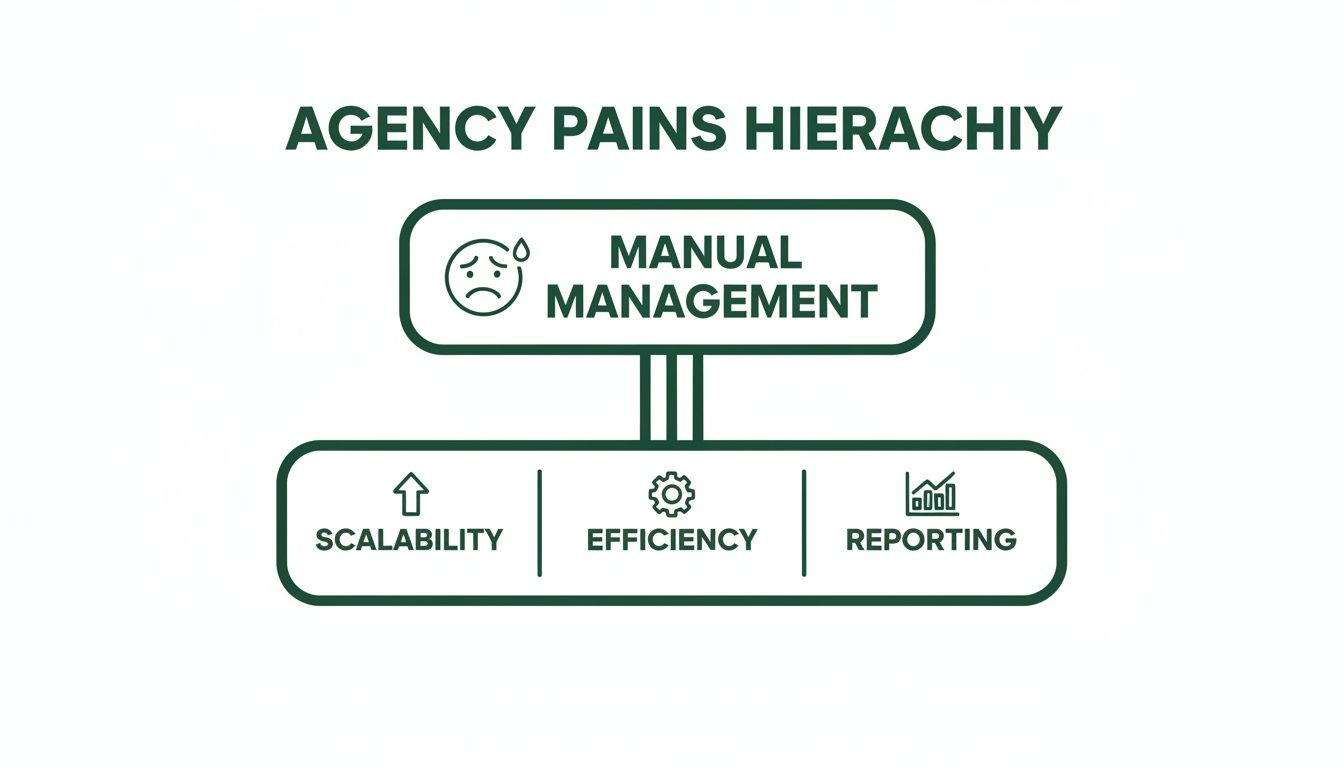
As you can see, sticking with manual processes directly chokes an agency's ability to grow, stay efficient, and deliver the clear, consistent reporting clients demand.
Seamless Collaboration and Approval Workflows
Agency life is a team sport, right? A single post often travels from a writer to a designer to an account manager before a client ever lays eyes on it. Without a platform that has built-in approval workflows, you're stuck in a mess of email chains and frantic Slack messages where feedback gets lost and campaigns get delayed.
A proper agency tool brings order to that chaos.
Internal Huddles: Team members can drop comments, tag colleagues for a second opinion, and edit drafts in real-time, all inside the platform.
Client Approval Gates: You can send finished posts to a clean, client-facing portal for review. Clients can approve, reject, or request edits with a click, creating a perfect, documented paper trail.
Granular User Permissions: You don't give everyone the keys to the kingdom. You assign specific roles—like creator, editor, or publisher—and can give clients "view and approve only" access to keep things locked down.
This isn't just about making life easier; it's a critical risk management strategy. It protects your agency by ensuring every single post has a documented client sign-off before it ever sees the light of day.
Robust Analytics and White-Label Reporting
Proving your worth is how you keep clients. But manually pulling performance data from five different platforms for ten different clients is a recipe for burnout and mistakes. A top-tier social media management software for agencies automates all of that, funneling key metrics into one central dashboard.
But agencies need more than just raw numbers; we need to tell a story with that data. This is where white-label reporting becomes a game-changer. It lets you generate professional, easy-to-read performance reports stamped with your agency’s logo, not the software’s. This reinforces your brand and presents results in a polished, client-ready package that screams "we know what we're doing." Of course, the platform is just one piece; you still need to use the best social media measurement tools to ensure you're tracking the metrics that actually matter.
When evaluating software, it's helpful to separate the absolute must-haves from the shiny objects.
Essential vs. Nice-to-Have Software Features for Agencies
Account Management: A unified dashboard for all clients is essential because it prevents login confusion, avoids cross-posting mistakes, and saves agencies significant time. A nice-to-have upgrade would be branded client portals with custom URLs for a more professional client experience.
Collaboration: Internal commenting and client approval queues are critical as they create a clear audit trail, reduce miscommunication, and ensure no feedback is missed. A valuable upgrade would be in-app live chat or video conferencing for faster team reviews.
Reporting: Automated data pulling and white-label reports are crucial because they help prove ROI to clients while reinforcing the agency’s brand credibility. A premium upgrade would be AI-powered predictive analytics that forecast campaign performance.
Content Management: A shared media library and bulk scheduling are important to maintain brand consistency and allow scalable content deployment across multiple clients. A helpful upgrade would be AI-driven content generation and optimization recommendations.
While the "nice-to-have" features are fantastic, nail the essentials first. A tool with predictive AI is useless if you can't even get a post approved by a client cleanly.
Advanced Content Creation and Scheduling
To cut through the noise on social media, agencies need more than just a scheduler. Look for platforms with advanced content features, especially the ability to efficiently create AI video that captivates and converts without leaving the tool. A shared media library is also non-negotiable; it's where your team can grab approved brand assets, ensuring consistency across every post.
Beyond the basics, you should be looking for features that truly let you scale:
Content Calendars: Get a bird's-eye view of everything scheduled across all your clients.
Bulk Scheduling: Upload a spreadsheet and schedule hundreds of posts in minutes.
Content Queues: Fill up a library with evergreen content that automatically publishes at preset times.
This kind of automation is what separates thriving agencies from struggling ones. In fact, agencies are absolute power users, with large enterprises accounting for over 60% of the social media management software market's revenue. That market, which hit $27.03 billion, is being fueled by the demand for tools that integrate AI for predictive analytics, which have been shown to boost campaign engagement by 30-40%.
How To Choose The Right Software For Your Agency
Picking the right social media management software for agencies can feel like wading through a sea of look-alike platforms. They all promise the moon, but the sheer volume of options is enough to make anyone’s head spin. The trick is to stop reacting to sales pitches and start a structured, manageable process focused entirely on what your agency actually needs.
Think of it this way: you wouldn't build a house without a blueprint. So why would you commit to a pricey software subscription without first mapping out what your agency requires to run smoothly and, more importantly, to scale? A rushed choice often leads to buyer's remorse, a frustrated team, and clunky workflows that create more problems than they solve.
Start With an Internal Audit
Before you even think about scheduling a demo, your first move should be to look inward. Getting brutally honest about your current operations is the only way to make a smart decision. You have to diagnose the specific illness before you can find the right medicine.
Start by getting a clear picture of your client roster and day-to-day workflows.
Map Your Bottlenecks: Where do things grind to a halt? Is it the endless back-and-forth for client approvals over email? Manually pulling stats for reports? Juggling a messy spreadsheet of logins and passwords?
Define Your Must-Haves: Based on those pain points, what features are truly non-negotiable? If reporting sucks up 10 hours of your team’s time every week, then automated, white-label reports are a must-have, not a nice-to-have.
Forecast Your Growth: Where is your agency headed in the next 12-24 months? The tool you choose today has to support the agency you're building for tomorrow. Make sure it can handle more clients, more team members, and more social profiles without the price tag exploding.
The goal here is to build a detailed checklist of your requirements before you ever talk to a salesperson. This list becomes your North Star, keeping you focused on what will actually move the needle for your business.
Evaluate Vendors and Schedule Demos
Once your internal audit is done, you're armed and ready to start looking at platforms. Don't just scan the feature list on a pricing page—that's just marketing. This part is about digging deeper to understand the tech, the company behind it, and what it really costs to partner with them.
A product demo is your chance to pressure-test a platform against your specific needs. Don't let them give you the standard tour. Treat it less like a presentation and more like a friendly interrogation. Come prepared with a list of tough questions that get to the heart of your biggest challenges.
Critical Questions to Ask During a Demo
When you've got a vendor on a call, take control of the conversation. Don't let them stick to their script. Push them with questions that reveal if their tool is genuinely built for the chaos of agency life.
Here are a few essentials to get you started:
Workflow & Permissions: "Show me, step-by-step, how your client approval workflow functions. How granular can we get with user permissions? I need to know an intern can't accidentally post on our biggest client's account."
Scalability & Pricing: "What's the real total cost of ownership here? Break down your pricing as we add more users, social profiles, and client seats. Are there any hidden fees I should know about?"
Support & Onboarding: "What kind of customer support do you offer agencies specifically? Will we get a dedicated account manager? What’s your average response time when things go sideways?"
Future-Proofing: "What does your product roadmap look like for the next year? How are you planning to keep up with changes from the social platforms, like new video formats or API updates?"
Choosing the right social media management software for agencies is a huge investment in your agency's future. By kicking things off with a thorough internal audit and asking the hard questions, you can cut through the noise and find a tool that will truly act as a partner in your growth.
Getting Your Team On Board With a New Tool
So you’ve picked out the perfect social media management software for agencies. That’s a huge step, but it’s only half the job. Even the most powerful platform is just expensive clutter if your team doesn't actually use it. Getting everyone on board isn’t just about flipping a switch; it's about managing the human side of the change.
The whole point is to ditch the chaotic spreadsheets and the never-ending email chains for a single, streamlined place to get work done. To pull that off, you need a solid game plan—one that gets people excited, trains them properly, and shows them immediately how this new tool makes their lives easier. Fumble the rollout, and you’ll find everyone slipping back into their old, inefficient habits before you know it.

Go For a Phased Rollout, Not a Big Bang
Trying to switch everyone over at once is a classic rookie mistake. A phased rollout is much smarter. It lets you find and squash bugs on a small scale before they become agency-wide headaches. Think of it like a soft launch for an internal product.
Start by hand-picking a small pilot group—your "vanguard team." You'll want a mix of roles here: an account manager, a content creator, maybe a strategist. Their mission? To be the first to use the new software with one or two clients who are in on the experiment.
This strategy pays off in a few big ways:
You iron out the kinks. This team will inevitably run into weird workflow quirks or technical glitches, but they’ll do it in a low-stakes environment.
You build internal champions. Once this group gets the hang of the tool and sees how much better it is, they become your biggest advocates. They'll be the ones convincing their skeptical colleagues.
You create real-world best practices. Their direct feedback helps you create training guides and rules that are actually useful, instead of just repeating what the software company’s generic manual says.
Laying the Foundation for a Smooth Switch
Once your pilot team has given you the intel, it's time to prep for the full agency launch. This part is all about communication and training. No one should feel like they've been thrown into the deep end.
Lay out your implementation plan clearly. Everyone needs to understand not just how to use the tool, but why you're making the switch. Hammer home the benefits that matter to them personally—less time wasted on reports, clearer client feedback, and no more digging through spreadsheets for passwords.
A successful software adoption is rooted in empathy. Acknowledge that change can be difficult, and frame the new tool as a solution designed to make your team's lives easier, not more complicated.
This is also when you make your processes official. Create an internal "knowledge base" with short video tutorials, quick-reference sheets, and clear instructions for your agency’s specific workflows. This resource will be a lifesaver for your current team and will make onboarding new hires a breeze.
Setting Up Workspaces and Defining Roles
The last piece of the puzzle is setting up the platform to mirror how your agency actually works. This is where you put your operational plan into practice inside the software, making sure everything is secure and efficient from day one.
First, create separate, secure workspaces for each client. This digital wall is non-negotiable. It prevents embarrassing cross-posting mistakes and keeps sensitive client data locked down.
Next, you need to set up user roles and permissions. A well-configured platform means people only have access to the features they need to do their job, which keeps things clean and secure.
Administrators: They hold the keys to the kingdom—billing, user management, and high-level settings.
Account Managers: Can access everything for their assigned clients, from publishing content to pulling reports.
Content Creators: Can draft and schedule posts, but their work might need a manager's sign-off before it goes live.
Clients: Get a special, view-only login. They can see a dedicated calendar and approve or reject content, creating a simple, trackable approval process.
By planning the rollout, giving your team great training, and setting up the platform thoughtfully, you turn what could be a massive headache into a catalyst for making your agency more efficient and ready for growth.
How To Measure ROI and Prove Software Value To Clients

For any agency, a new piece of software has to be more than just another line item on the expense report—it needs to be a strategic investment. The right social media management software for agencies doesn't just save you a few minutes here and there; it generates real, measurable value. Proving that return on investment (ROI) is everything when it comes to justifying the cost internally and showing clients just how efficient your agency is.
This goes way beyond simple time tracking. It’s about building a rock-solid business case by connecting the software's features to tangible outcomes. Think increased billable hours, better client results, and sky-high retention rates. When you can draw a straight line from the tool to your agency's bottom line, its value becomes impossible to ignore.
Calculating Your Internal ROI
The most straightforward way to measure ROI is to put a number on your efficiency gains. Before you even sign up, you need to audit how much time your team is sinking into repetitive, manual tasks. That's your baseline.
Once the software is up and running, track how much time you're saving. Let's say automated reporting shaves 10 hours of manual work off a manager's plate each month. If their billable rate is $150/hour, you’ve just freed up $1,500 worth of their time. That's value you can see.
Here are the key metrics to zero in on:
Hours Saved on Reporting: Tally up the time spent pulling data by hand versus generating slick, white-label reports with a single click.
Time Saved on Scheduling: Compare the old way of posting one-by-one against using a bulk scheduler or a shared content library.
Reduced Administrative Overhead: Don't forget the time saved by ditching shared password docs and endlessly chasing down client approvals via email.
By translating saved hours directly into billable value, you completely reframe the software's cost. It stops being an expense and becomes an investment that directly fuels your agency's profitability and capacity to take on more work.
Proving Software Value to Your Clients
Now, showing that value to your clients is a different ballgame. Frankly, they don't care about your internal efficiency—they care about their results. The trick is to frame the software’s benefits in a way that highlights a direct, positive impact on their campaigns and their experience working with you.
This value is both quantitative and qualitative. A great platform won't just boost campaign performance; it'll strengthen the client-agency relationship, which is a massive driver of retention. You can get a much deeper understanding of this by exploring a comprehensive social media ROI calculator to measure campaign success and weaving its principles into your client reports.
Communicating Enhanced Performance and Collaboration
When you're talking to clients, always lead with the outcomes the software makes possible. Don't just mention the tool; show them the incredible results it helps you deliver.
Enhanced Campaign Performance: Use the platform's advanced analytics to present data that's clearer and more insightful than ever before. Highlight tangible improvements in key metrics like:
Engagement Rate: Show how smarter scheduling and content optimization led to a 15% jump in interactions.
Conversion Tracking: If the tool plugs into their web analytics, you can directly attribute leads and sales to specific social media posts.
Audience Growth: Use detailed reports to demonstrate steady, high-quality follower growth over time, not just vanity numbers.
A Superior Client Experience: The "soft" benefits are just as crucial for keeping clients happy and loyal. The right software simply makes your agency easier and more transparent to work with.
Frictionless Approvals: A streamlined approval workflow means no more lost emails or confusing feedback threads. It just works.
Brand Safety: Emphasize how dedicated client workspaces and user permissions shield their brand from embarrassing (and costly) mistakes.
Professional Reporting: Polished, white-label reports reinforce your agency’s professionalism and make the results crystal clear.
By framing the conversation around these tangible benefits, you prove that your investment in top-tier social media management software for agencies is also a direct investment in their success.
A Few Common Questions, Answered
Jumping into the world of agency-specific social media software can bring up a few questions. Let's clear up the most common ones so you can make a decision with confidence, minus the confusing tech-speak.
Think of this as your cheat sheet for the must-know details.
How Much Should An Agency Budget For Social Media Management Software?
There’s no magic number here—it really comes down to your agency's size and needs. A smaller agency just getting its sea legs, maybe handling 5-10 clients, should probably expect to set aside anywhere from $150 to $500 a month.
Once you’re in the mid-sized range, juggling 20-50 clients, you'll see those costs climb. You're likely looking at a monthly spend between $500 and $2,000. For the big players who need all the bells and whistles—deep analytics, custom integrations, full white-labeling—the investment can easily push past $2,000+ a month.
The key is to look past the sticker price. Think about the total cost, including any extra fees for adding more users or social profiles. Your best bet is to find a platform with a scalable plan that can grow right alongside your client roster.
The right software pays for itself through massive efficiency gains and happier, stickier clients. Don't frame it as just another monthly bill—it's a serious investment in your agency's capacity to deliver.
Can These Tools Manage All Client Engagement?
Absolutely. One of the single most powerful features you'll find in an agency-grade tool is the unified social inbox. It’s basically a central command center for all things client engagement. It pulls DMs, comments, and brand mentions from platforms like Instagram, Facebook, and LinkedIn into one clean, manageable feed.
This is a game-changer for a few reasons:
Pure Efficiency: Your team can jump in and respond to everything without the soul-crushing task of logging in and out of a dozen different native apps.
Seamless Collaboration: You can assign messages to the right person on your team, leave internal notes for context ("Hey, Sarah handled a similar issue last week"), and mark conversations as done.
Bulletproof Brand Safety: It’s your safety net. Nothing slips through the cracks, ensuring your clients always look responsive, professional, and on top of their game.
What Is The Difference Between Agency Software And A Regular Business Plan?
The real distinction is that one is built for a single brand, while the other is purpose-built for the chaos of a multi-client agency workflow. A social media management software for agencies is designed from the ground up to handle many clients, offering critical features a standard business plan just can't touch.
Here are the key things that set them apart:
Multi-Client Architecture: The power to manage dozens of clients from a single dashboard, with each in its own secure, walled-off workspace. This is huge for preventing those cringe-worthy (and costly) cross-posting mistakes.
Advanced User Permissions: You get granular control over who sees what. You can give a junior team member posting access but not reporting, or even grant clients view-only access to approve content before it goes live.
White-Label Reporting: This is all about looking professional. You can generate sleek, client-ready performance reports that feature your agency's logo and branding, not the software's.
A regular business plan just doesn't have the DNA to support the security, branding, and collaborative needs of a growing agency.
Ready to stop juggling accounts and start growing them with precision? Gainsty provides the AI-powered tools and organic strategies your agency needs to deliver incredible Instagram growth for your clients. See how we can elevate your services at https://www.gainsty.com.