Why Bother Boosting Instagram Posts Anymore?
Ever feel like you’re screaming into the void on Instagram? You spend hours crafting the perfect Reel or a killer carousel post, only for it to reach a tiny sliver of your followers. You're not imagining it. That’s just the reality of an oversaturated platform where organic visibility is on a nosedive.
And that, right there, is why a strategic boost is still one of the most powerful tools in your arsenal. We're not talking about buying vanity likes. We're talking about putting rocket fuel on your best-performing content to reconnect with your audience and find new customers who would have scrolled right past you otherwise.
Getting Over the Organic Reach Slump
The digital stage is packed. With millions of brands all vying for the same eyeballs, the algorithm has gotten incredibly picky about what it shows people. The painful result? A huge drop in how many of your own followers see your posts without a little paid push.
The data backs this up. Engagement rates have been taking a hit, with an average drop of 28% year-over-year in the first half of 2025. This isn't a fluke; it's a direct result of platform saturation and constant algorithm changes. It's forcing brands to get comfortable with boosting just to stay visible. You can dig into more of these social media benchmarks and see the full story for yourself.
Think of boosting less as an expense and more as a delivery fee. You've already created something valuable; boosting just makes sure it actually gets delivered to the right address.
A Precision Tool for Real Growth
Boosting isn't just about getting more views—it's about getting the right views. When you put money behind an Instagram post, you unlock powerful targeting tools that organic posting just can't touch. This is where the magic really happens.
You can use a boost to chase specific, measurable business goals. Most of these fall into a few key buckets:
More Profile Visits: Funnel targeted traffic straight to your Instagram profile. The goal here is to grow your follower count with people who are genuinely into what you do.
More Website Clicks: Send potential customers directly from your post to a product page, a new blog article, or a signup form on your site.
Higher Engagement: Take a post that's already getting love and pour gas on the fire. More comments, shares, and saves tell the algorithm your content is the real deal.
Generate More Messages: Get people to slide into your DMs. This is perfect for service-based businesses, coaches, or anyone selling high-ticket items where a conversation is key.
Picking the Right Post to Put Your Money Behind
Before you even glance at your budget, the single most important call you'll make is which post to boost. Let’s be real: boosting the wrong content is like putting premium fuel in a broken-down car—it’s a total waste of money and won't get you anywhere.
The secret to a killer boost is to find a post that's already a hit with your organic audience and pour some gasoline on that fire.
Find Your Organic Champions
Think of your Instagram Insights as your own personal focus group. Dive into your post analytics and look for the clear winners. You're hunting for content that already has a ton of organic engagement—the posts with an impressive number of likes, comments, shares, and especially, saves. These aren't just vanity metrics; they're direct signals that the content genuinely connects with people.
A post with strong organic traction already has momentum. When you boost it, you’re not starting from a dead stop. This approach seriously stacks the deck in your favor because the content has been pre-validated by the people who matter most: your current followers.
Look for posts that tick these boxes:
High Engagement Rate: Anything that sparked conversations, got shared around, or was saved for later is a prime candidate.
Clear Value: Does the post solve a problem, offer a hot tip, or just make people laugh? Value is what drives action.
Strong Visuals: The image or video has to be a scroll-stopper. Period. No amount of ad spend can fix a blurry or boring visual.
This infographic breaks down how boosting helps you cut through the noise on a crowded platform.
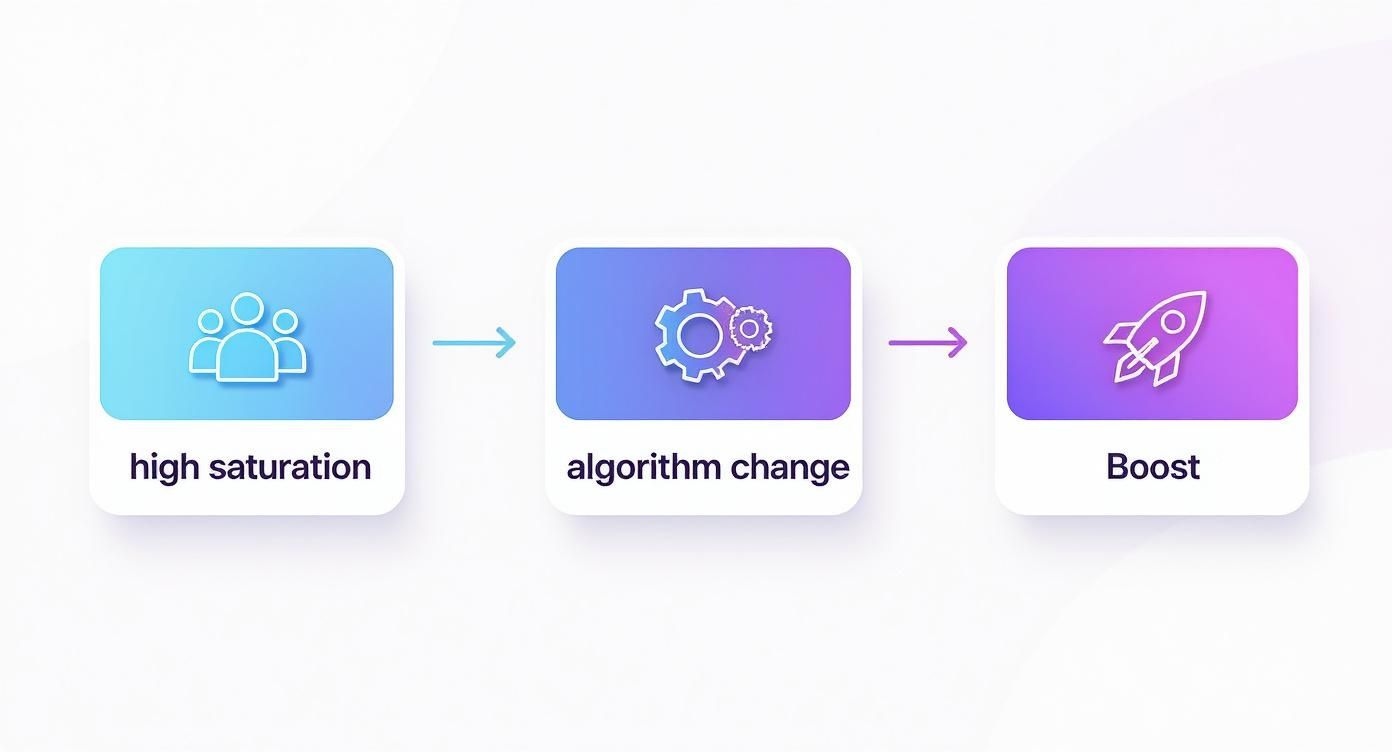
As you can see, boosting is a direct answer to platform saturation and tricky algorithms. It's a powerful way to guarantee your content gets seen.
Match the Post to a Clear Goal
Okay, so you've found a top-performing post. Now what? You have to match it with a specific business goal. What, exactly, do you want people to do after they see it? This goal will shape every other choice you make, from the call-to-action (CTA) button to the audience you target.
For example, if you want to drive traffic to a new product page, a gorgeous product shot with a "Shop Now" button is a no-brainer. But if you’re trying to get more DMs for your coaching service, a video of a client testimonial with a "Send Message" CTA is going to be far more effective.
Don't just pick a pretty picture. Pick a post that can act as a powerful tool to achieve a real, tangible business outcome. Getting this right is the difference between a wasted budget and a profitable campaign.
To really get your chosen post flying, try using an Instagram Hashtag Generator to find relevant and trending hashtags that your ideal audience is already using. The right hashtags are crucial for discoverability and can seriously impact your results when you boost a post on Instagram.
Finally, give your post one last polish before you hit that boost button. Double-check for typos, make sure the CTA is crystal clear, and test the destination link to ensure it works perfectly. Not sure what kind of content to even create? Check out our guide on the different types of Instagram posts for some fresh ideas. Your job is to remove any and all friction that might stop someone from taking the action you want them to take.
Finding Your Perfect Audience on Instagram
Hitting the ‘Boost’ button is the easy part. Anyone can do that. The real magic—and where you get your money’s worth—is telling Instagram exactly who needs to see your post.
Relying on Instagram's default "Automatic" audience is basically like shouting into a crowded room and just hoping the right person hears you. It's time to stop guessing and start targeting with the precision of a seasoned pro.
This is the shift from just spending money to making a strategic investment. A well-targeted boost doesn't just get you views; it connects your content with people who are genuinely interested in what you have to offer. That’s how you turn passive scrollers into active followers and, eventually, customers.
Moving Beyond Automatic Targeting
When you boost a post on Instagram, you'll see a tempting shortcut: the "Automatic" audience. This setting just targets people who are similar to your existing followers. Sure, it can be a decent starting point, but it's a trap if you rely on it. It assumes your current followers represent everyone you could possibly reach, which is rarely the case.
To unlock real, meaningful growth, you have to build a custom audience. This is where you get to play director, defining your ideal viewer based on specific demographics, interests, and even their behaviors.
Let's say you run a local boutique specializing in handmade leather goods. Instead of a generic boost that goes out to anyone and everyone, you could build a custom audience that looks something like this:
Location: People living within a 15-mile radius of your shop.
Age: 25-55, the sweet spot for your typical customer.
Interests: Users who have shown interest in pages related to 'sustainable fashion,' 'leather crafting,' 'shop local,' and 'handmade accessories.'
See the difference? This level of detail ensures your ad budget is spent reaching a highly relevant group of potential customers, not just a random assortment of users who will scroll right past.
The goal isn't just to reach more people; it's to reach the right people. A smaller, highly engaged audience is always more valuable than a massive, indifferent one. Getting this right is fundamental to seeing a real return on your ad spend.
Unlocking the Power of Lookalike Audiences
Ready for one of the most powerful tools in your targeting toolkit? Meet the Lookalike Audience. This feature is an absolute game-changer. It lets Instagram find new people who share key characteristics with your best existing customers or most engaged followers. It’s like cloning your ideal customer base.
You can create a Lookalike Audience from a few different sources:
Your existing followers: Find people who are remarkably similar to those who already follow and love your brand.
A customer email list: Upload a list of your customers, and Instagram will work its magic to find users with matching profiles.
Website visitors: Use the Meta Pixel to build an audience of people who have already visited your site and shown interest.
Creating a Lookalike Audience leverages Meta's vast data to do the heavy lifting for you. It connects you with a fresh audience that is statistically much more likely to be interested in your brand from the get-go.
To really dial in your targeting, you can explore other resources on how AI can be used to launch ads. And for an even deeper dive into audience creation, our guide on how to find your target audience on Instagram has more detailed strategies waiting for you.
This strategic approach is essential. As of 2025, Instagram has over 2 billion monthly active users and an ad-reachable audience of 1.74 billion. By using custom and Lookalike audiences, you can effectively carve out your own profitable niche within this massive digital crowd.
Setting a Smart Budget and Timeline
How much should you spend to boost a post on Instagram? And for how long? These are the two biggest questions that seem to trip everyone up, but nailing them is way simpler than you might think. The goal isn't just to throw money at a post; it's about making every dollar work smarter for your specific goals.
Your budget and the campaign's duration are two sides of the same coin—they work together to determine your potential reach. Think of it like this: a higher daily spend gets your post in front of more people, more quickly. A longer duration, on the other hand, gives the algorithm more time to patiently find the right people.
There’s no magic number here. The "correct" amount is whatever aligns with your objective.
From Small Tests to Strategic Campaigns
Let's ground this in some real-world scenarios. If you're just dipping your toes in the water, a small test campaign is your best friend. A $50 budget spread over five days ($10/day) is a fantastic way to test the waters on a new product announcement or see which call-to-action really connects with a new audience. It's low-risk, high-reward in terms of data.
But for a bigger splash, you need more firepower. A $500 budget for a week-long promotion (about $71/day) can drive serious traffic for a major sale or a new service launch. That level of spending gives you the muscle to reach a much larger, more refined slice of your audience.
Your budget should be a direct reflection of your goal's value. If a successful boost can drive thousands in sales, investing a few hundred dollars is a calculated business decision, not an expense.
Aligning Your Spending with Your Goals
The real key is to tie every single dollar to a clear outcome. Don't just pull a number out of thin air. Instead, work backward from what you want to achieve. If the goal is driving website clicks, your budget needs to be hefty enough to get your post in front of enough people to actually generate those actions.
To help you visualize how this works, I've put together a table showing how different budget levels can be used for different objectives.
Sample Instagram Boost Budget Scenarios
When planning ad budgets, your total spend, campaign duration, and daily budget all influence how many people you can reach. Here’s how different budget levels typically perform:
$50 Budget (5 Days, $10/day): This is ideal for testing a new audience, promoting a blog post, or gathering initial data. You can expect an estimated reach of 2,000 to 5,000 people — perfect for small-scale experiments or learning what content resonates.
$150 Budget (7 Days, ~$21/day): A mid-range option suited for driving traffic to a webinar or increasing local brand awareness. With this spend, your campaign could reach around 6,000 to 15,000 people, giving you enough data to measure engagement and optimize.
$500 Budget (10 Days, $50/day): This level works best for major product launches, seasonal promotions, or lead-generation campaigns. You can expect a broader reach of 20,000 to 50,000+ people, helping you scale visibility and drive stronger results.
Note: These reach estimates can vary wildly based on your audience targeting and, most importantly, the quality of your content.
The best advice I can give is to start with what you can comfortably afford to test. Even a tiny budget can deliver invaluable data.
Track your results relentlessly, figure out what's working, and reinvest your profits into the winners. This simple, iterative approach is how you turn guesswork into a reliable growth strategy, ensuring every dollar you spend is pushing your business forward.
How to Analyze and Improve Your Results
Your boosted post is officially live and out in the wild. That’s great, but the work isn’t over yet. The real growth happens after you launch, when you put on your detective hat and dig into the data. This is where you figure out if you made a smart investment or just threw money at the algorithm.
Think of your Instagram Insights as a report card. It tells you exactly what landed with your audience and, more importantly, what flopped. Don’t get spooked by the numbers; they’re just clues that will point you toward much more effective campaigns down the road.
Translating Metrics into Action
Once your campaign is running, you need to look past the vanity metrics like likes and comments. Zero in on the numbers that directly tie back to the goal you set in the first place. These are your key performance indicators (KPIs), and they tell the real story of your boost's performance.
Here’s a quick rundown of how to interpret the most important data points:
Reach vs. Impressions: Reach is the number of unique accounts that saw your post. Impressions are the total number of times it was seen. If your impressions are way higher than your reach, it means people are seeing your post multiple times—a fantastic sign that your content is sticky and engaging.
Profile Visits: This metric is pure gold if your goal was to get more followers. A high number of profile visits means your ad was compelling enough to make people curious and want to learn more about you.
Website Clicks: For anyone driving traffic off-platform, this is the one to watch. It tells you flat-out if your call-to-action (CTA) and ad were persuasive enough to get people to actually leave the app and check you out.
Your data tells a story. High reach with low engagement might point to a weak CTA. Lots of website clicks but no sales could mean your landing page needs work. The numbers aren't just stats; they're direct feedback from your audience.
The Feedback Loop for Smarter Boosting
Analyzing your results isn't a one-and-done task. The goal is to create a continuous feedback loop that makes every dollar you spend work harder than the last. It’s an ongoing process of refining your strategy over time.
For instance, one small business owner reported a 34% jump in profile visits and a 12% rise in website clicks within just 48 hours after they decided to boost a post on Instagram. The impact of paid amplification can be incredibly direct.
This process is all about asking the right questions based on what the numbers are telling you.
Think about these common scenarios:
High Engagement, Low Clicks: Your visual and caption totally worked, but the "Shop Now" button didn't. Next time, you could try a different CTA or create a stronger sense of urgency in your offer.
Low Reach for Your Budget: This might mean your audience is too narrow or you’re competing in a crowded space. Consider broadening your interest targeting on the next boost to see if that helps.
High Clicks, Low Conversions: The ad did its job, but something is broken on your website. Is your landing page slow? Is it clunky on mobile? Is the checkout process a nightmare? Time to investigate.
By constantly testing, analyzing, and tweaking, you turn every single boost into a learning opportunity. For a deeper dive into all the metrics you should be tracking, check out our complete guide to using Instagram analytics for business growth. This approach is how you make your ad spend more efficient over time and drive real, measurable results for your brand.
Got Questions About Boosting? We’ve Got Answers.
When you're first dipping your toes into boosting posts on Instagram, it's totally normal to have a few questions pop up. After all, you're putting your own money on the line. Let's clear up some of the most common points of confusion so you can move forward with confidence.
Boosted Posts vs. Full Ad Campaigns
So, what's the real difference between hitting that "Boost Post" button and running a full-blown ad campaign through Meta's Ads Manager? It’s a classic question.
Think of it like this: boosting a post is like putting a high-performance engine in your everyday car. It’s quick, easy, and gives you a serious burst of speed right from the Instagram app to reach more people.
A full campaign in Ads Manager, on the other hand, is like building a custom race car from the ground up. You get way more granular control over campaign objectives, specific ad placements, A/B testing creative, and tons of other advanced options.
For most straightforward goals—like driving more profile visits or getting website clicks from a single, high-performing post—boosting is the perfect tool. It’s built for speed and simplicity.
What to Do If Your Boost Gets Rejected
Nothing’s more frustrating than getting that "Your promotion was not approved" notification. Don't panic. It happens to the best of us, and it's usually for a few common reasons tied to Meta's advertising policies.
Here’s a quick troubleshooting checklist to run through:
Check Your Text: Does your caption make any exaggerated claims or promises? Ad policies are notoriously strict about things that sound too good to be true.
Review Your Visuals: Make sure your image or video doesn't contain anything prohibited. Classic examples are "before and after" shots for health products or excessive text on the image.
Examine Your Landing Page: If you’re sending people to a website, Instagram’s bots will crawl that page, too. A broken link, a slow-loading site, or a non-compliant page will get your ad rejected in a heartbeat.
Once you think you've found and fixed the problem, you can just edit the post and try to boost it again.
How Often Should You Really Be Boosting Content?
This is a big one. There's no magic number here, but a solid rule of thumb is to always prioritize quality over quantity. Bombarding your audience with boosted posts every single day is a surefire way to cause ad fatigue. People will just start tuning you out.
Instead, think strategically. A good starting point is boosting one or two of your absolute best-performing organic posts each week. This approach ensures your audience only sees your A-game content, keeping them engaged without ever feeling spammed.
Ready to grow your audience the right way? Gainsty uses advanced AI and real Instagram experts to help you get more organic followers and engagement, safely and effectively. Stop guessing and start growing at https://www.gainsty.com.