.jpg&w=1920&q=75&dpl=dpl_GGyxFv8p7dFRVJcE3MLdnpEeGpKo)
Building Your Promotion-Ready Instagram Post

Think of it this way: your post is the product, and the promotion is just the marketing. You can have the biggest marketing budget in the world, but if the product is boring or of low quality, nobody will buy. The same goes for your content.
A post that’s already engaging and well-crafted is the foundation for any promotion, whether you’re aiming for organic reach or running a paid campaign. Let’s break down the three key ingredients that make a post worth promoting. If you skip this part, you’ll end up paying more for clicks and getting less meaningful engagement.
Craft an Irresistible Hook
You have literally less than two seconds to stop someone from scrolling right past your post. That first impression is everything. Your hook—whether it’s the first line of your caption or the immediate impact of your visual—has to be strong enough to stop the thumb in its tracks.
A great hook could be:
A thought-provoking question that piques curiosity ("Ever wondered why...?")
A bold or even controversial statement that challenges a common belief.
A surprising statistic or fact that makes someone pause.
A visual that’s just plain stunning, unexpected, or emotionally resonant.
For instance, a fitness coach could write, "Stop doing crunches if you want abs," which immediately grabs attention. It’s far more compelling than the generic "Here's a great core workout." The first hook promises a secret, earning you the next few seconds of their time.
Write Captions That Spark Conversation
Once your hook has done its job, your caption has to deliver. A killer caption is more than just a description of the photo; it's a compelling narrative that enhances the image. It should add value, tell a story, or get a real conversation started in the comments. The goal here is to get people talking, not just double-tapping.
Treat your caption like a mini-blog post. Keep paragraphs short and use line breaks to make it easy on the eyes. Emojis can add a touch of personality and break up the text, but don’t go overboard. Most importantly, always end with a clear call-to-action (CTA). Instead of a weak "What do you think?", ask something specific like, "Which of these 3 tips are you trying first?"
The best captions shift the focus from you to your audience. Talk about their problems, their goals, and their experiences. When people feel like you're talking directly to them, they're so much more likely to engage.
If you want to really level up your caption game, our complete guide on how to write Instagram captions is packed with templates and practical examples.
Prioritize High-Quality Visuals
Let’s be honest: Instagram is a visual-first platform. Grainy, poorly lit, or uninspired images will kill your promotion before it even has a chance. Your visuals need to be sharp, well-composed, and perfectly aligned with your brand’s look and feel.
A few visual strategies I’ve seen work wonders:
Use Human Faces: It's a simple fact that posts with faces tend to get more engagement. We're wired to connect with other people.
Embrace Carousels: These are perfect for telling a story, sharing a step-by-step tutorial, or showing off a product from different angles. Carousels encourage swipes, which is a powerful engagement signal for the algorithm.
Nail the Technical Details: Always make sure your photos and videos are high-resolution. After you've captured great content, it’s worth learning about optimizing your visuals for Instagram to make sure they stay crisp and vibrant, even after the platform compresses them.
By putting in the effort on these three core elements—the hook, the caption, and the visuals—you create a post that not only performs well on its own but also gives your ad spend the best possible return. This prep work isn't just a suggestion; it’s the non-negotiable first step to promoting anything on Instagram.
Driving Reach With Organic Promotion Tactics
Once your post is polished and ready to go, the real work begins. It's time to get it in front of as many of the right people as possible—all without opening your wallet. A smart organic strategy is the engine that drives sustainable account growth, building the kind of momentum that paid ads can later pour fuel on. This is where you shift from simply publishing content to strategically distributing it across every corner of the Instagram ecosystem.
Mastering organic promotion means you're no longer just hoping your existing followers see your content. You're actively pushing it into discovery channels, tapping into relevant communities, and building the social proof that turns casual visitors into dedicated followers. It’s all about being intentional with every tool Instagram gives you.
The Art and Science of Hashtags
So many people treat hashtags as an afterthought, but they're incredibly powerful search and discovery tools. A classic mistake is either using massively broad tags like #marketing (where you'll be buried in seconds) or not using any at all. The best approach I've found is a tiered strategy that perfectly balances broad reach with pinpoint relevance. This ensures your post shows up for both massive audiences and highly engaged niche communities.
Think of it like casting a few different fishing nets:
Broad/Popular Hashtags (1-2): These are the giants with millions of posts, like
#digitalmarketingor#contentcreator. They give you a quick, temporary flash of visibility. Don't expect it to last, but it's a good initial jolt.Community/Niche Hashtags (5-7): This is where the magic happens. These are more specific to your industry or topic—think
#socialmediamanagerlifeof#brandstorytellingtips. The audience is smaller, but they're far more engaged, which leads to much higher-quality interactions.Hyper-Niche/Branded Hashtags (2-3): These are unique to you, like
#GainstyGrowtha specific campaign tag, like#YourBrandChallenge. They're fantastic for building community and tracking all the user-generated content related to your brand.
This balanced mix gives your post its best shot at getting discovered. If you really want to go deep on this, we've laid out a complete playbook in our Instagram hashtag strategy guide.
Timing Is Everything: Use Your Insights
Posting when your audience is actually online is one of the easiest wins you can get. There’s no need to guess anymore—Instagram gives you this data on a silver platter. Your own Instagram Insights holds the key to your specific audience's behavior.
Just navigate to your professional dashboard, tap "Total Followers," and scroll down to "Most Active Times." You'll see a clear chart showing the days and hours your followers are scrolling the most. Aim to post just before these peak times. This gives your content an initial engagement boost that signals to the algorithm that this post is worth showing to more people.
Create a Content Ecosystem With Reels and Stories
A feed post should never exist in a vacuum. Your different content formats need to work together, creating a promotional ecosystem that keeps your audience hooked. The moment you publish a new feed post, its promotional journey has only just begun.
Right after it goes live, share it to your Instagram Stories. But please, don't just use the default share sticker. Add some context, ask a question with a poll, or even cover part of the image with a GIF and text that says "Tap to see!" This little bit of effort creates curiosity and drives real, direct traffic to your new post.
Then, a day or two later, create a Reel that complements it. For instance, if your post was a carousel of "5 Marketing Tips," your Reel could be a quick, punchy video diving deeper into just one of those tips. This repurposes your core idea and helps you reach a completely different segment of your audience that lives on the Reels tab.
A well-promoted post isn't just shared once. It becomes the centerpiece of a multi-day, multi-format content push that maximizes its reach across your entire Instagram brand.
Amplify Your Message with Collaborations and UGC
Sometimes, the most authentic way to promote your content is to have someone else do it for you. User-Generated Content (UGC) and creator collaborations are absolute gold for tapping into new, highly relevant audiences. Encourage your followers to create content featuring your product, and then reshare their best posts to your Stories or feed (always with credit, of course).
Collaborations can be as simple as a Story takeover or as powerful as an Instagram Collabs post, which shares your content to both your audience and your partner's simultaneously. This introduces your brand to a pre-built community that already trusts the creator’s taste, giving you a massive dose of social proof. The data backs this up: posts with hashtags see 12.6% more engagement, and with 95 million photos uploaded daily, you need every advantage you can get to stand out.
2. Choosing Between Boost Post and Ads Manager
Once you've squeezed every last drop of organic reach out of a post, it's time to add some fuel to the fire with paid promotion. Instagram gives you two main ways to do this: the simple "Boost Post" button right on your profile and the much more powerful Meta Ads Manager. The path you choose here can make a huge difference in your results and how far your budget goes.
Think of it like this: the Boost Post button is the express checkout lane at the grocery store. It’s fast, convenient, and perfect when you have a straightforward goal. Ads Manager, on the other hand, is the fully-stocked, professional-grade kitchen, giving you every tool you could need to build a highly customized campaign from the ground up.
Knowing when to use each one is the secret to a smart paid strategy.
When to Use the Boost Post Button
You’ve seen that little blue "Boost Post" button under your content—it's designed for speed and simplicity. It's the perfect entry point into the world of paid ads on Instagram and works brilliantly in a few specific situations.
Its biggest strength is putting money behind a post that’s already a winner organically. If you notice a post is getting way more likes, comments, and shares than usual, boosting it can pour gasoline on that fire. It’s a low-risk way to get your best content in front of more of your followers and a lookalike audience that Instagram’s algorithm builds for you.
Go for the Boost Post button when your goals are simple, like:
More Engagement: Your main goal is to rack up more likes, comments, and shares to build social proof.
Simple Traffic: You just want to drive people to your profile or the link in your bio.
Reaching Your Fans: You need to make sure a higher percentage of your own followers see an important update.
If you’re just getting your feet wet with paid ads, this is a fantastic place to start. For a deeper dive, our guide on what "boosting" really means on Instagram is a great resource. The organic performance of your post is your best clue about whether it's worth promoting. This simple flowchart breaks down how to think about it.
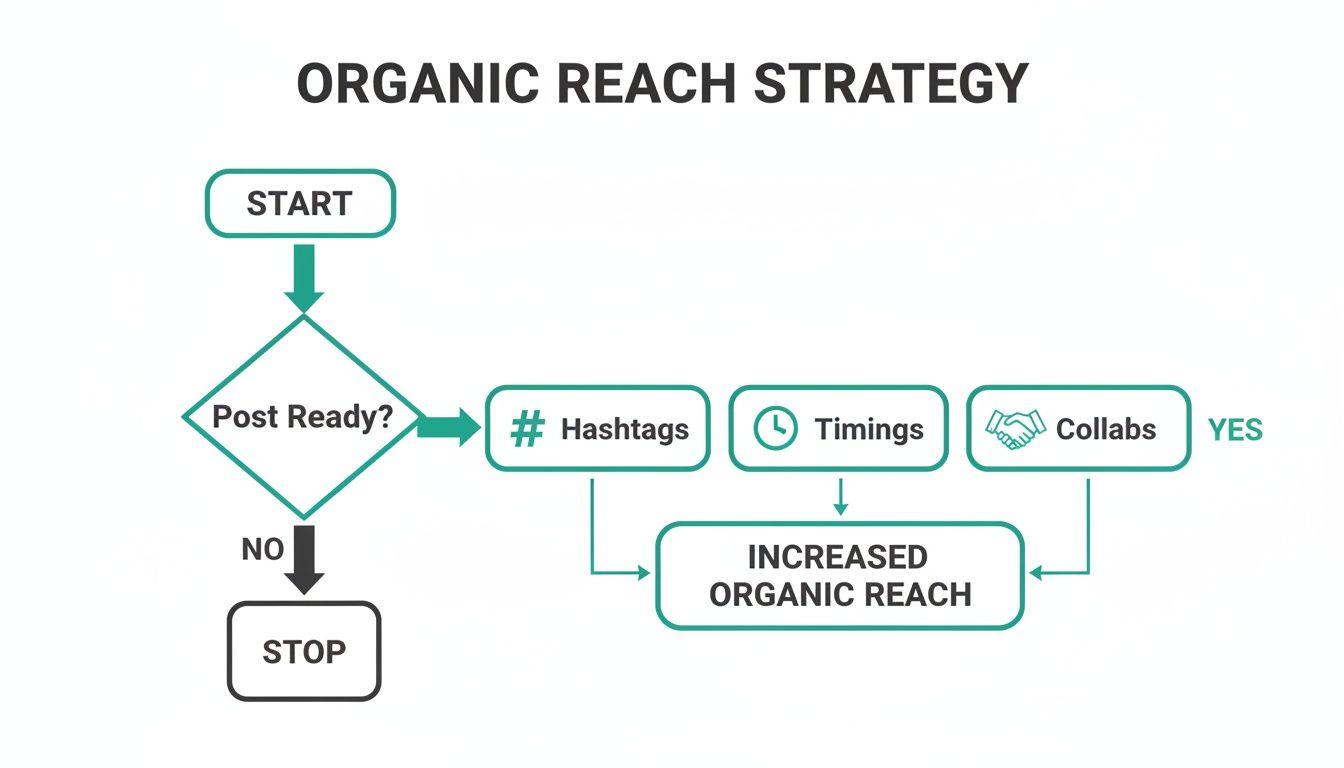
As you can see, once a post proves itself, organic tactics like hashtags and timing come first, laying the groundwork for a successful paid push.
When to Use Meta Ads Manager
When your goals get more specific and you need more control, it's time to graduate to Meta Ads Manager. This is the command center for running serious ad campaigns across both Instagram and Facebook, offering a level of precision the Boost button just can't touch.
Ads Manager is the right call when you need to do more than just get likes. It lets you set specific campaign objectives, like lead generation, website conversions, or even app installs. You can build incredibly detailed custom audiences based on people who have visited your website, signed up for your email list, or engaged with your profile. This is where you get to be a true sniper with your targeting.
Consider Ads Manager essential if you're:
Hyper-Targeting: You want to target users based on thousands of detailed interests, online behaviors, and demographics.
Aiming for Business Goals: Your goal is to get email signups with a lead form or drive actual sales on your website. Ads Manager is the only tool for this.
Testing and Optimizing: You want to create ads from scratch (sometimes called "dark posts") that don't appear on your main feed and A/B test different images, captions, and buttons to find out what works best.
Deciding between these two isn't just about features; it's about your money. A huge part of this is understanding Instagram ad costs and how to stretch your budget. Ads Manager gives you far more control over your bidding strategy and how your money is spent, which almost always leads to a lower cost-per-result for more complex campaigns.
Comparing Boost Post vs. Instagram Ads Manager
To make it even clearer, let's break down the key differences. This table shows you what each tool offers and when it shines.
Best For – Boost Post: A Simple and fast way to amplify existing organic posts.
Ads Manager: For complex campaigns with specific business goals.
Campaign Objectives – Boost Post: Engagement, profile visits, website clicks.
Ads Manager: Supports conversions, lead generation, app installs, and many other objectives.
Audience Targeting – Boost Post: Basic targeting (automatic, location, interests).
Ads Manager: Highly detailed targeting, including demographics, behaviors, and custom audiences.
Creative Control – Boost Post: Uses an existing post.
Ads Manager: Create new ads from scratch (dark posts) and run A/B test variations.
Placement Options – Boost Post: Limited to Feed, Stories, and Explore.
Ads Manager: Full control across all Meta placements, including Facebook, Messenger, and more.
Budget & Bidding – Boost Post: Simple daily budget and duration.
Ads Manager: Advanced bidding strategies like cost cap or bid cap.
Ultimately, choosing the right tool for the job ensures every dollar you spend is working as hard as possible to deliver real, measurable results for your business.
Unlocking Advanced Promotion Strategies
Alright, so you've got the hang of boosting posts, and you're seeing some decent results. Now it’s time to take the training wheels off and dig into the tools that the pros use. This is where you stop just amplifying content and start strategically engineering campaigns that actually move the needle for your business.
We're moving beyond that simple "Boost Post" button and into the Meta Ads Manager. Yes, it looks a bit more intimidating, but this is where the real power lies. It's the difference between tossing a net into the water and hoping for the best, versus using a high-tech fish finder to target exactly what you want to catch.
Find Your Perfect Audience with Custom and Lookalike Targeting
One of the biggest game-changers inside Ads Manager is the ability to create Custom Audiences. Forget generic interest-based targeting. We're talking about building audiences from your own data—people who already know, like, and trust your brand to some degree.
You can pull from several powerful sources:
Your Website Visitors: Using the Meta Pixel, you can create a list of everyone who has visited your website, or even get super specific and target only those who viewed a certain product or reached the checkout page.
Your Customer List: Have an email list or customer phone numbers? You can securely upload that file, and Meta will find their Instagram profiles. It's a direct line to your existing customers.
Instagram Engagers: This is a goldmine. You can build an audience of people who have recently liked, commented on, saved your posts, or even just visited your profile. They're already warm leads.
Now for the real magic. Once you have a solid Custom Audience (let's say, a list of your top 100 customers), you can create what's called a Lookalike Audience. Instagram's algorithm dissects thousands of data points about the people on your list and then scours the platform to find new users who are eerily similar in their behaviors and interests. Honestly, it's probably the single most effective way to find new, high-quality customers.
The Art of A/B Testing Your Promotions
If you're guessing what works in your ads, you're lighting money on fire. That's why A/B testing (or split testing) isn't optional for a serious promotion strategy. The concept is simple: you run different versions of your ad against each other to see which one performs best.
Instead of launching a single ad and hoping it works, you create two or more versions where you only change one thing. This lets you isolate exactly what's driving results.
Here are a few things I always recommend testing:
Visuals: Pit a video against a static image. Or try a clean product shot versus a candid lifestyle photo. You might be surprised what resonates.
Headlines/Captions: Does a question-based hook grab more attention than a caption that leads with a benefit? Test it.
Calls-to-Action (CTAs): See what happens when you compare "Shop Now" with "Learn More." The right CTA can dramatically change your click-through rate.
Just set up your test with a small budget and let it run long enough to get meaningful data. This data-driven approach takes the emotion and guesswork out of the equation, so you can confidently put your real budget behind a proven winner.
By constantly testing and iterating, you're not just running ads; you're building a library of insights about what truly motivates your audience, making every future campaign smarter and more effective.
Leverage Reels for Cost-Effective Promotion
Reels aren't just for organic reach anymore; they're an absolute powerhouse for paid promotion. The data is compelling. In 2024, influencers are seeing an average engagement rate of 2.08% on Reels, which easily beats carousels (1.7%) and single photos (1.17%).
Even better, vertical Reel ads have a 48% lower cost per action (CPA) than non-vertical ads. That makes them a no-brainer for getting more bang for your buck. You can find more of these kinds of insights over on Sproutsocial.com.
The trick to a killer Reels ad is to make it feel like it belongs there. People are scrolling Reels for quick, entertaining, and authentic content. A stuffy, corporate ad will get skipped in a heartbeat.
Instead, create vertical video ads that are:
Fast-Paced and Engaging: Use quick cuts, trending audio, and bold on-screen text to grab attention within the first two seconds.
Value-Driven: Don't just sell. Offer a quick tip, a funny behind-the-scenes moment, or a mini-tutorial.
Authentic: It should feel less like a commercial and more like a great piece of organic content.
When you start weaving these advanced strategies together—pinpoint targeting with audiences, systematic optimization with A/B testing, and budget-friendly reach with Reels—you'll change your Instagram promotions from a simple boost button into a predictable growth engine for your brand.
How to Measure and Optimize Your Campaigns
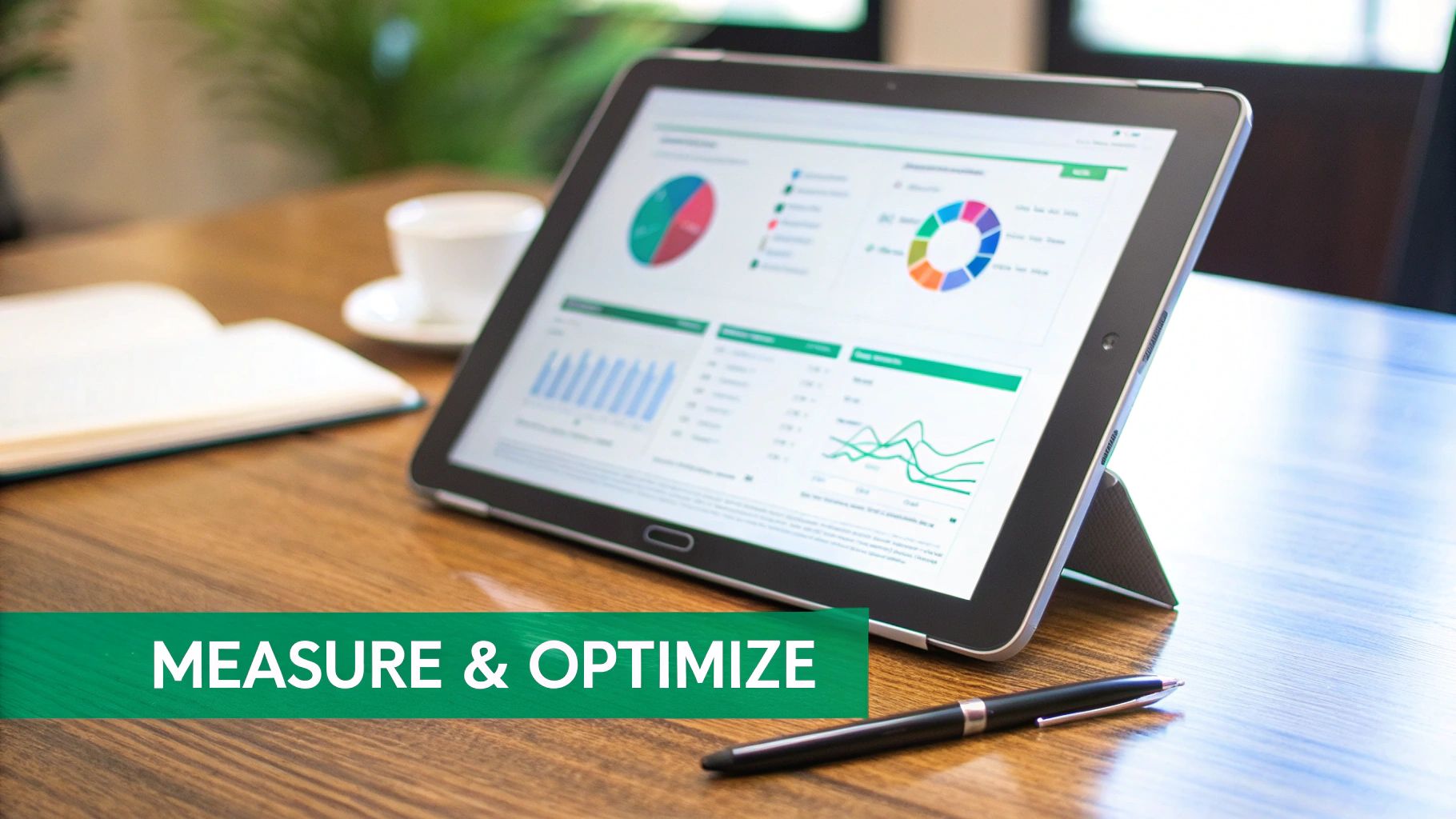
Hitting "promote" isn't the finish line; it’s actually the starting block. The real magic in a great Instagram promotion strategy happens after your post goes live. This is where you shift from just spending money to making smart investments, turning a jumble of numbers into clear, actionable insights.
Without keeping a close eye on performance, you're flying blind. Tracking your campaigns lets you see what’s actually connecting with your audience and what’s falling flat. It’s this constant cycle of measuring, learning, and tweaking that separates a one-hit wonder from a predictable, scalable growth engine.
Understanding Your Core Metrics
Jumping into Instagram Insights or Ads Manager for the first time can feel a bit like drinking from a firehose. There are numbers, charts, and terms everywhere. The trick is to ignore the noise and focus on the metrics that truly matter for your goals. You don't need to track everything, just the key performance indicators (KPIs) that tell you if you're heading in the right direction.
Here are the essentials you should always have on your radar:
Reach: The total number of unique accounts that saw your post. Think of this as the size of your audience. If your reach is low, your targeting might be too narrow, or your budget might be too small for the crowd you're trying to attract.
Engagement Rate: This is your total engagements (likes, comments, saves, shares) divided by your reach. It’s a direct measure of how interesting your content is. A high engagement rate tells the algorithm—and you—that your ad is genuinely resonating.
Click-Through Rate (CTR): The percentage of people who saw your ad and then clicked your call-to-action link. A healthy CTR (usually anything over 1% is a good start) means your visual, caption, and offer were compelling enough to make someone stop scrolling.
Cost Per Result (CPR): This is the bottom line. It tells you exactly how much you're paying for each desired action, whether that's a website click, a new follower, or a sale. Your main job is to get this number as low as possible over time.
Think of it like this: Reach is how many people you spoke to, Engagement Rate is how many listened, CTR is how many raised their hand, and Cost Per Result is what you paid for each handshake.
Turning Data into Actionable Decisions
Once you're comfortable with these metrics, you can start making informed decisions. The data tells a story, and your job is to read it and decide what happens next. This is the optimization loop that drives real, tangible improvement.
For instance, what if your Reach is huge but your Engagement Rate is in the gutter? That's a classic sign that your ad is being seen, but it’s not interesting enough to stop the scroll. It’s time to head back to the drawing board with your creativity. Test a different image, rewrite that hook, or try a video instead.
Or maybe your CTR is painfully low? This often points to a disconnect between your ad and your call-to-action. Is your copy promising one thing while your button says another? Perhaps the visual isn't sparking enough curiosity. You could A/B test your button text—"Shop Now" vs. "Learn More"—to see what moves the needle.
Optimizing Your Budget for Better ROI
Ultimately, analyzing your campaigns is all about getting a better return on your investment (ROI). Your data will quickly reveal your star performers—the ads that are bringing in the lowest Cost Per Result. That's where you want to double down.
Don't be afraid to pull the plug on underperforming ads. It can feel like admitting defeat, but it’s one of the smartest things you can do. Every dollar you stop wasting on a weak ad is a dollar you can put behind a proven winner.
The potential on Instagram is massive, with ads able to reach 96.6% of the platform's active users. While an average conversion rate hovers around 1-2%, hitting 3% or more on a lead generation or sales campaign means you have a top-tier performer on your hands. To dive deeper into these kinds of stats, you can find great resources for marketers looking to master the Instagram ad platform. By constantly monitoring your CPR and shifting your budget to what works, you ensure every dollar you spend is working as hard as it possibly can.
Your Top Instagram Promotion Questions, Answered
If you're diving into paid promotions on Instagram, you've probably got a few questions. That's a good thing. Asking the right questions is the first step to making sure your ad budget is working for you, not against you. Let's walk through some of the most common questions I hear from people trying to get their promotions right.
How Much Should I Actually Spend to Promote a Post?
This is the big one, isn't it? While there's no magic number, a great place to start, especially if you're new to this, is around $5 to $10 per day. Run it for about three to five days. This is the sweet spot—it’s enough cash to give the algorithm some real data to work with, but not so much that a small test run breaks the bank.
Here’s the thing, though: your focus shouldn't be on the total spend. It should be on your Cost Per Result. For instance, if you're trying to get people to your website and you see you're paying about $0.50 per click, you can do the math. A $50 budget should get you roughly 100 clicks. Start with a small test, see what that cost-per-result looks like, and if it's efficient, then you can feel confident putting more money behind it.
Ugh, Why Was My Instagram Promotion Rejected?
Don't panic—it happens to the best of us. Nearly every time an ad gets rejected, it's because it accidentally tripped one of Meta's Advertising Policies. Usually, it's one of a few usual suspects.
I see these a lot:
Over-the-top claims: Promising things that sound too good to be true, like "lose 30 lbs in one week!"
Copyrighted music: Using a trending song in your video ad that you don't have the commercial license for is a super common mistake.
Restricted content: Trying to promote things like tobacco, weapons, or even certain health supplements is a no-go.
Too much text on the image: The old "20% text rule" isn't as strict as it used to be, but a visual cluttered with words can still get your ad flagged.
My advice? Give the ad policies a quick scan before you hit "Promote." If your ad does get denied, Instagram will almost always tell you why. Just fix the issue, resubmit it, and you should be good to go.
How Long Does It Take for a Promotion to Get Approved?
Typically, your promotion will be reviewed and approved within 24 hours. Sometimes, though, it can take a bit longer. If you're running ads during a major holiday season like Black Friday, expect potential delays because everyone is trying to get their ads live at once.
To be safe, I always recommend setting up your promotions at least a day or two before you absolutely need them to run. You'll get a notification as soon as it's live. If you've been waiting for more than 48 hours, it might be worth popping into your Ads Manager to check its status manually.
My Takeaway: The "best" promotion format doesn't exist. There's only the best format for your specific goal. What are you trying to achieve? Your answer to that question dictates whether you should use a Reel, a Carousel, or a single image.
Should I Promote a Reel, Carousel, or Single Image?
This all comes back to your objective. What do you want this promotion to do?
If you're chasing maximum reach and engagement for the lowest cost, Reels are king right now. The algorithm is pushing them hard. But if you need to tell a more complex story, show off multiple products from a collection, or walk someone through a how-to guide, a Carousel is perfect for that. It keeps people swiping and engaged with your content for longer. And don't discount the classic single image post—for a bold, simple message or a truly stunning photo, it still packs a major punch.
Tired of trying to outsmart the algorithm on your own? Gainsty is designed to build your audience with real people who will actually engage with your content. We blend expert-led strategy with smart tech to deliver authentic, organic growth. Let's build your community the right way—get started with Gainsty today!