Why Your Instagram Highlights Views Actually Matter
It’s tempting to think of Highlights as just a dusty archive for your old Stories. In reality, they're a permanent, high-visibility showcase for your best stuff, sitting right under your bio where everyone can see them. When someone lands on your profile for the first time, what do they see? Your profile pic, your bio, and your Highlights. That's it. High instagram highlights views are proof that this critical "above the fold" real estate is doing its job and grabbing attention.
I like to think of it this way: your feed posts are your current magazine issues, but your Highlights? That’s your "greatest hits" album. They deliver instant value and answer your audience's biggest questions without making them scroll for miles.
What High Views Tell Your Audience
A clean, well-organized set of Highlights with solid viewership is instant social proof. It screams, "Hey, people find this content valuable, and you will too!" This simple signal can be the nudge a new visitor needs to finally hit that "Follow" button. An active and thoughtfully curated Highlight section shows you're committed to providing genuinely useful, evergreen resources.
High Highlight views directly contribute to real growth in a few key ways:
Better Follower Conversion: When a new visitor binges your Highlights, they "get" you. They understand your value fast, making them far more likely to become a follower.
Powerful Brand Storytelling: You can literally guide people through your brand's journey, from an "About Me" to "Our Products" to "Client Wins." It's your story, on your terms.
Boosted Engagement: Directing people to your Highlights from Reels or posts keeps them on your profile longer. This is a huge positive signal to the algorithm that your account is sticky and engaging.
Your Highlights aren't just a collection of past stories; they are a strategic navigation tool for your brand. They guide new visitors from curiosity to conversion by showcasing your best content on demand, 24/7.
The Strategic and Algorithmic Edge
At the end of the day, tracking your instagram highlights views isn’t just about feeling good. It’s a direct feedback loop on what’s working with your evergreen content. If views are low, it might mean your covers are boring, your titles are confusing, or the content inside just isn’t hitting the mark.
By paying attention to which Highlights get the most eyeballs, you learn exactly what your audience craves. This is gold. You can use that data to double down on popular topics and build a profile that doesn't just attract new people but actually keeps them coming back. It’s a fundamental piece of the puzzle for building a truly effective Instagram identity.
Crafting Stories That Beg to Be Highlighted

The secret to getting more Instagram Highlights views doesn't start when you're creating the Highlight itself. It begins way earlier, with the Stories you post every day.
You have to create content so genuinely useful or entertaining that your followers would actually miss it when it disappears after 24 hours.
Stop thinking about Stories as disposable, temporary content. Instead, see each one as a potential evergreen asset for your profile. This simple shift in mindset changes everything. Every Story becomes a building block for a permanent, valuable collection.
Plan Around Strategic Content Pillars
The best Highlights you see on other profiles aren't happy accidents—they are meticulously planned. You need to start by defining a few core content pillars that make sense for your brand and, more importantly, for your audience.
These pillars are basically thematic buckets that you can fill over time. For example, a fitness coach's pillars might be "Workout Demos," "Client Wins," and "Nutrition Q&A." A local coffee shop could use "Barista Life," "New Brews," and "Community Events."
Here are a few pillar ideas that almost always work:
Behind the Scenes (BTS): Show your process, your team, the mistakes, the wins. This stuff builds a real human connection and trust.
Tutorials & How-Tos: Give away quick, actionable advice. Mini-guides that solve a specific problem for your audience are pure gold.
Customer Features: Nothing sells better than social proof. Showcase user-generated content, testimonials, or quick case studies.
FAQs: Collect all the common questions you get and answer them in one place. It saves you a ton of time in your DMs and positions you as the go-to expert.
When you create Stories designed to fit into these pillars, you're not just posting for today. You're strategically building a library of high-value content that will keep working for you long after that initial 24 hours is up.
Make Your Stories Interactive From the Start
An engaged Story viewer is far more likely to become a loyal Highlight viewer. Instagram gives you a whole toolkit of interactive stickers for a reason—they turn passive scrolling into an active conversation.
A viewer who just taps through your content will forget it in seconds. But someone who participates? They become invested.
A Story that prompts a response is a Story worth saving. When a user interacts with a poll, quiz, or Q&A, they form a small connection to that content, making them more likely to seek it out again later in your Highlights.
Try weaving these interactive elements directly into your planned content:
Polls & Quizzes: Use them to gauge opinions or test your audience's knowledge. A travel blogger could run a poll on "Which destination should I cover next?" before building out a "Trip Planning" Highlight.
Q&A Stickers: Host an "Ask Me Anything" session on a specific topic. Then, you can cherry-pick the best questions and your answers for a comprehensive FAQ Highlight.
Countdown Timers: Perfect for building hype around a launch or event. Every Story with that timer is a natural fit for a dedicated "Launch Day" Highlight.
This approach ensures your Stories are engaging right now while also being perfectly designed for long-term value. If you need some inspiration, check out these diverse https://www.gainsty.com/blog/instagram-story-highlight-ideas to get your creative juices flowing.
Design With a Long-Term Purpose
Before you post any Story, ask yourself this simple question: "Will this still be useful or interesting next week? What about next month?" This forces you to level up your content quality.
Think of each Story as one slide in a larger presentation. How does it fit into the narrative of the Highlight it will end up in? This means paying attention to visual consistency, making sure the story flows logically, and keeping your information crystal clear.
Even a 15-second clip should have a clear point. To really nail this, you can learn how to make a highlights video that pulls people in. When you master that, every piece of content becomes strong enough to stand on its own while contributing to a binge-worthy collection.
Making Your Highlights Impossible to Ignore
Putting together great Stories is half the battle, but even incredible content can fall flat if it isn't packaged correctly. Think of your Instagram Highlights as the cover of a magazine or the trailer for a movie—they’re the hook. Your goal is to make them so compelling that a first-time visitor to your profile can't help but tap through.
This is where the little details really start to move the needle on your Instagram Highlights views. You don’t have to be a graphic designer; you just have to be intentional.
Design Covers That Stop the Scroll
Your Highlight covers are the very first impression. They need to be clean, on-brand, and easy to understand at a glance. A jumble of random, blurry images from your Stories makes a profile look messy and unprofessional. A cohesive set of covers, however, instantly signals that you take your brand seriously.
And you don't need expensive software. Free tools like Canva are packed with templates and icons you can easily tweak to match your brand's aesthetic.
A few simple approaches always work well:
Simple Icons: Use clean, minimalist icons that give a visual cue about the content. A shopping bag for "Shop," a star for "Reviews," or a map pin for "Travels."
Brand Colors & Patterns: If icons feel too busy, just use your brand's core colors or a consistent background pattern. It's a fantastic way to create a polished, minimalist vibe.
Bold Text: Let the words do the talking. Use a clean, on-brand font to spell out the category. This is super effective if your brand has a strong typographic style.
The secret sauce here is consistency. Pick a style and stick with it across all your covers. This creates a clean, organized navigation bar that invites people to explore.
Write Short, Punchy Titles That Create Curiosity
Once the cover grabs their attention, the title seals the deal. You have very little real estate here—only about 10-11 characters are fully visible on most phones before getting cut off. Every single letter counts.
Your titles need to be short, direct, and ideally, create a little intrigue. They should either clearly state the value inside or spark enough curiosity to earn a tap.
Think of your Highlight titles like micro-headlines. Their one and only job is to get the click. "About Us" is fine, but "Our Story" feels more personal. "Services" works, but "Work w/ Me" is a direct invitation.
Look at how a small tweak can make a big difference:
Testimonials: Instead of using a generic title like Testimonials, a more engaging alternative is Client Love.
Q&A: Rather than the standard Q&A, a more inviting option is Ask Me!
Products: Replacing Products with Shop this creates a more action-oriented and engaging label.
Our Team: Instead of Our Team, using Meet Us feels more personal and approachable.
This isn't just about semantics; it’s about psychology. Shifting from a passive label to an active, intriguing phrase can genuinely boost the number of people who decide to watch.
Strategically Arrange Your Highlights
Did you know you can control the order of your Highlights? Most people don't. By default, the one you most recently added a Story to gets bumped to the front (the far left). You can and should use this to your advantage.
Put yourself in the shoes of a brand-new follower. What's the first thing you want them to know? Your most crucial Highlights should always occupy the first four or five slots, since that's what's visible without any side-scrolling.
For a business or creator, a smart flow might look something like this:
Start Here / About: Your introduction. This is where you build that initial rapport.
Services / Ways to Work: Immediately clarify what you do and who you do it for.
Results / Reviews: Hit them with social proof. Nothing builds trust faster than seeing happy clients or customers.
FAQs / Tips: Answer their questions before they even ask and provide some free value. This builds authority.
To reorder your Highlights, all you have to do is add any Story to the Highlight you want to move to the front. You can even add a placeholder image and delete it right away—the Highlight will stay put in that first position. It’s a simple trick that gives you full control over your profile’s narrative.
Ultimately, your Highlights are just curated collections of your best Stories. So, a crucial part of this whole process is learning how to get more views on Instagram Stories in the first place. When you pair great Story content with this kind of strategic, polished packaging, you create a powerful engine for turning casual profile visitors into a genuinely engaged audience.
Smart Ways to Promote Your Highlights and Drive Traffic
So, you’ve put in the work to create some killer Instagram Highlights. That’s awesome. But if you just let them sit on your profile, they might as well be invisible. Getting real views—and turning those views into engagement or sales—means you have to actively get them in front of people.
This isn’t about adding a bunch of extra work to your plate. It’s about being smart and weaving your Highlights into the content you’re already creating. Let’s break down how to do it.
Weave Highlights into Your Everyday Content
The simplest and most effective way to promote your Highlights is to talk about them where your audience is already looking: your feed, Stories, and Reels. Think of it as creating a natural next step for anyone who engages with your content.
You just posted a mouth-watering photo of a finished recipe? Don't just leave it there. Guide people to the full process you saved in your Highlights.
In Feed Post Captions: Did you share a carousel of glowing customer reviews? Cap it off with a direct call-to-action. Something like, "Want to see more wins like this? Check out our 'Client Love' Highlight right on our profile!"
During Your Stories: When you’re in the middle of a Q&A, and someone asks a question you've answered before, mention it! Say, "Great question! I actually have a whole breakdown on this in my 'FAQs' Highlight." You can even use the "Add Link" sticker to send them straight to your profile.
As a CTA in Reels: Reels are discovery gold. Create a short, punchy video teasing the best parts of a tutorial. Then, end it with a clear verbal call to action: "I walk through the entire process step-by-step in my 'How-To' Highlight. Tap the link in my bio to watch it now!"
Getting that initial click is a mix of a few key elements. Your covers and organization matter, but the titles are what really pull people in.
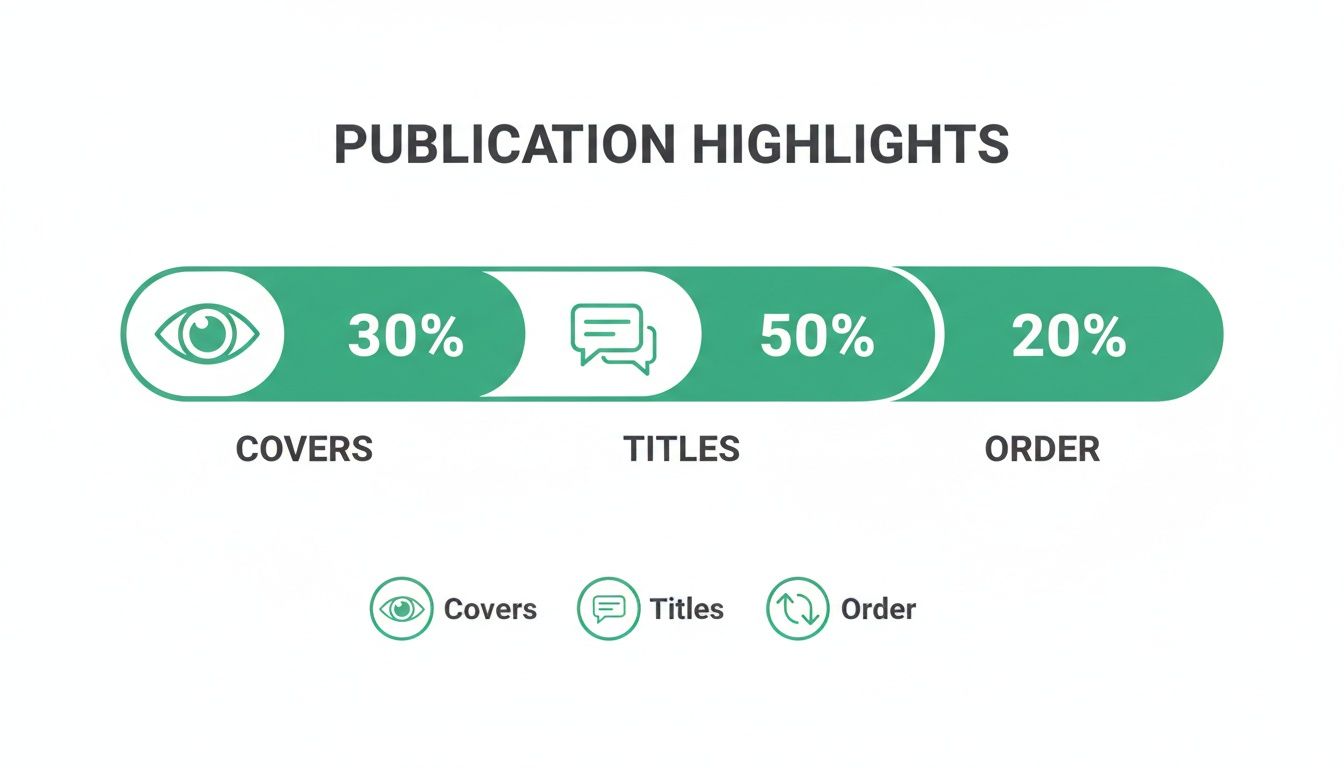
As you can see, compelling titles account for 50% of the draw, making them the single most important factor for getting that first tap.
Leverage Your Off-Platform Channels
Don't box your promotion strategy into just Instagram. Your most loyal followers—the ones on your email list or reading your blog—are the perfect audience to direct toward your best Highlight content.
Think of your Highlights as valuable, bite-sized resources. If you've created a comprehensive Highlight covering a recent industry event, it becomes a perfect piece of bonus content to share with your email subscribers.
Cross-promotion turns your Instagram Highlights into a destination. When you link to a specific Highlight from an external source like a newsletter, you're not just asking for a follow—you're offering a direct solution or piece of valuable content.
For instance, you can easily embed a callout in a related blog post. If you've written an article about your top five skincare tips, add a little box that says, "For live demos and my daily routine, watch my 'Skincare' Highlight on Instagram!" This sends highly interested traffic right where you want it.
Choosing the right promotional channel depends on how much effort you can put in and what kind of impact you're looking for.
Highlight Promotion Channel Effectiveness
Reels CTAs: This channel delivers high potential impact with a medium level of effort. It is particularly effective for reaching new audiences and driving high-intent traffic from your most viral content.
Story mentions: Story mentions offer medium impact with low effort and work best for nudging your most engaged, daily followers toward related evergreen content.
Feed post captions: This method has low to medium impact and requires minimal effort. It is useful for consistently reminding followers about the resources available on your profile.
Email newsletters: Email newsletters provide high impact with a medium effort requirement. They are ideal for directing your most loyal off-platform audience to valuable, specific Highlight collections.
Blog or website links: This channel delivers medium impact with low effort and is best suited for capturing qualified traffic from search engines and converting readers into followers.
Ultimately, a mix of these channels will give you the best results. Start with the low-effort tactics and build from there.
Create Content Specifically to Promote Highlights
This might sound a little meta, but one of the best ways to get eyes on your old content is to create new content about it. It’s surprisingly effective for boosting instagram highlights views.
A "Highlight Tour" Reel or Story is a powerhouse tactic. Just screen-record your phone as you tap through your top three or four Highlights on your profile. As you navigate, briefly explain the value inside each one. For example: "First up, we have 'Our Process,' where I break down exactly how we work with new clients from start to finish..."
This strategy does two things at once:
It reminds your existing followers of the treasure trove of resources they might have missed, encouraging them to go back and watch.
It shows new followers that your profile is more than just a pretty feed—it's a curated library of information, which makes hitting that "Follow" button a no-brainer.
By actively guiding your audience, you transform your Highlights from a passive archive into a dynamic, essential part of your content strategy. This ensures your best work doesn't just sit there—it gets seen.
Tracking and Analyzing Your Highlight Performance
So you’ve created and promoted your Highlights. Great start, but the work isn’t over. If you really want to master your strategy, you have to know what’s working and what’s not. Tracking your Instagram Highlights views is basically getting a report card for your evergreen content—it shows you exactly which topics grab your audience’s attention and which ones are collecting dust.
Diving into your analytics isn't just about stroking your ego with big numbers. It’s about getting real, actionable data that helps you make smarter decisions. When you understand these numbers, you can double down on your most popular content, give underperforming Highlights a much-needed makeover, and keep refining your approach to get the biggest bang for your buck.
Where to Find Your View Data (and What It Means)
First things first, let's find the numbers. Locating your Highlight view count is easy, but the data you see changes over time. This is where a lot of people get tripped up, but it’s actually pretty simple once you understand the timeline.
When you’re watching one of your own Highlights, tap the "Seen by" counter in the bottom-left corner. This is your data hub. Here's how the timing works: a Story will show you a list of specific viewers for its first 24 hours on your profile. That list continues to update for another 24 hours after you add it to a Highlight. That gives you a 48-hour window to see exactly who watched.
After those 48 hours are up, the list of names vanishes. But—and this is the important part—the total view count keeps climbing for as long as the Highlight exists. For more on this, social media analysts at Meltwater.com have broken down similar platform mechanics.
Understanding this distinction is key to your analysis:
The 48-Hour Viewer List: This is great for instant feedback. You can see which of your most engaged followers are checking things out right away.
The Long-Term Total View Count: This is your true north. It reflects the overall reach and staying power of a Highlight over weeks, months, or even years.
The metric that truly matters for growth isn't who saw your Highlight yesterday; it's the total number of views it racks up over its lifetime. That number tells you how valuable it is as a permanent asset on your profile.
Turning Numbers into Smarter Decisions
Once you’ve got the data, the real work begins. Raw numbers are just numbers. The magic happens when you start digging in, asking questions, and looking for patterns. Your analytics are telling you a story about what your audience actually wants from you.
I recommend setting aside time once a month to do a quick review. Pull up the total views on each Highlight and track them in a simple spreadsheet or a note on your phone. This habit will help you spot trends and pinpoint your top-performing content pillars almost immediately.
Ask yourself these three questions:
Which Highlight has the most views? This is your content goldmine. Whatever that topic is, your audience is hungry for it. Think about how you can create more feed posts, Reels, or even spin-off Highlights about it.
Which one has the fewest? This is a red flag. It could mean the topic is a dud, the cover is boring, or the title isn't clear. This Highlight is your top candidate for a refresh or to be replaced entirely.
Are views on a specific Highlight suddenly spiking? If you see a sudden jump, retrace your steps. Did you just promote it in a Reel that took off? Did you mention it in a popular post? This connects the dots between your promotional efforts and actual results.
By consistently checking in on this data, you stop guessing and start knowing. If you want to go even deeper into your account's performance, our complete guide explaining Instagram Insights is the perfect next step.
Spotting Viewer Drop-Off to Improve Retention
Beyond just the total view count, you can get even more granular by analyzing retention within a single Highlight. It’s a simple but powerful trick.
As you tap through the individual Stories in one of your Highlights, keep an eye on the view count for each slide. Does the number stay pretty consistent from the first Story to the last? Or do you see a steep drop-off somewhere in the middle?
A major drop-off is a huge clue. It tells you that your cover and title did their job—they got the click—but the content inside didn't hold people's attention. That’s incredibly valuable feedback. Pinpoint the exact Story where people are leaving and take a hard look at it. Is it too long? Boring? Irrelevant? Swapping out or just removing those weak links can dramatically improve your Highlight’s overall performance and make sure your audience walks away happy.
Common Questions About Instagram Highlights Views
Diving into Instagram Highlights often brings up more questions than answers. It’s a powerful feature, but its mechanics—from viewer lists that vanish to view counts that seem stuck—can feel a bit mysterious.
Let's clear the air. This is your troubleshooting guide for the most common questions people ask about their Highlight views. We'll get straight to the point, so you can stop guessing and start analyzing your performance like a pro.
Why Did My Viewer List Disappear?
This is the big one, and the reason is all about timing. When a Story is live, you can see the name of every single person who watches it for the first 24 hours.
When you add that Story to a Highlight, Instagram extends the clock. You get an additional 24 hours to see that viewer list, giving you a grand total of 48 hours from the moment the Story was first posted. After that, the list of names is gone for good. The total view count, however, keeps ticking up in your insights.
Instagram does this intentionally. It shifts the focus from who watched to how many watched, which is a much better metric for understanding the long-term impact of your evergreen content. For a deeper dive, check out our guide on whether you can see who views your Instagram Highlights.
Do Multiple Watches from the Same Person Count?
Yes, they absolutely do, and this is fantastic news. Instagram doesn't just track unique viewers; it tracks total impressions. So, if a loyal follower comes back to watch your "Workout Routine" Highlight three times to get the form right, that counts as three views.
High repeat viewership is a goldmine of feedback. It tells you that you've created something so useful or entertaining that people are bookmarking it and coming back for more.
A high number of repeat views on a single Highlight is one of the strongest signals that you've created a truly valuable resource for your audience. It proves your content has staying power beyond a single, fleeting glance.
Think about it: a wedding photographer's "Pricing" Highlight with lots of repeat views likely means potential clients are seriously considering their packages. That’s the kind of engagement you want.
How Do Views Actually Impact My Growth?
Highlight views are way more than just a number—they're a core part of your growth engine. They turn your profile into an on-demand resource, giving new visitors a reason to stick around and hit that "follow" button. The data backs this up, with 72% of marketers working with Instagram influencers, who often use Highlights to showcase partnerships and drive serious engagement.
While the specific list of viewers is temporary, the total view count (which you can track forever in your Insights) is directly linked to profile visits and conversions. The more views your Highlights get, the more valuable your profile appears to both new visitors and the Instagram algorithm.
What If My Highlight Views Aren't Updating?
Seeing a view count that’s frozen can be frustrating, but it’s usually just a small technical hiccup. Before you worry, run through this quick checklist:
Update Your App: The most common culprit is simply an outdated version of Instagram. Pop over to your app store and make sure you're running the latest version.
Clear Your Cache: Your phone can store old data that causes display glitches. Clearing the app's cache in your phone's settings is a quick fix that won't delete your content.
Check Your Account Type: You need a Business or Creator account to access detailed, long-term analytics. If you're still on a Personal account, you won't see these insights.
Just Wait a Bit: Sometimes, the issue is on Instagram's end. If you've tried everything else, give it a few hours. These server-side bugs often resolve themselves.
Do Views from Archived Stories Carry Over?
Nope. When you add a Story from your archive to a Highlight, its view count starts over at zero. It doesn’t matter if the Story is from last week or last year; the original views it got when it was live are not transferred.
This is why the best strategy is to add a Story to a Highlight while it’s still active (or within that initial 24-hour archive window). Doing so bundles all its initial momentum and engagement data in one place, giving you a much clearer picture of its performance right out of the gate.
Ready to turn those views into real, organic followers? Gainsty uses a powerful combination of expert strategy and advanced AI to help you connect with an audience that truly cares about your content. Stop guessing and start growing with a platform designed for authentic engagement. Start your journey with Gainsty today and watch your community flourish.