Why You Can't Natively Search Multiple Instagram Hashtags
If you're a marketer hunting for user-generated content, a creator looking for inspiration, or a researcher tracking a trend, you've definitely hit this wall. You want to zero in on a niche—say, vegan foodies in New York who also love fitness (#veganNYC + #fitfoodie)—but Instagram makes you wade through each hashtag's feed one by one.
This isn't an accident. The platform's search is designed to be simple and broad, keeping the experience smooth for a casual user browsing a single topic. For anyone doing serious, targeted research, though, it's a massive roadblock. You can't find content at the intersection of different interests, which is exactly where the most valuable communities live.
The Strategic Value of Layering Hashtags
This built-in limitation actually reveals a key part of a smart hashtag strategy. It’s not about just piling on tags; it's about using the right combination to show up in different searches. To find those combinations, you have to look beyond Instagram's own tools.
This decision tree breaks it down pretty clearly:
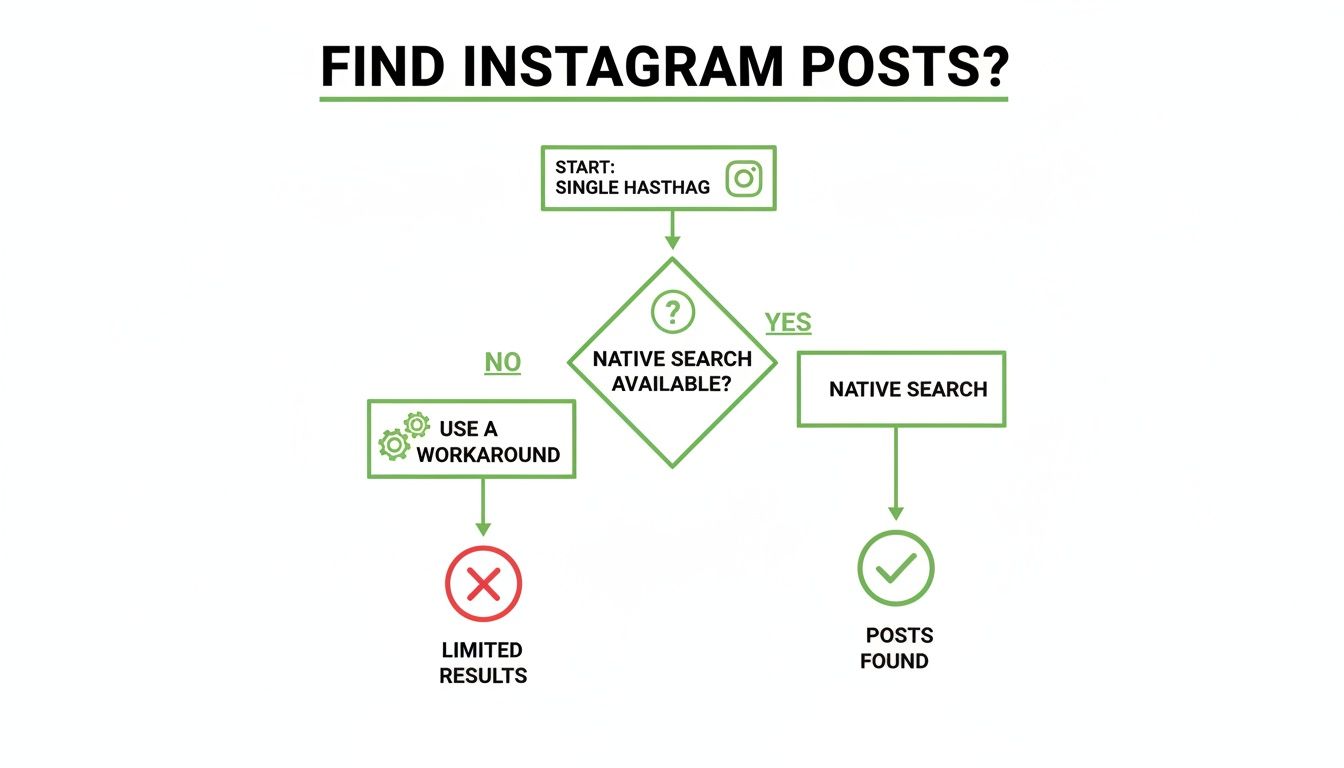
As the flowchart shows, once your search gets more complex than a single tag, you need to rely on external methods. And that's exactly what we're going to get into.
Hashtag strategy itself has come a long way. While Instagram's official advice is to stick to 3–5 relevant tags, some data tells a different story. One study found that using 9–11 well-chosen hashtags can actually boost reach by up to 79.5%. It's all about mixing popular, niche, and branded tags to hit that sweet spot.
The real magic happens when you move beyond the platform's limits. Learning to effectively search Instagram by multiple hashtags unlocks a new level of insight. You can pinpoint specific trends, spot micro-influencers, and connect with super-engaged communities that are otherwise totally hidden.
Luckily, you're not stuck. There are several solid workarounds, from simple browser tricks to powerful third-party software. And if you want a deeper dive into how the platform's search algorithm thinks, our guide on Instagram search suggestions is a great place to start.
Instagram Multi-Hashtag Search Methods at a Glance
Before we dive into the step-by-step for each method, here’s a quick overview to help you decide which approach is right for you. Some are quick and dirty, while others require a bit more setup but deliver far more powerful results.
Manual workaround: This method is easy and completely free, making it best for quick, casual searches or small-scale research when you just need fast results without advanced tools.
Google site search: This approach is also easy and free, and it works best for finding popular, indexed Instagram posts directly from your browser without needing to log into extra platforms.
Social listening tools: This method has a medium difficulty level and comes at a paid cost. It’s best suited for marketers, agencies, and businesses that need deeper analytics, tracking, and reporting.
Instagram Graph API: This is the most difficult option and requires developer resources and associated costs. It’s best for custom-built solutions and large-scale data analysis where advanced automation and precision are required.
Choosing the best method really depends on your goals. Are you just trying to find a few cool posts for inspiration, or are you building a full-blown marketing campaign? Keep that in mind as we explore each of these options in detail.
Getting Creative With Manual and Browser-Based Searches
So, you need to find content that hits the sweet spot between a few different topics, but you're not ready to shell out for specialized software. No problem. A couple of clever, zero-cost tricks can get you there. These methods take a little elbow grease, but they’re surprisingly effective for targeted research, digging into competitor strategies, or finding that perfect user-generated content.
The most direct route is what I call a "manual intersection" search. It's as simple as it sounds: you search for your first, broader hashtag right inside Instagram. Then, you start scrolling. When you see a post that looks promising, you tap into it and manually scan the caption and comments for your second, more specific hashtag.
Imagine you're a cafe owner hunting for local content. You could search #SanDiegoCoffee, then eyeball those posts for mentions of #DogFriendlyCafe. Yes, it’s a bit of a grind, but for quick and dirty projects, it's a totally functional way to search instagram by multiple hashtags.
Using Google to Do the Heavy Lifting
For a much more powerful and efficient approach, it’s time to leave the app and head over to Google. By using specific search operators, you can basically command Google to act as a super-filter for Instagram, showing you only the posts that have all the tags you’re looking for.
The magic lies in the site: operator paired with your hashtags in quotes. This tells Google to search exclusively within instagram.com for pages that contain every single hashtag you list.
The search query looks like this: site:instagram.com "#firsthashtag" "#secondhashtag"
Let's put it into practice. Say you're a travel blogger planning a trip to Iceland. You want to find photographers who have posted content tagged with both #travelphotography and #iceland. Your Google search would be simple: site:instagram.com "#travelphotography" "#iceland"
And voilà, here’s a peek at what you’d see on the Google results page for that search. Every single link on that page will take you straight to an Instagram post that includes both of your target hashtags.
This technique is an absolute game-changer because it completely sidesteps Instagram's built-in search limits. It serves up a direct, hyper-relevant list of content. You can even toss in a third or fourth hashtag to get even more specific with your results.
Pro Tip: Take your Google search a step further by using the "Tools" option to filter results by time (like "Past Month" or "Past Year"). This is perfect for finding fresh content and spotting what’s currently trending with your hashtag combo.
Fine-Tuning Your Search Game
While the Google method is a fantastic workaround, it's good to remember that it only shows public posts that Google has had time to index. That means you might miss brand-new posts or anything from private accounts.
Of course, finding posts is only half the battle. A truly effective Instagram strategy relies on continuously discovering new and relevant hashtags. Keeping a pulse on what’s popular in your niche ensures both your searches and your own content hit the mark. For a deep dive on that, check out this great guide on how to find trending hashtags on Instagram. When you combine a solid hashtag discovery process with these targeted search tricks, you’ve got a seriously robust approach to your content strategy.
Alright, when you’ve pushed the manual methods and Google hacks as far as they can go, it’s time to call in the professionals. I’m talking about social listening and management platforms. These tools are built from the ground up to blow past Instagram’s search limits, giving you a ridiculously powerful way to search instagram by multiple hashtags with speed and accuracy.
Frankly, they do a lot more than just search; they're packed with analytics that can completely reshape how you see your content strategy.
To get around Instagram's built-in walls, most serious marketers use these kinds of platforms for their advanced analytics and monitoring. If you're shopping around, you can find solid reviews of the best social media management platforms to see what fits your budget and needs. This is where you graduate from simple searching to full-on market research.

Setting Up a Monitoring Project
The heart of these platforms is what’s usually called a "monitoring project" or a "listening stream." This is where you tell the software exactly what to look for. And unlike a simple search bar, you can use Boolean logic here—powerful commands like AND, OR, and NOT—to build incredibly specific queries.
Let’s say you’re a fitness apparel brand on the hunt for user-generated content (UGC). You could set up a project to find posts that include both #HIITworkout AND #HomeGym. Boom. That simple command instantly filters out every post that only uses one of those tags, leaving you with a clean, targeted feed of people working out in their home gyms.
The setup is almost always a breeze:
Kick off a new project: Just give it a clear name, something like "HIIT UGC Campaign."
Plug in your keywords: This is where the magic happens. In the keyword field, you’d type your hashtags using those Boolean operators. For example:
(#HIITworkout AND #HomeGym) OR #AtHomeWorkout.Refine with filters: You can dial it in even further. Filter by language, specific locations, or even add negative keywords to exclude posts that mention your competitors.
This kind of control is something you just can't get from tinkering around in the app or a web browser. You're not just finding random posts; you’re building a custom, real-time feed of your ideal content.
The Real Value Beyond the Search
The true power of these platforms isn’t just in finding the posts—it’s in the data and context they provide. For any serious marketer, this is gold. You can analyze sentiment to see if mentions are positive or negative, spot the influential users who are really driving the conversation, and even keep tabs on your competitors' hashtag game.
With a dedicated social listening tool, you stop reactively searching for content and start proactively monitoring the entire conversation around your niche. You can get real-time alerts when your specific hashtag combos pop up, letting you jump in and engage immediately.
To help you compare, here's a look at how some of the big players stack up for this kind of work.
Feature Comparison of Popular Social Listening Tools
Boolean search queries: Tool A (Sprout Social) fully supports Boolean logic using AND, OR, and NOT operators. Tool B (Brand24) also supports Boolean searches with an advanced query builder, while Tool C (Hootsuite) offers Boolean functionality within its Streams and Insights features.
Real-time alerts: Tool A provides configurable real-time alerts via email and in-app notifications. Tool B delivers real-time alerts through email and Slack notifications, and Tool C supports alerts directly within its Streams.
Sentiment analysis: Tool A includes automated sentiment scoring that categorizes mentions as positive or negative. Tool B offers sentiment analysis with the added advantage of manual override options, while Tool C integrates sentiment tracking into its analytics reports.
Influencer identification: Tool A identifies influencers based on reach and engagement metrics. Tool B uses a dedicated “Influence Score” to highlight key voices, and Tool C includes influencer insights within its analytics reporting.
Location-based filtering: Tool A allows location filtering down to the city level. Tool B supports filtering by country and language, while Tool C offers location targeting using radius-based searches.
Each platform has its strengths, but they all provide the core functionality needed to go way beyond Instagram's native capabilities.
Sure, these platforms come with a monthly price tag, but the investment almost always pays for itself in time saved and insights gained. For any business, agency, or creator focused on growth, they’re a non-negotiable part of the toolkit.
Of course, a killer search strategy is only as good as the hashtags you’re searching for. To keep your queries sharp, check out our guide on how to find trending Instagram hashtags.
The Developer's Way: Using the Instagram Graph API
If you're comfortable getting your hands dirty with some code, the Instagram Graph API is by far the most powerful and flexible way to find posts with multiple hashtags. Let's be clear: this method isn't for everyone. It demands some technical skill, but the payoff is total control over your data analysis, which is why it's the go-to for agencies, SaaS companies, and big brands.
The API doesn't just hand you a neat list of posts with #digitalnomad and #balilife. It doesn't work that way. Instead, you have to create a programmatic workaround. The strategy is to pull a massive dataset of recent posts for your main, broader hashtag (like #digitalnomad) and then run your own script to sift through that data, filtering for posts that also include your other, more specific hashtags. It's a two-step dance: collect, then filter.

Getting Set Up With the API
Before you can pull a single post, you need to get acquainted with Meta’s developer ecosystem. This means jumping through a few hoops to get the right permissions to access Instagram's data.
Here’s the initial setup process:
Create a Facebook Developer Account: This is your key to the kingdom for all of Meta's APIs.
Set up a Facebook App: You'll need to configure an app to get the credentials necessary for making API calls.
Request Permissions: Your app needs approval for specific permissions, like
instagram_basicandinstagram_manage_insights, which give you access to public content and data.
Once your app gets the green light, you can start making calls. A developer could, for example, pull the latest 1,000 posts tagged with #digitalnomad. From there, their script would loop through each post's caption, looking for #balilife or other specific tags, building a custom, highly relevant dataset from scratch.
This method is less of a simple search and more of a large-scale data mining operation. It lets you build custom dashboards, track how different hashtag communities overlap over time, and pipe that data directly into your own business intelligence tools.
Who Is This Really For?
Let's be honest, the API approach is no quick fix. But for certain problems, it's the only real solution. It’s perfect for organizations that need to bake Instagram data directly into their own software or conduct complex, ongoing analysis that off-the-shelf tools just can't handle.
Think about these scenarios:
A marketing agency building a private tool to monitor competitor campaigns across very specific hashtag combinations.
A SaaS company developing a new feature that sniffs out micro-influencers in hyper-niche markets.
A major brand doing market research on where different customer interests intersect online.
One huge thing to watch out for is the API's rate limits. These rules restrict how many requests you can make in a certain period. If you need high-volume data, you’ll have to plan your queries strategically to stay under the limit or potentially pay for higher tiers of API access. It’s a complex route, for sure, but the Instagram Graph API offers the ultimate level of precision for deep hashtag analysis.
Alright, finding those hyper-specific posts was just the warm-up. The real magic happens when you turn those search results into actual growth. Now that you've got a curated list of content from your ideal audience—whether you found it through Google or a slick third-party tool—it's time to connect.
When you search Instagram by multiple hashtags, you're basically creating a treasure map to your niche communities. These are the people most likely to vibe with what you're doing, which makes any time you spend engaging with them infinitely more valuable than just dropping comments on generic, popular posts.
Find Your Next Brand Collaborators
One of the best ways to use this technique is for scouting potential partners. Let's say you run a sustainable fashion brand. Searching for posts that use both #sustainablefashion and #slowliving doesn't just show you content; it shows you creators who live and breathe your brand's core values.
These aren't just random influencers. They're authentic voices within the exact community you want to reach. Start by genuinely engaging with their content—leave a thoughtful comment, share a post you love to your Stories. This is how you start building a real relationship that can lead to a powerful collaboration. It blows a cold outreach email out of the water every time.
Uncover Authentic User-Generated Content
User-generated content (UGC) is pure marketing gold, and multi-hashtag searches are the fastest way to strike it rich. Imagine you own a coffee shop. You could search for #MyCityCafe AND #MorningRitual. Suddenly, you're not just seeing pictures of your coffee; you're seeing customers who have made your brand a genuine part of their daily lives.
Found some great UGC? Here’s what to do next:
Ask for Permission: Always, always ask before you repost. A quick, friendly comment is all you need.
Give Credit Where It's Due: When you share, tag the creator in the caption and in the photo itself. It’s a simple act of appreciation that sends traffic and good vibes their way.
Create a Community Feed: Make a habit of featuring customer photos. It encourages more people to share their own experiences and use your branded hashtag.
The secret to making any of this work? Be authentic. Ditch the generic "Great post!" comments. Instead, point out something specific you loved about their photo or caption. That little bit of extra effort shows you’re actually paying attention and makes you stand out.
Drive High-Quality Follows and Engagement
At the end of the day, this whole strategy is about building a loyal community, not just racking up a high follower count. When you interact with people at the intersection of specific interests, you attract followers who are truly invested in your niche.
Your engagement rates will naturally climb because the connections you're making are built on shared passions, not just random follows.
This targeted approach is a key piece of any solid growth plan. If you want to see how it fits into the bigger picture, check out our complete Instagram hashtag strategy guide. It'll give you the full framework for turning these targeted searches into real, sustainable growth.
Common Questions About Searching Multiple Hashtags
Once you start digging into multi-hashtag searches, a few common questions always seem to pop up. Let's tackle them head-on so you can fine-tune your strategy and get the most out of every search.

Can I Search for Posts With One Hashtag but Not Another?
You absolutely can, and it’s a brilliant way to cut through the noise. The easiest way to do this is with a Google site search. Just add a minus sign (-) right before any hashtag you want to exclude.
For example, a search string like site:instagram.com "#healthyrecipes" -"#keto" tells Google to show you posts tagged with #healthyrecipes while kicking out anything that also includes #keto. It's a simple but powerful trick. Many third-party social listening tools also have this feature, often calling it a Boolean “NOT” operator, giving you precise control to filter out irrelevant content.
Are There Any Free Tools for This Type of Search?
Yes, a few good options won't cost you a dime. While the most powerful social monitoring platforms are paid subscriptions, the best free method by far is using Google's site: search operator. It lets you hunt for posts with all your target hashtags right from your browser. It’s quick, easy, and completely free.
And of course, there's the manual approach of checking posts one by one. This is also free, but it becomes a real time-sink if you need to analyze more than just a handful of posts. For quick, small-scale searches, it works in a pinch.
The key to effective growth is moving from broad engagement to hyper-targeted interactions. By finding users interested in the specific intersection of your niche (e.g., #vanlife AND #solotravel), you build more meaningful connections that lead to a stronger, more invested community.
Should I Use Broad or Niche Hashtags for My Search?
Honestly, the magic happens when you use a mix of both. My go-to strategy is to start with one broader, high-volume hashtag to cast a wide net. Then, I'll layer in one or two very specific niche hashtags to narrow down the results.
This technique is all about pinpointing a passionate, specific community inside a much larger conversation. Think about it: searching for #digitalart combined with #procreatebrushes is infinitely more effective for finding your ideal audience than just searching for generic tags like #art or #drawing on their own. It’s this strategic blend that transforms a basic search into a powerful discovery engine.
Ready to stop searching and start growing? Gainsty uses advanced AI and expert strategies to connect you with real, engaged followers in your niche. Forget the bots and fake accounts—build an authentic community and watch your influence grow. Discover how Gainsty can change your Instagram followers today!