Why This Question Comes Up So Often
Maybe a new colleague mentioned their photography, an old friend resurfaced in Suggested, or someone you used to follow flipped their profile to private. You search How I can see a private Instagram account hoping for a setting you missed. The curiosity is normal, and it doesn't make you suspicious.
The confusion comes from how public Instagram feels most of the time. Public posts travel through Explore, hashtags, shares, and search, so a locked grid feels like a technical glitch you should be able to work around. It isn't a glitch. It's a deliberate choice by the owner to approve their audience one person at a time.
The Question Behind the Question
Most readers aren't really asking for a bypass. They're asking one of three quieter questions:
Did I do something wrong: You wonder if you were removed, blocked, or never accepted in the first place.
Is there a polite way in: You want to reconnect without looking intrusive or creating a fake account.
Can I just check one thing: You want to confirm a photo, a mutual friend, or whether an account is genuine.
Each version leads to the same safe path. You ask, you identify yourself clearly, and you accept the answer. Anything that removes the owner's choice from that process conflicts with how the account was set up.
Practical rule: If a method would surprise the account owner if they knew you used it, it's not a legitimate viewing method.
That test helps you sort advice quickly. A follow request passes it, because the owner sees your name and decides. A secret viewer, a borrowed login, or a deceptive second account fails it, even if a website describes it as harmless research. The rest of this guide builds on that distinction, not on tricks to get around it.
What a Private Instagram Account Actually Means
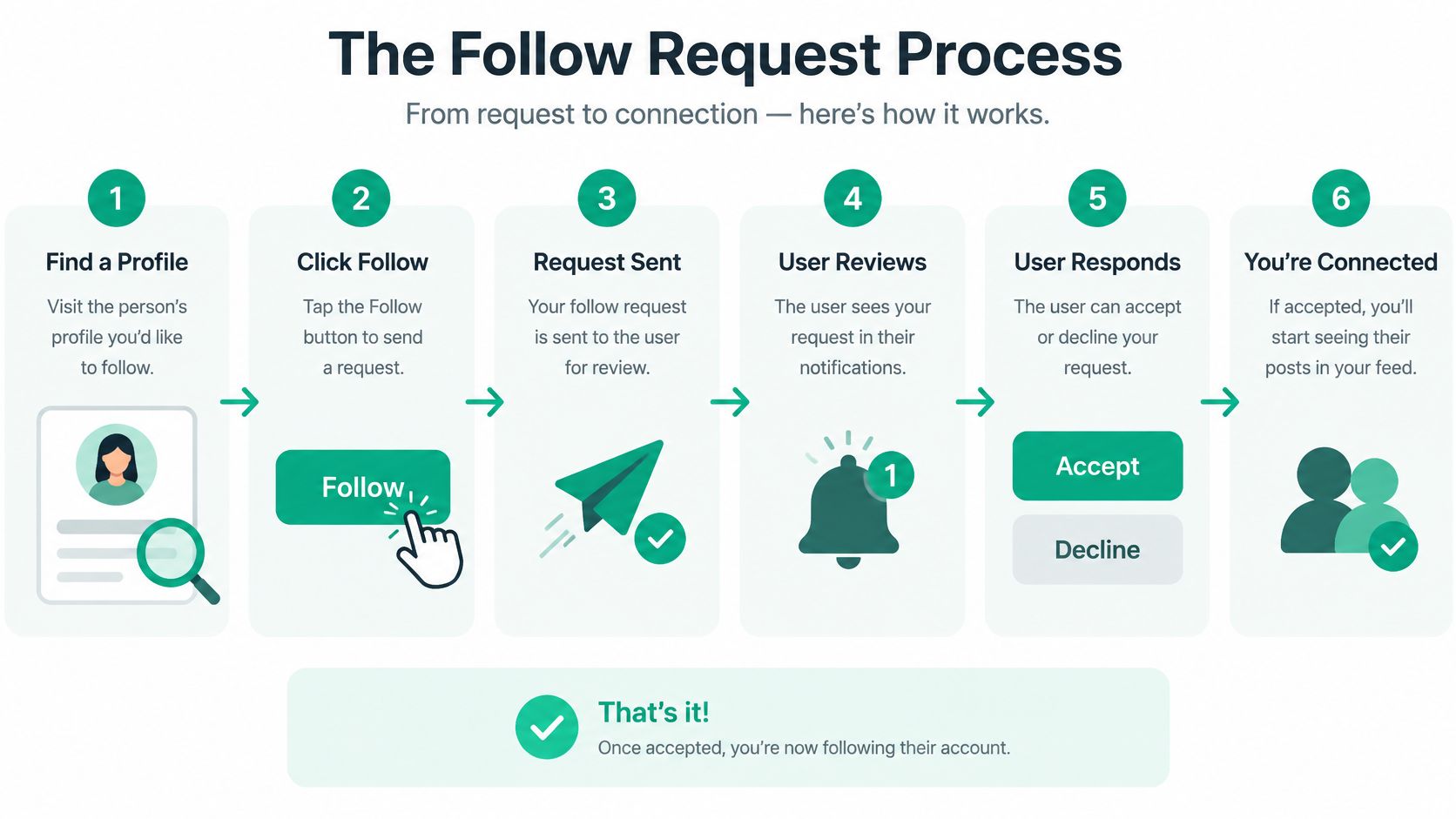
When someone switches to private, Instagram limits their posts, Stories, and other restricted content to approved followers. Instagram's privacy and safety guidance on controlling who sees your content explains that switching to private lets the owner control who sees their content and that every incoming follow request must be approved before access is granted. That guidance was first published on June 6, 2017, and updated on November 29, 2024, in that same source.
The infographic below shows the approval flow that creates that boundary.
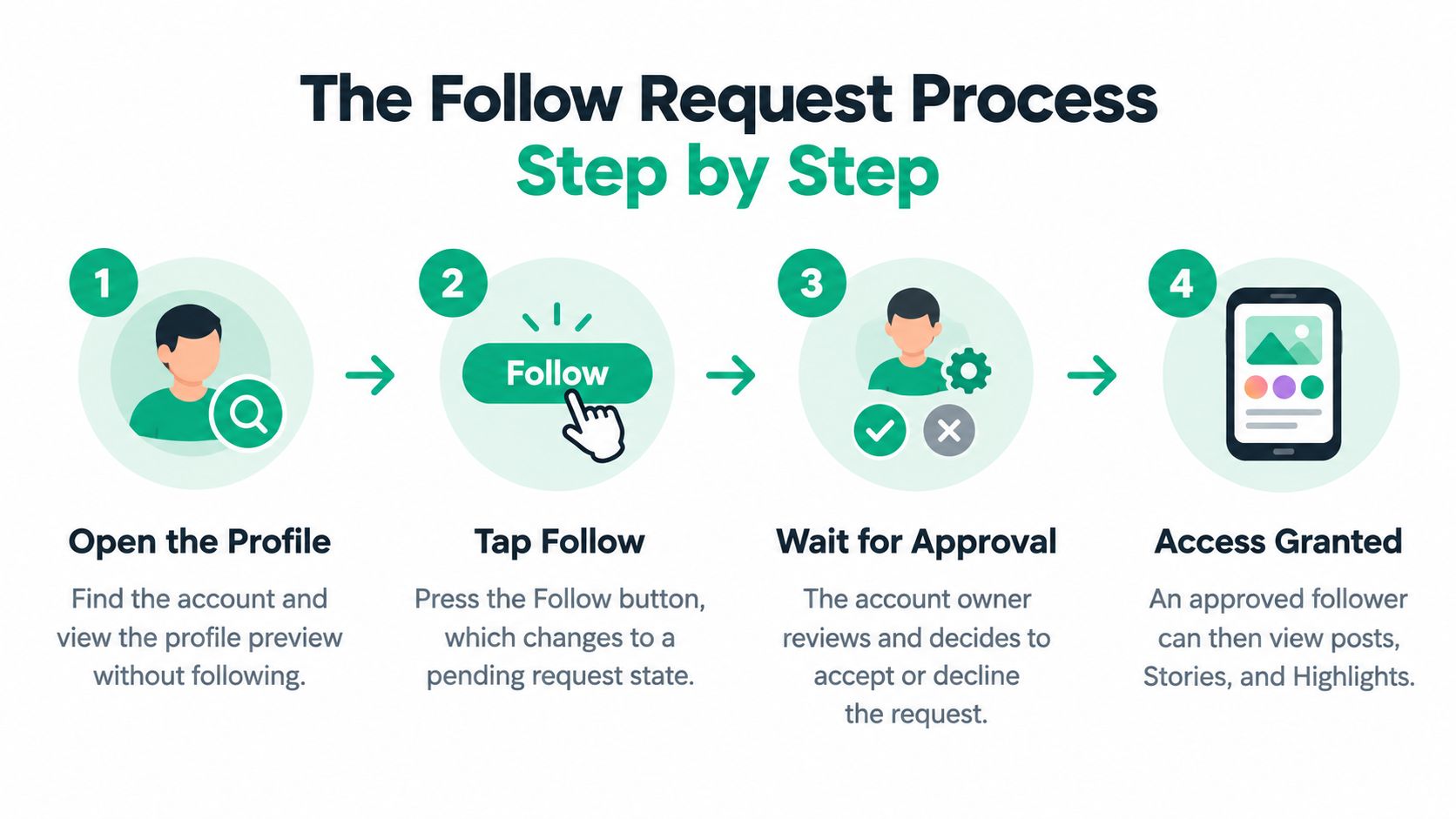
Some profile-level details can still be visible, such as the username, display name, profile photo, and bio. That preview helps you confirm you've found the right person, but it doesn't open the grid. If you want to check your own settings while you learn this, work through Instagram privacy setup steps and compare what visitors see before and after approval.
Public Preview Versus Protected Content
You may see the profile photo and bio, but feed posts and Reels on the private account require approval.
You may see the username and display name, but Stories and Highlights shared with followers require approval.
You may see follower and following counts, but viewing the full follower and following lists requires approval.
Private accounts are one format among several, and the different types of IG accounts and how their visibility differs can help you tell a private personal profile from a public creator or business profile.
One last detail matters. An owner can remove an existing follower without blocking them, as noted in the Instagram guidance cited above. Approval isn't permanent access. It's ongoing permission the owner can withdraw.
The Follow Request Process Step by Step
Start on the profile, not a search result screenshot. Check the spelling of the username, the profile photo, and any website or bio clues that confirm this is the right person. A clear profile on your side helps too, because the owner will judge your request from your photo, name, and bio.
Send a Request the Owner Can Judge
Open the profile: Tap through from search, a mutual follower, or a direct link the owner shared.
Tap Follow: The button changes to a pending state, often shown as Requested.
Add context if you can: If message options are available, send one short, honest note, such as who you are and where you met.
Wait without chasing: Don't cancel and resend repeatedly, and don't create a second account to ask again.
A good note is boring in the best way. "Hi, I'm Sam from your Thursday pottery class" gives the owner a reason to recognise you. A vague compliment, a fake shared interest, or pressure to accept quickly does the opposite.
If the request sits unanswered, treat that as information. The person may rarely check requests, may keep the account for close family, or may not want new followers. You can ask a mutual contact to introduce you in person, or you can view material the owner publishes elsewhere in public. Our guide to how to see followers on Instagram within the app's normal visibility rules explains what follower information you can view once you're legitimately connected.
Don't pay or boost your way into a private audience. Access comes from recognition and consent, not spending.
That distinction matters for brands too. Reading about paid vs organic social strategy can clarify why paid reach works for public campaigns, but it doesn't buy entry to a private personal account. If your request is declined or ignored, the respectful move is to stop there.
Why Search Tricks and Indirect Routes Do Not Work
You've probably seen suggestions to search the username with a hashtag, check a location page, or look for a cached copy on Google. Those ideas assume private content leaks into public discovery systems. Instagram is built to prevent that leak.
Instagram's help guidance on private posts and hashtag visibility says a private post containing a hashtag does not appear on the corresponding public hashtag page and is visible only to approved followers in the relevant direct message context. Location pages and public aggregators face the same basic limit. They can't reliably surface content the owner restricted to approved followers.
Where Indirect Searches Break Down
Hashtags: A tag on a private post doesn't place that post on the public tag page.
Locations: A place tag doesn't turn a protected photo into a public listing.
Cached previews: Search engines can't index a private grid the owner hasn't made public, and old snippets may be incomplete or outdated.
Aggregator sites: A page claiming to mirror private posts is either guessing, showing public scraps, or trying to get your data.
Context helps explain why so many accounts use this setting. A roundup citing Pew and Imperva findings on private account use notes that 72% of U.S. adults who use social media in a 2021 Pew Research Center survey considered it very or somewhat important to limit what particular people can see, and a 2021 Imperva study of approximately 1.3 million Instagram accounts reported that 28.4% were private. That sampled figure isn't a definitive global percentage, since Instagram doesn't publish one.
So what's left if you don't get approved? Ask the owner to share a specific post directly, or look for a separate public account or official website they've chosen to publish. That's not a workaround. It's the owner choosing a different audience on purpose.
The Risks Behind Private Viewer Tools
Search results for this question are crowded with sites promising anonymous viewing, hidden follower lists, and instant access without following. Every one of those promises conflicts with how Instagram's privacy model works. When a claim can't work through Instagram itself, the useful question shifts: what does the site gain from your click?
The comparison below separates the pitch from the likely outcome.
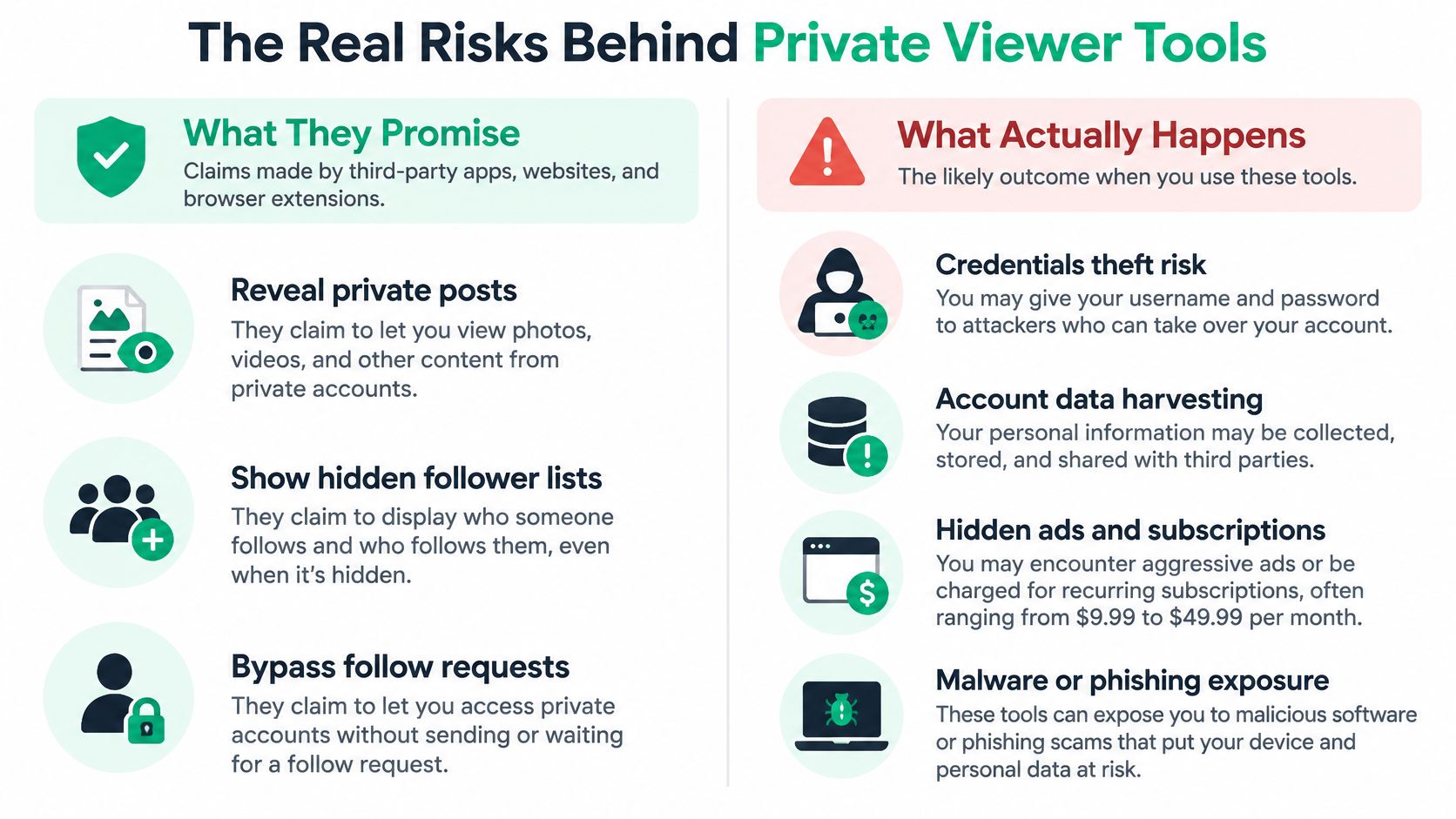
The most common viewer tool follows the same script: you enter a username, watch a fake loading bar, then face a demand to log in, complete a survey, pay for verification, or install an app. That sequence exists to harvest credentials, collect personal data, push subscriptions, or deliver malware. Nothing in it is built to show you a private grid.
But what if the site looks professional, complete with glowing testimonials? A polished template costs almost nothing, and fake reviews are part of the same script. Judge the page by what it asks of you, not by how it looks.
Red Flags You Can Spot in Seconds
Password requests: A third party asks for your Instagram login outside Instagram.
Guaranteed access: The page promises private posts with no approval and no limits.
Payment for access: You're asked to pay after a teaser preview that shows nothing verifiable.
Unusual permissions: An app or extension wants broad access unrelated to viewing a profile.
Pressure and countdowns: The site rushes you so you don't stop to check who runs it.
Parents should pay special attention here. A page summarising recent teen privacy survey findings and viewer scam risks notes that in a 2025 Ipsos survey of 2,005 U.S. parents of teens, 94% considered default private teen accounts helpful, and that users under 16 need parental permission to loosen certain Teen Account settings. Scam viewer sites exploit the same curiosity those protections are meant to manage.
For broader background on protecting accounts and personal data, Gini Help's 2026 privacy guide is a useful companion. The safest assumption is simple: if a tool claims to bypass approval, treat it as a phishing or account takeover risk until proven otherwise.
A Safety Checklist Before You Search Any Further
Pause before you type a username into another viewer site. Run through the checks below, especially if you've already clicked a suspicious page or entered details somewhere you shouldn't have.
If You Have Not Entered Anything Yet
Close the viewer tab: Don't test it with a throwaway username, because the site may still track or mislead you.
Use Instagram directly: Open the app or the official website yourself instead of following a search ad or pop-up.
Check the address: Look for misspelled domains that imitate Instagram or Meta.
If You Already Shared Credentials or Installed Something
Change your Instagram password from within the official app, then log out of other sessions.
Turn on two-factor authentication so a stolen password alone isn't enough.
Revoke suspicious app access in your account settings and remove extensions you don't recognise.
Report phishing or impersonation through Instagram's own reporting tools.
Warn close contacts if your account sent strange messages, because takeover often spreads through direct messages.
These steps pair well with practical steps to secure your Instagram account against takeover, particularly if you reuse passwords across apps. Change any other account that shares the same password, starting with your email.
A legitimate follow request never asks for your password, a payment, or an install. It only asks the account owner for permission.
Save this checklist for the next time a friend sends you a viewer link. Sending them the checklist is more helpful than sending them the link, and it stops a curiosity click from becoming an account recovery problem.
The Respectful Way Forward and Key Takeaways
Private isn't a puzzle to solve. It's a boundary the owner set so they can choose a smaller audience, and that choice is common because people value control over who sees everyday photos, family moments, and location clues. Your job as the requester is to make a clear, honest ask and then respect the outcome.
Keep three takeaways in mind. First, approval is the method, so opening the profile and tapping Follow is the whole legitimate process. Second, indirect routes don't grant access to protected content, because hashtags, locations, caches, and aggregators don't override the owner's setting. Third, viewer tools put you at risk, because promises of secret access are a common front for phishing, credential theft, and malware.
How This Looks in Real Life
For a parent, the respectful path might mean asking a teen directly, using family supervision tools you've agreed together, and talking about why default private settings exist. For a professional contact, it might mean connecting on a public portfolio instead of insisting on a personal account. For an old friend, one recognisable request and a short note is usually enough.
Ask once, clearly: Use your real account and real name where possible.
Respect silence: An ignored request is an answer you shouldn't try to route around.
Protect yourself too: Keep two-factor authentication on and never enter credentials into a viewer site.
If you remember one mental model, make it ask, respect, and protect. Ask the owner, respect their decision, and protect your own account from services that trade on impatience.
If you're building your own Instagram presence ethically instead of chasing locked profiles, Gainsty helps individuals and businesses grow with organic followers and dedicated engagement support. Visit Gainsty to set up a growth approach built on real visibility and audience trust.