Why Tagging on Instagram Is a Growth Superpower
Don't mistake tagging for just another feature—it's one of the most powerful organic growth strategies you have. Think of it as a digital introduction or a virtual tap on the shoulder. When you tag another account, you're not just labeling them; you're creating a clickable bridge that notifies them and invites their entire audience to discover your content.
This simple action transforms a static post into an interactive handshake between communities. It all comes down to social proof and shared exposure. By connecting your content to other users, brands, or locations, you're essentially borrowing their credibility and getting a peek at their followers. The psychology is simple: a tag from a trusted account feels like a genuine endorsement.
Fostering Community and Collaboration
At its core, tagging is all about connection. A local coffee shop that tags its regulars in daily posts isn’t just putting names to faces; it's actively building loyalty and making those customers feel seen and appreciated.
In the same way, when a creator collaborates with a brand and tags them properly, they amplify their shared message, making sure it lands in front of both audiences at once. This mutual benefit is what makes tagging such an effective networking tool. Every tag is a chance to start a conversation and strengthen a relationship, which is a massive part of how you can boost Instagram engagement without spending a dime.
Understanding tagging as a tool for connection, not just a function, allows you to directly influence your visibility, engagement rates, and overall brand perception. It sets the stage for meaningful, sustainable growth.
Strategic Tagging for Maximum Impact
Of course, a good tagging strategy isn't about spamming as many accounts as you can. It's about being intentional and tagging the right accounts—the ones that are genuinely relevant to your content.
Here are a few scenarios where smart tagging makes all the difference:
User-Generated Content (UGC): A customer posts a killer photo wearing your brand's t-shirt. When you re-share it and tag them, you give them credit and a moment in the spotlight, which encourages others to start creating content for you, too.
Partnership Amplification: You’re co-hosting a giveaway with another brand. Tagging them in every post ensures all stakeholders get the maximum exposure from the campaign. It’s a team effort.
Location-Based Discovery: A travel blogger exploring Paris tags the Eiffel Tower and a small local bistro. Now, their content becomes discoverable to anyone else searching for those specific places.
To really kick things up a notch, you need to understand the world your brand lives in. Using Instagram competitor analysis tools can give you invaluable insight into who the key players are in your niche, helping you refine who you tag and why.
Tagging Across All Instagram Formats
If you want to master tagging people on Instagram, you need to get familiar with how each format works. Tagging isn't a one-size-fits-all game. The way you tag someone in a permanent grid post is completely different from how you’d do it in a fleeting Story, and each method has its own impact.
Let's walk through the specifics for each format so you can start tagging with confidence. When you get it right, a simple tag can be the spark that ignites real growth, turning a quick mention into a wave of new followers.
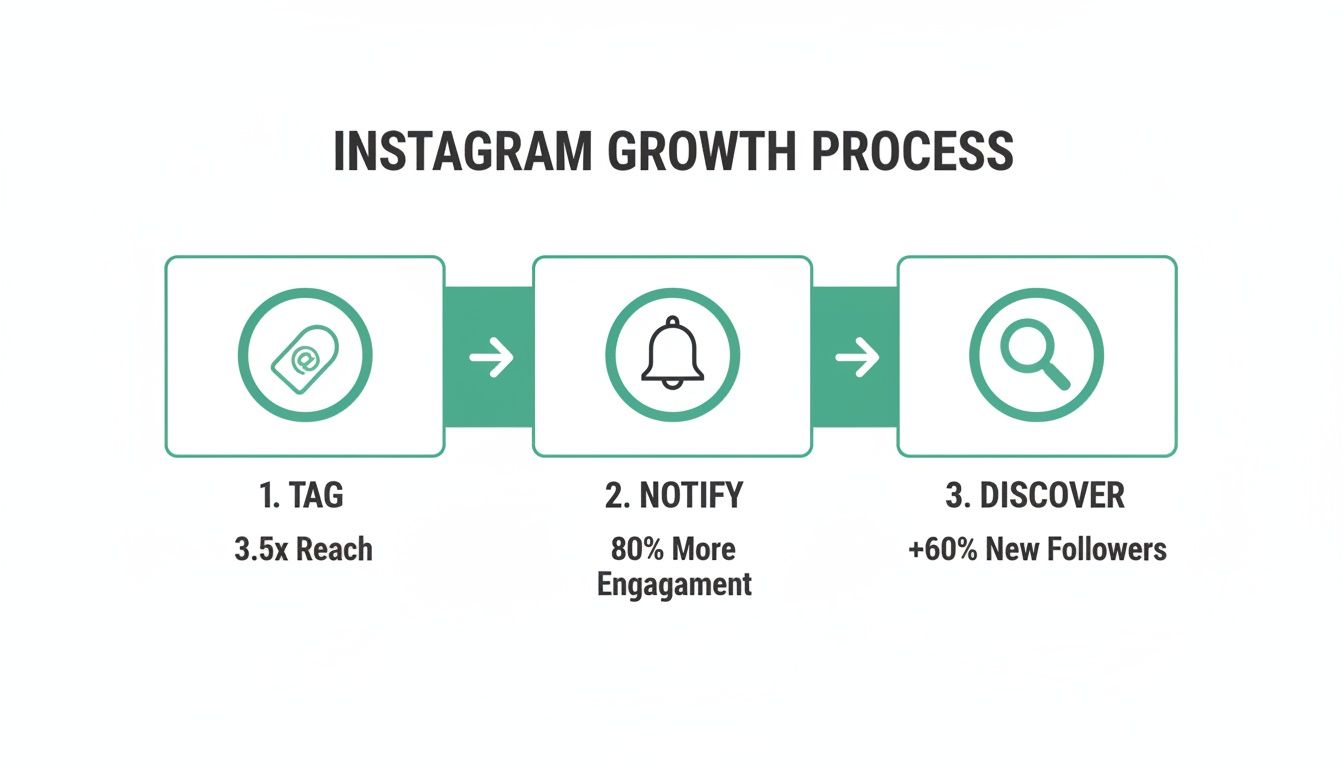
This is the cycle in a nutshell: your tag sends a notification, which leads someone new to discover your profile and interact with your content. It’s a simple but incredibly powerful loop that drives a huge amount of the platform's organic reach.
How to Tag in Feed Posts
For the photos and videos that live on your profile grid, tagging is essential. Instagram lets you tag up to 20 accounts in a single post, which is usually more than enough to credit everyone from the photographer to the brands featured.
When you're about to publish a new post, you'll see an option for "Tag people" on the final screen before you hit "Share." Just tap that, tap anywhere on your photo, and start searching for the username. It's a quick process that ensures anyone you feature gets a notification and that your post shows up on the "Tagged" tab of their profile.
What if you forget someone? No problem. Just head back to the post, tap the three-dot menu in the corner, and choose "Edit." From there, you’ll see a little person icon in the bottom-left of your image—tap it to add or remove tags anytime.
Tagging Effectively in Instagram Stories
Stories give you two different ways to tag people, and your choice really comes down to aesthetics. Do you want the tag to be a bold, central part of your design, or more of a subtle nod?
The @Mention Sticker: This is your go-to for making a statement. You can find it in the sticker tray at the top of your Story editor. It creates a clean, tappable sticker that you can resize, move around, and even change the color of. It’s impossible to miss.
The Text Tool: For a more integrated look, just open the text tool (the "Aa" icon) and type the "@" symbol followed by the username. This creates a simple text link that you can style to match the rest of your Story's vibe.
Either way you do it, the tagged user gets a notification and, crucially, the option to re-share your Story to their own audience. This is one of the easiest ways to get more eyes on your content.
A quick tip: You can technically tag up to 10 accounts in a single Story, but don't go overboard. A single, relevant tag is always better than ten random ones. With over 2 billion monthly active users on the platform, strategic tagging is how you cut through the noise and reach the right people.
Using Tags and Collaborators in Reels
When it comes to Reels, tagging is all about giving credit and sparking collaboration. You can tag accounts in the caption or directly on the video itself during the upload screen, pretty much the same way you do with a standard feed post.
But the real game-changer for Reels is the "Invite Collaborator" feature. This goes way beyond a simple tag—it makes another person a co-author of your Reel. When they accept the invite, the Reel shows up on both of your profiles and shares the same pool of views, likes, and comments. For partnerships, this is the ultimate tool for merging your audiences and blowing up your visibility. If you really want to get the most out of it, understanding the nuances of adding collaborators on Instagram Reels can make a huge difference in your content's performance.
Mentioning Users in Comments
Tagging isn't just for content you create. You can also pull people into conversations by tagging them in the comments of any post—yours or someone else's. Just type the @ symbol and start typing their username.
This is a fantastic tactic for building community. Let's say a follower asks a question in your comments that you know another one of your followers is an expert on. You can tag that expert to bring them into the thread, connecting people and showing you're an engaged host. These small interactions really add up; metrics show that even something as simple as adding a location tag can boost a post's engagement by 79%. It just goes to show that every tag, no matter where it is, contributes to your overall performance.
A Quick-Reference Guide to Instagram Tagging
With so many options, it can be helpful to see everything laid out side-by-side. Here’s a quick breakdown of how tagging works across the main Instagram formats.
Feed Posts: You can tag users directly on the photo or video itself and also mention them in the caption. This is best used when crediting creators, brands, or people featured in the post. The tag will appear in the “Tagged” section of their profile, giving it lasting visibility.
Stories: Tagging is done using the @Mention sticker or the text tool. This works best for direct callouts, brand partnerships, or encouraging re-shares. The tagged user receives a notification, making it easy for them to repost your Story and extend reach.
Reels: Users can be tagged in the caption, directly on the video, or added as a Collaborator. This is ideal for giving credit or co-creating content. Using the Collaborator feature is especially powerful because the Reel appears on both profiles, significantly expanding reach.
Comments: Tagging someone in the comments is useful for pulling them into a conversation, answering a question, or adding context. The tagged user gets a notification, drawing their attention directly to that post or discussion.
Think of this list as your cheat sheet. The right tag in the right place can do wonders for your engagement, helping you build connections and grow your audience one mention at a time.
Managing Your Tagging Workflow: Desktop vs. Mobile
Let's be real: while Instagram started as a mobile-only world, many of us now live between our phones and computers. For creators and social media managers, figuring out the quirks of tagging on each device is key to a smooth workflow. They're not the same, and knowing what works where can save you a ton of headaches.
Unsurprisingly, the mobile app is still the undisputed king. It gives you the full arsenal of tagging features, no questions asked. You can tag accounts in photos, invite collaborators to your Reels, and pop that interactive @mention sticker in your Stories, all with a few quick taps. Mobile is built for creating on the fly, and it shows.
Navigating the Desktop Tagging Experience
Instagram’s desktop version has gotten so much better over the years, finally letting you upload and tag right from your browser. This is a massive win for anyone who edits their photos on a computer and wants to post them right away. When you go to create a new post, the "Tag people" option is right there, just like on mobile, letting you click on the image and search for usernames.
But, and this is a big but, the desktop experience still has some serious limitations. There are a few key features that are either missing in action or just feel awkward compared to the app.
Story Tagging: That slick, interactive @mention sticker? You can't use it when you build a Story on your desktop. It's a mobile-exclusive feature, plain and simple.
Collaborator Invites: The all-important "Invite Collaborator" option for a Reel or feed post is completely absent from the desktop interface. You have to do this from your phone.
Editing Tags: While you can add tags when you first post from a desktop, trying to edit them later is clunky. The mobile app makes tweaking tags on existing content a much cleaner process.
This is a critical distinction for social media managers juggling multiple accounts. You might draft your captions and upload all your media from a laptop, but you’ll still need to grab your phone for those final touches, like adding a collaborator. For those in the trenches managing multiple clients, it's definitely worth checking out the best social media management platforms to help bridge these cross-device gaps.
Key Takeaway: For full functionality—especially for anything collaborative or interactive in Stories—the mobile app is your go-to. Use the desktop for convenient uploads, but plan on switching to your phone for any of the more advanced tagging features.
So, Which Workflow Is Right for You?
Ultimately, it all boils down to what you're trying to accomplish.
For quick and simple photo posts where you just need to tag a handful of accounts, the desktop is perfectly fine and might even speed up your process. Think of a photographer uploading a finished gallery from their computer—they can tag all their clients without ever touching their phone.
On the other hand, an influencer kicking off a brand partnership absolutely must use the mobile app to send that crucial collaborator invitation. By understanding which device is best for which task, you can build a tagging strategy that's both efficient and effective, no matter where you're working from.
Tagging Products and Locations to Expand Your Reach
While getting the hang of how to tag people on Instagram is a core skill, great tagging goes way beyond just mentioning other accounts. If you really want to level up, you need to be using product and location tags. These are serious growth levers that can turn a simple post into a discoverable, interactive experience that actually drives action.
Think of it this way: these tags add crucial context that helps Instagram’s algorithm figure out who needs to see your content and when. By using them strategically, you’re opening up entirely new ways for people to find you. You’re not just connecting with individuals anymore—you're tapping into entire communities built around specific places and products, which can massively broaden your audience.
Turn Your Feed into a Clickable Catalog with Product Tags
For any business using Instagram Shopping, product tags are an absolute game-changer. This feature lets you tag specific items from your product catalog directly in your feed posts, Stories, and Reels. When someone taps on your content, a little shopping bag icon pops up, showing them exactly what products are featured and how much they cost.
Another tap, and they're on the product page, ready to buy—often without ever leaving the Instagram app. This whole process removes friction, turning your profile from a simple gallery into a dynamic, shoppable storefront.
Imagine a boutique posting a photo of a new outfit. Instead of just listing the items in the caption and hoping for the best, they can:
Tag the exact shirt, jeans, and shoes in the image.
Let followers instantly see the price and tap for more details.
Drive sales directly from that one piece of content.
It’s all about creating a seamless shopping experience that captures a customer’s interest the moment they feel inspired. You're building a direct line between visual appeal and revenue.
Product tagging fundamentally changes the role of your Instagram content. It moves from being purely brand marketing to becoming an active sales channel, directly contributing to your bottom line.
Use Location Tags to Dominate Local Discovery
Even if you don't sell physical products, location tagging is one of the most powerful and underutilized tools for organic growth. When you add a location to your post or Story, your content gets added to that location’s public feed. This is huge. It means anyone exploring that location on Instagram can find you, even if they have no idea who you are.
Just think about the possibilities:
A local restaurant tags its city in a post about a new special. Instantly, it becomes visible to every local foodie searching for dinner options in the area.
A travel creator visiting a national park tags a specific landmark. Now, their photos show up for other travelers who are planning a trip to that exact spot.
A retail store tags its physical address, which helps potential customers find it on a map and see what’s happening inside the shop in real-time.
This is such a critical strategy because it connects your content with a highly motivated, geographically-focused audience. The data backs this up, too. Marketers who are disciplined about their tagging practices are 23% more likely to report their Instagram efforts as "effective."
When you consider the massive advertising audiences in places like India (223 million) and the United States (143 million), the potential for monetization becomes crystal clear. You can dig into more of these Instagram trends and data points here.
The Unspoken Rules of Instagram Tagging Etiquette
Knowing how to tag people on Instagram is just the first step. The real magic happens when you understand the social etiquette behind it.
Think of it this way: a good tag builds a bridge to a new community. A thoughtless one feels like digital spam, and it can burn the very connection you were trying to make.
The golden rule is pretty simple: relevance is everything. Before hitting that "Tag People" button, just ask yourself if the person or brand is genuinely part of the content. Tagging a collaborator, a featured brand, or someone who’s actually in the photo? That’s authentic. Tagging a celebrity on a random selfie, hoping they'll notice? Not so much. That's a fast track to getting ignored or even blocked.
Giving Credit Where It's Due
One of the best ways to use tagging is to give credit where it's due. It’s a simple act of respect that goes a long way.
If you share user-generated content (UGC)—like a customer’s awesome photo of your product—tagging their account is non-negotiable. It shows you appreciate them, which in turn encourages more people to create and share content featuring your brand.
The same goes for any collaboration. Make sure every single contributor gets a nod. This includes people like:
The photographers and videographers who brought the visuals to life.
Any models or subjects featured in the post.
Brands whose products are part of the shot.
The location, whether it's a cool local café or a photo studio.
This simple practice turns your post into a networking hub and shows you value your creative partners. If you're wondering who to tag, thinking through a list of potential accounts is a great place to start. We actually have another guide that dives deeper into finding the right people to tag on Instagram.
Managing Your Own Tagged Photos
Tagging etiquette is a two-way street, so it's just as important to manage how your own profile is represented. The "Tagged Photos" section of your profile is basically a gallery curated by other people, and you have control over it.
You can set your account to manually approve any tags before they show up on your profile. Honestly, this is a must-have setting to keep spammy or irrelevant content from being associated with your brand. Just pop into your privacy settings and turn on "Manually Approve Tags."
If you do get tagged in a post you’d rather not be linked to, you have a couple of options:
1. Hide it from your profile: The tag stays on the original post, but it won't appear in your "Tagged Photos" tab. 2. Remove the tag completely: This permanently deletes the tag from their post altogether.
Successful tagging is a tool for authentic networking, not a shortcut for attention. Each tag should be a genuine nod to another creator or brand, strengthening the social fabric that helps everyone grow.
With Instagram's user base expected to reach 1.44 billion by 2025, your tagging strategy has a massive potential reach. And since 73% of U.S. teens now prefer using Instagram to hear from brands, it's more important than ever to get it right.
Common Questions About Instagram Tagging
Even if you’ve been using Instagram for years, tagging can sometimes throw you a curveball. From hitting weird limits to wondering why a tag just won't work, a few questions pop up over and over again. Let’s clear those up so you can tag with confidence.
Is There a Limit to How Many People I Can Tag?
Yep, Instagram definitely has limits in place, mostly to keep spammers at bay.
For a standard feed post—that's a photo or a video—you can tag up to 20 accounts. When it comes to Instagram Stories, the limit is a bit lower; you can mention up to 10 accounts per Story, usually with the @mention sticker.
Just a heads-up, though: just because you can max out your tags doesn’t mean you should. The golden rule is relevance. Tagging a bunch of accounts that have nothing to do with your content can come across as spammy and might even hurt your credibility.
Why Can't I Tag a Specific Person on Instagram?
Struggling to tag someone? Nine times out of ten, it boils down to their privacy settings. If you’ve hit a wall, it’s probably for one of these reasons:
They’ve Limited Tags: Many users set up their accounts to manually approve any tag before it shows up on their profile. Some might even block tags from people they don’t follow altogether.
You Might Be Blocked: If someone has blocked you, you won't be able to interact with their account in any way. That includes tagging, commenting, or messaging.
It's a Private Account: You can't tag a private account if you aren't following them. Instagram just won't let the tag go through.
A Simple Typo: It sounds obvious, but you’d be surprised how often it happens. Double-check that you've spelled their username perfectly, including any underscores or numbers.
What Happens When I Tag a Private Account?
When you tag people on Instagram who keep their profiles private, things work a little differently. They will get a notification telling them you've tagged them, and they can see your post from their activity feed.
But here's the key difference: the photo or video won't automatically appear on their profile in the "Tagged Photos" section. For that to happen, they have to see the notification and manually approve the tag. Until they do, only your followers (and you, of course) can see the post with their tag on it.
Ready to turn those tags into real, organic growth? Gainsty uses advanced AI and expert strategies to help you connect with the right audience and get more followers. Start growing your Instagram authentically today. Find out more at https://www.gainsty.com.