Why Reels Are Your Most Powerful Growth Tool
Before we jump into the “how,” let's talk about the “why.” You need to understand that Reels aren't just another feature; they are the single most effective tool for organic growth on Instagram right now. The platform's algorithm has completely shifted its focus to short-form video, opening up a massive opportunity for creators to connect with audiences way beyond their current followers.
This isn't just a trend—it’s a fundamental change in how people discover content. Unlike feed posts or Stories that mostly preach to your existing choir, Reels are built for discovery. They're front and center on the Explore page and the dedicated Reels tab, putting your work in front of countless new faces who've never heard of you.
The Unmatched Power of Algorithmic Reach
The real magic of Reels is their potential for explosive, non-linear growth. I've seen it happen time and again: one single, well-made Reel gets picked up by the algorithm and is suddenly being shown to hundreds of thousands—sometimes millions—of potential new followers.
This algorithmic push gives you a direct line to building a community and driving traffic in a way that’s become incredibly difficult with static photos.
For creators, this translates to real results:
Expanded Reach: You're no longer capped by your follower count.
Audience Building: Attract new, genuinely interested followers, fast.
Increased Engagement: The format naturally encourages more likes, comments, shares, and—most importantly—saves.
The numbers back this up. Reels now account for 38.5% of all Instagram feed posts as of Q1 2025, a significant leap from just 5% in 2020. Even more crucial for creators, Reels receive 2x more impressions than other content types and boast an average engagement rate of 1.23%, which significantly outperforms photo and carousel posts. If you want to dig deeper, you can check out the complete Instagram Reels statistics.
Here’s the bottom line: If you're serious about growing your Instagram, mastering Reels isn't just a good idea. It's the main engine for organic reach on the platform today.
Amplifying Your Growth with Smart Tools
The algorithm gives you the opportunity, but a smart strategy is what makes it count. This is where AI-powered platforms like Gainsty can be a total game-changer. Instead of just throwing content out there and hoping for the best, Gainsty analyzes performance data to help you find your ideal audience.
It pinpoints the users who are most likely to engage with your content, turning the broad reach of Reels into real, authentic follower growth. Combining powerful content with this kind of intelligent targeting is the modern formula for building an Instagram account that truly thrives.
Crafting Reel Concepts That Resonate
A reel that goes viral rarely starts with a professional camera or slick editing. It starts with a single, powerful idea that clicks with a very specific audience. Before you even think about hitting record, your one job is to nail down a concept that actually helps people, solves a real problem, or hits them right in the feels.
This is where many creators spin their wheels, scrolling endlessly for “inspiration” without a game plan. The secret isn't just copying what's trending; it's about putting your spin on it and making it relevant to your niche. The sweet spot for a viral concept is where what your audience truly cares about meets what you can authentically deliver.
Find Your Ideation Framework
Don't just wait for a lightbulb moment. Build a repeatable system for coming up with killer ideas. I've found that the best-performing Reels almost always fall into one of three buckets. Think of these as your core content pillars.
Solve a Problem: What’s the number one question you get in your DMs? What’s a common frustration for people in your community? A real estate agent could make a reel on “3 Overlooked Costs of Buying Your First Home,” instantly tackling a massive fear for their audience.
Educate and Inform: Teach your audience something useful in 30-60 seconds. A fitness coach doing a “5-Minute Ab Workout You Can Do Anywhere” is creating something people will immediately save for later. It’s pure, actionable value.
Entertain and Relate: Use humor or share a genuine story to forge an emotional connection. A video showing the hilarious chaos of trying to work from home with a cat walking on your keyboard will always outperform a generic “Happy Monday!” post. It’s just more human.
Instead of staring at a blank screen, you can now ask a better question: “What problem can I solve for my audience today?”
The Power of a Simple Script
Look, you don't need a Hollywood screenplay for a 90-second Reel, but you absolutely need a plan. “Winging it” is the fastest way to create a rambling, unfocused video that loses viewers before you get to the good stuff. All you need is a basic three-part outline to keep your message tight.
This simple structure makes sure your point lands cleanly. For instance, a food blogger making a Reel for a “3-Ingredient Pasta Sauce” could map it out like this:
Hook: “You're making pasta sauce all wrong.” (Bam, instant curiosity).
Value: Quickly show the three ingredients coming together, emphasizing how ridiculously simple it is.
Call-to-Action: “Save this for your next weeknight dinner!” (Tells them exactly what to do next).
A killer hook in the first three seconds is non-negotiable. If you don't grab their attention immediately, they're gone. That first line or visual is everything.
Strategic Trend-Jacking
Jumping on a trend can be a massive shortcut to getting more eyes on your content, but you have to be smart about it. Don't just blindly replicate a dance. The real goal is to borrow the familiarity of a trend to introduce new people to your unique value.
You can spot trending audio by looking for the little diagonal arrow next to a song title while scrolling your feed. If you find a sound you like, tap and save it for later. When you're ready to create, ask yourself how you can twist it for your niche. A financial advisor could use a trending “unpopular opinion” sound to share a counterintuitive saving tip. It feels fresh and relevant, not forced.
If you need a spark of inspiration, we've compiled tons of video ideas for Instagram that you can easily adapt for your content.
A Practical Guide to Filming and Editing Reels
You’ve got a brilliant idea and a script ready to go. Now it’s time to bring it to life. This is the part where we get a little technical, but trust me, creating high-quality, professional-looking video is easier than you think. You don't need fancy gear—just your smartphone and a bit of know-how.
Your phone's camera is a powerhouse. Seriously. The things that really separate amateur content from the polished stuff are the fundamentals: good lighting, a steady shot, and clean audio. Before you even think about hitting record, take a minute to set up your space.
Smartphone Filming Best Practices
Good lighting is your best friend. Period. Filming in a well-lit room, especially with natural light from a window, instantly makes your video look sharper and more professional. If you're stuck without good natural light, a simple ring light is a game-changing (and affordable) investment.
Next up, stability. Shaky footage is the fastest way to get someone to scroll past your Reel. You don't need a Hollywood-level dolly rig; propping your phone against a stack of books or grabbing a small, cheap tripod will make a massive difference. To keep things looking sharp, make sure you’re filming with the right Instagram Reel dimensions and video specs to avoid the platform awkwardly cropping or stretching your video.
Here are a few more quick tips I swear by:
Clean Your Lens: It sounds almost too simple, but a quick wipe of your camera lens can be the difference between a blurry mess and a crystal-clear shot.
Use the Back Camera: Your phone’s rear-facing camera is almost always better than the selfie cam. Use it whenever you can for a noticeable jump in quality.
Shoot in 4K: If your phone has the option, film in 4K. It gives you so much more flexibility to crop or zoom in later without turning your video into a pixelated mess.
Mastering the Instagram In-App Editor
Instagram's built-in editor has gotten surprisingly powerful, and for many Reels, it’s all you’ll need. Once you upload your clips, you'll land in the editing timeline. This is where you can trim, arrange, and spice up your video.
The first thing you should master is trimming your clips. Just tap a clip, grab the handles at either end, and drag to shorten it. This is absolutely crucial for keeping your Reel fast-paced and cutting out any dead air or fumbled words.
This workflow is a great way to visualize how your initial idea flows all the way through to the final edit.
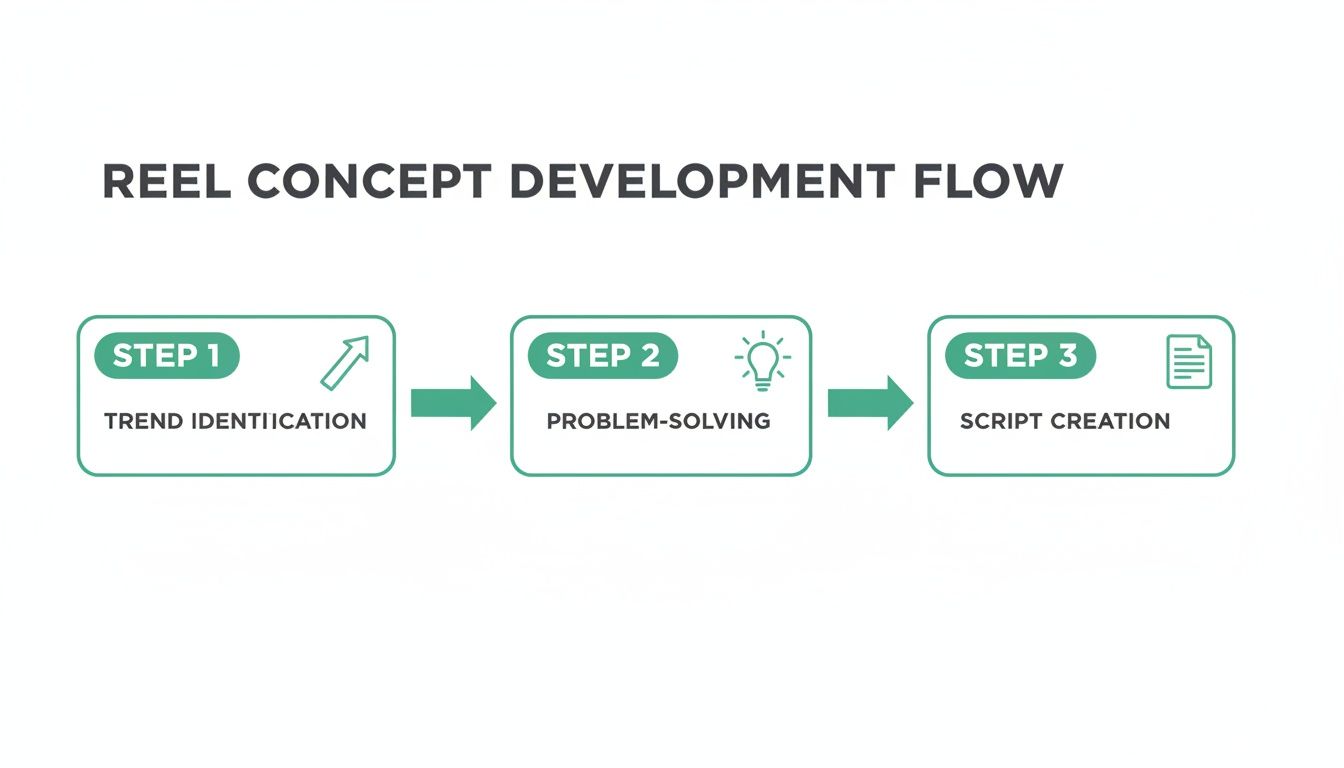
Starting with a solid concept and script makes the filming and editing stages so much smoother.
Beyond just trimming, here are some other features you should get comfortable with:
Text Overlays: Add text to call out important points. The real magic is using the timing tool to make text pop up and disappear right when you need it to, which helps guide your viewer's attention.
Audio Syncing: When you pick a trending audio clip, look for the “Sync” feature. With one tap, it automatically aligns your video clips to the beat of the song, making your Reel feel instantly more dynamic and professional.
Effects and Filters: Don't sleep on the effects library. The Green Screen effect is a classic for a reason—it lets you place yourself in front of any background image or video you want.
Pro Tip: The voiceover tool is one of the most underused features. Recording your own narration over different clips (B-roll) is an incredible way to tell a compelling story, add context, or share a personal insight that connects with your audience.
When to Use Third-Party Editing Apps
The in-app editor is perfect for speed, but every so often, you need more firepower. That’s where third-party apps come into play, offering a whole suite of advanced features that can really make your content stand out.
Apps like CapCut and InShot are incredibly popular because they offer a desktop-level editing experience on your phone. Think custom transitions, detailed color grading, super-accurate auto-captioning, and keyframe animations that just aren't possible inside Instagram.
In-App Editor vs Third-Party Apps
Choosing the right tool often comes down to the complexity of your video and how much time you have. Here’s a quick breakdown to help you decide what’s best for your workflow.
Speed & Convenience
The Instagram in-app editor excels at speed and ease of use. You can record, edit, and post a Reel without ever leaving the app, which is perfect for quick, spontaneous content. Third-party apps are still efficient but require exporting and uploading, adding an extra step. This feature is best for creators who prioritize fast turnaround and real-time posting.
Advanced Transitions
Instagram’s editor offers only basic transitions, which limit creative flexibility. Third-party apps like CapCut provide advanced transitions, smooth scene blending, and professional effects. This makes them ideal for creating visually dynamic, high-production Reels that stand out in competitive niches.
Auto-Captions
Instagram includes a basic captions sticker, which is helpful but limited in customization. Third-party apps offer highly accurate auto-captions with control over fonts, colors, timing, and animations. This is best for creators focused on accessibility, sound-off viewers, and polished, branded text overlays.
Color Grading
Instagram provides simple filters for quick color adjustments, which work well for casual content. Third-party apps allow deeper color grading, letting you control tone, contrast, warmth, and mood more precisely. This feature is ideal for creators who want consistent aesthetics or cinematic-style visuals.
Object Removal
Instagram does not support object removal at all. Many third-party apps offer tools to remove unwanted background elements, helping clean up shots and keep focus on the subject. This is especially useful for product videos, tutorials, or any content filmed in less-than-perfect environments.
So, what's the verdict? If you're making a simple, trending-audio Reel, the in-app editor is your best bet. But for a more polished, story-driven piece with custom effects and precise edits, taking your clips into a third-party app is definitely the way to go.
If you're curious about what else is out there, refer to our guide on the best Instagram video editing apps to find the perfect tool for your creative style.
How to Optimize Your Reels for Maximum Reach

Creating a brilliant Reel is only half the battle. The real work begins when you need to get that video in front of the right people. Strategic optimization before you hit “Publish” is what separates a Reel that fizzles out with a few hundred views from one that actually takes off. This is your chance to give the Instagram algorithm clear signals about who needs to see your content.
Without a smart posting strategy, even the most amazing video can land with a thud. You have to nail a few key elements that work together to boost your visibility and get people interacting.
Write Captions That Drive Action
Think of your caption as more than just a description—it's your best tool for starting a conversation and encouraging those all-important engagement signals like saves, comments, and shares. A killer caption adds context, offers more value, and tells your viewers exactly what to do next.
Don't just rehash what's in the video. Use that space to expand on your topic, share a personal story connected to the reel, or ask a direct question that people can't help but answer. Your goal is to create a mini-community right there in your comments.
A simple framework for a caption that performs:
A Strong Hook: Kick it off with a bold statement or a question that grabs attention and ties directly into your Reel's theme.
Provide Value: Share a key takeaway, an extra tip you didn't mention in the video, or a personal insight that builds a connection.
Call to Action (CTA): Be direct. Tell your audience what you want them to do. “Save this for later,” “Comment your biggest takeaway,” or “Share this with a friend who needs it” are all fantastic CTAs.
Consider your caption the second act of your Reel. The video gets their attention, but the caption is what turns a passive viewer into an engaged follower. A compelling caption can seriously bump up your shares and saves, which are gold to the algorithm.
Master Your Hashtag Strategy
Hashtags are basically the search engine for your Reel. They act like signposts that guide both the algorithm and new audiences to your content. A classic mistake is to load up on massive, generic hashtags like #fitness or #food. Sure, they have massive volume, but your content will get lost in the noise within seconds.
The secret is to use a tiered approach. You want a healthy mix of hashtags with different levels of popularity to give your Reel its best shot at getting seen by the right people.
A balanced hashtag strategy should include:
Broad/Popular Hashtags (1-2): These have millions of posts and help Instagram get a general sense of your content (e.g., #digitalmarketing, #healthyrecipes).
Niche-Specific Hashtags (3-5): These are much more focused and zero in on your ideal audience (e.g., #smallbusinessmarketingtips, #veganmealprepideas).
Community/Trending Hashtags (2-3): Tap into what's happening right now, whether it's a specific challenge, an event, or a trending audio.
For instance, a real estate agent making a reel about buying a first home could use #realestate (broad), #firsttimehomebuyer (niche-specific), and #housingmarketupdates (community). If you're still stuck, our deep dive on the best hashtags for Instagram Reels breaks this down even further.
Choose the Perfect Cover and Posting Time
Your Reel's cover photo is its first impression. It's the little thumbnail people see on your profile grid and, more importantly, on the Explore page. A blurry, confusing, or boring cover will get scrolled right past, no matter how awesome the video is.
Always choose a crisp, high-quality, and intriguing frame from your video, or better yet, upload a custom cover. The most effective covers often have a bold text overlay that immediately communicates the reel's value, like “5-Minute Ab Workout” or “The Secret to Perfect Pasta.”
Beyond the cover, timing is everything. Posting when your audience is most active gives your Reel a crucial initial boost in engagement. That early traction is what signals the algorithm to show it to more people. You can find this data in your Instagram Insights under Professional Dashboard > Total Followers > Most Active Times.
While that data is a great starting point, tools like Gainsty can dig deeper. Our AI analyzes your unique engagement patterns to pinpoint the absolute best times to post for your specific account. It takes the guesswork out of the equation, ensuring every Reel has the strongest possible launch.
Taking Your Reels to the Next Level: Growth and Monetization
So, you've nailed the basics of creating Instagram Reels. You know how to film, edit, and post. Now what? It's time to shift your mindset from just making content to building a real, sustainable asset on the platform.
This is where the real work—and the real reward—begins. We're moving beyond one-off viral moments and into creating a system for consistent growth that opens up serious monetization opportunities. It’s about playing the long game, treating your Reels less like individual posts and more like episodes in a larger story that your audience can't wait to follow.
Build Your Content Universe with Series and Pillars
Stop thinking in terms of one-off videos. The most successful creators think in series. A content series is simply a collection of Reels built around a single, compelling theme, designed to hook your audience and keep them coming back for more. It builds anticipation and turns passive scrollers into genuine fans who actively look for your next post.
For instance, a personal finance creator might launch a weekly “Money Myth Mondays” series, where they debunk a common financial misconception each week. This makes content planning a breeze and quickly establishes them as a go-to authority in their space.
Here’s how you could structure your own content pillars:
Your Go-To Educational Series: A weekly deep dive into a core topic in your niche.
The “Behind-the-Scenes” Look: Give people a peek at your creative process, your workspace, or a day in your life.
Community Q&A Sessions: Dedicate a recurring Reel to answering the questions your followers are actually asking.
When you have a structure like this, you'll never run out of ideas again. It turns the chaotic scramble for content into a predictable, manageable workflow.
The creators who win on Instagram don't just post content; they build a content universe. A series gives your audience a reason to follow you for the long haul, not just for a single video.
Why Reels Are a Goldmine
To really succeed, you need to understand the financial engine driving Reels. It’s not just about views; it’s about recognizing that brands are pouring massive amounts of money into this format. And that's great news for you.
Projections show Instagram’s total ad revenue could hit nearly $68 billion by 2025. What's even more telling is that Reels ads are expected to account for 22.2% of all Instagram ad placements. A massive slice of brand advertising budgets is flowing directly into the video ecosystem you're a part of, which makes your skills incredibly valuable.
This massive investment is a clear signal that Instagram's algorithm will continue to champion Reels. If you’re using a service like Gainsty to amplify your organic growth, your efforts are perfectly aligned with where the platform—and its advertisers—are placing their bets.
Cashing In: Your Monetization Playbook
Once you have a growing, engaged audience, the doors to making real money swing open. Instagram even has built-in tools to help you turn your creative passion into a legitimate income stream.
Branded Content: This is the most popular route. As your account gains traction, brands will start reaching out to pay you for creating Reels that feature their products or services. A strong portfolio of authentic, high-performing Reels makes you a magnet for these partnerships.
Instagram Reels Play Bonus Program: This is an invite-only program where Instagram pays you directly based on how well your Reels perform. While the criteria for getting an invitation can feel a bit mysterious, the surefire way to get on their radar is by consistently posting high-quality, original content.
But it doesn't stop there. A powerful Reels presence can become the top of your own sales funnel, driving traffic to your products, coaching services, or affiliate links. Your videos introduce what you offer to a massive new audience. For anyone serious about scaling their impact, a deep dive into Mastering Instagram Video Advertising is a must, as it lays out advanced strategies for just this kind of growth.
Ultimately, mastering Reels is about more than making a single video go viral. It's about building a powerful engine for audience growth that you can point toward tangible opportunities, from brand deals to building your own empire.
Answering Your Biggest Questions About Instagram Reels
Even when you feel like you've got the hang of making Reels, new questions always pop up. The platform is constantly evolving, so what worked last month might not be the magic bullet today. This section is all about tackling those nagging questions creators run into all the time.
Think of this as your personal troubleshooting guide for the little things that can feel like major roadblocks. Let's clear up the confusion so you can get back to creating with confidence.
What’s the Perfect Length for an Instagram Reel?
This is probably the most common question I hear, and the honest-to-goodness answer is… it depends. Instagram lets you create Reels up to 90 seconds long, but that doesn't mean you should. The algorithm cares way more about watch time and completion rate than it does about sheer length.
Someone watching your entire 15-second Reel sends a much better signal to Instagram than someone swiping away from your 90-second Reel after only 30 seconds.
For quick tips and trends: Keep it short and sweet, somewhere in the 7-15 second range. This is the sweet spot for content that’s easy to digest and, more importantly, easy to rewatch. Those re-watches are gold for your metrics.
For tutorials or stories: If you're telling a story with a clear beginning, middle, and end, or walking someone through a mini-tutorial, stretching to 30-60 seconds makes sense. The key is to make every single second count.
The golden rule is simple: make your Reel only as long as it needs to be. Be ruthless in your editing. If a clip doesn't add value or move the story forward, cut it.
How Can I Find Trending Audio Before It Blows Up?
Using trending audio is a fantastic way to boost your reach, but jumping on a sound after everyone else has used it can get you lost in the noise. The real trick is learning how to spot these trends early.
You'll know a sound is trending when you see that little diagonal arrow next to the audio title as you scroll. But to really get ahead of the curve, you have to be a bit of a detective.
Scout on TikTok: Let's be real—most Instagram trends are born on TikTok a week or two earlier. Spend some time on your “For You” page and pay close attention to the sounds you hear over and over again.
Follow the Trend Spotters: There are a bunch of creators out there whose entire niche is finding and sharing up-and-coming sounds. Follow a few of them, and it’s like having your personal trend forecaster.
Use Instagram's Audio Library Strategically: When you tap to add audio, Instagram will suggest trending sounds. Instead of just picking the top one, look at the number of Reels made with it. A sound that's rising fast but is still under 50,000 uses is often the perfect one to hop on.
Ugh, Why Did My Reel Views Suddenly Tank?
Every creator has been there. You’re on a roll, your views are climbing, and then—bam—your latest Reel gets almost no traction. It's frustrating, but it’s rarely a sign that you're “shadowbanned” or that the algorithm hates you.
More often than not, a sudden decline in views comes down to one of these common culprits:
Content Inconsistency
When you post content that’s far outside your usual niche, Instagram’s algorithm struggles to understand who should see it. As a result, your Reel gets shown to the wrong audience—or hardly anyone at all.
How to fix it: Return to your core content pillars. Review your top-performing Reels and focus on repeating the formats, topics, and styles your audience has already engaged with.
Weak Initial Engagement
Instagram heavily judges a Reel based on how it performs in the first few hours. If it doesn’t get early likes, comments, or saves, the platform assumes it’s not interesting and limits its reach.
How to fix it: Post when your audience is most active (check Instagram Insights). Use captions that invite action, like asking a clear question or encouraging viewers to save the post.
Low Watch Time
If viewers swipe away quickly, it signals that the content isn’t holding attention. This often happens when the opening isn’t strong enough, or the video slows down midway.
How to fix it: Make the first three seconds count with a bold hook or curiosity trigger. Keep edits tight, remove filler, and maintain momentum so viewers stay until the end.
The most important thing is not to panic over one or two underperforming Reels. Every creator has flops. Just keep creating, pay attention to your analytics, and tweak your strategy as you go.
Ready to turn your Reels into a reliable growth engine? Gainsty uses advanced AI to get your content in front of a targeted, authentic audience that actually wants to see it. It’s time to stop guessing and start seeing the followers and engagement your hard work deserves. Discover how Gainsty can amplify your reach today.
.png&w=1920&q=75&dpl=dpl_D59Qa4oJ5cFQ7dZDLQ1JPQVnqHSs)




.png&w=750&q=75&dpl=dpl_D59Qa4oJ5cFQ7dZDLQ1JPQVnqHSs)