Why Your Profile Deserves a System, Not a Setup
A creator can publish useful tutorials every week and still lose potential followers when the profile describes an outdated niche. The bio may promote an old service, pinned posts may feature a finished launch, and Highlights may answer questions the current audience no longer asks. Nothing appears seriously broken, so the problem can remain unnoticed for months.
One-time checklists rarely prevent that drift. They help you fill fields, choose a photo, and add a link. They do not assign an owner, set a review date, or explain what evidence should justify a change. A profile that converted during one campaign can confuse visitors after the offer, audience, or content priorities change.
Instagram's management features have evolved with these demands. Business profiles launched in August 2014 with dashboards for impressions, reach, and frequency connected to ads and posts. Story Highlights arrived in December 2017, followed by the Professional Dashboard in February 2021, as documented in this history of Instagram's business features. These additions made the profile a place where people evaluate an account, research an offer, and decide whether to act.
Practical rule: If your profile can influence a follow, message, click, or purchase, assign it an owner, a review cadence, and a change log.
A workable system has five parts:
Optimization: Make the profile understandable at a glance.
Planning: Keep the grid, Stories, and pinned content aligned with current priorities.
Engagement: Respond and interact in ways that give visitors a reason to return.
Measurement: Track profile actions and test one change at a time.
Delegation: Give teammates access without surrendering brand control.
Review the profile after campaigns, offer changes, and major audience shifts. The goal is a profile that stays accurate while the business keeps moving, rather than a frozen snapshot of last quarter.
Optimizing Your Bio, Branding, and Grid as Conversion Assets
Treat each profile element as an answer to a visitor's next question. The name field helps people identify your category, the bio explains the promise, the profile photo supports recognition, and the grid proves that the promise is real.
Audit the elements in sequence
Start with the name field, not the username. Add the clearest niche or service phrase that a relevant visitor might use when searching Instagram. Keep the username recognizable, but use the name field to clarify what the account does.
Next, rewrite the bio around one audience and one action. For example:
Weak: “Marketing tips | Founder | Coffee lover | DM me.”
Stronger: “Instagram systems for local service businesses. Weekly workflows, profile audits, and practical content ideas. Download the profile checklist below.”
The second version tells visitors who it serves, what they'll learn, and what to do next. It doesn't try to promote every service, personality trait, and destination at once. For additional guidance on structure and clarity, compare these Instagram bio tips from BAMF with the practical recommendations in this Instagram bio tips guide.
Use a profile photo that remains identifiable at small size. A face usually works for a creator, while a simple, high-contrast logo can work for a brand. Highlights should answer recurring objections, such as pricing, process, results, FAQs, or product use. Pinned posts can introduce the account, demonstrate expertise, and direct visitors toward the current offer.
The grid deserves separate attention. Instagram has expanded profile customization, including the ability to reorder grid posts, so merchandising the first visible sequence no longer depends only on pinned posts, as discussed in this overview of Instagram updates. Arrange the opening view so a visitor sees a coherent promise rather than an accidental archive.
Re-audit the profile quarterly, or monthly if campaigns, products, or positioning change quickly. Run an extra review whenever you shift niches, launch a campaign, or update an offer.
During each audit, review the name field to confirm it clearly identifies the searchable category or service. Check the bio monthly for active offers so it still states the audience, promise, and next action. Revisit the profile photo whenever branding changes to make sure recognition stays instant. Review Highlights monthly so they continue answering common questions and showing current proof. Update pinned posts with each campaign so they frame the account and support the current offer. Review grid order quarterly, or after a major launch, so the first impression remains coherent.
Your audit is complete only when the visible profile matches the content you're publishing now.
Building a Content Planning and Scheduling Workflow
A profile stays useful when its content supports the same promise visitors read in the bio. Planning isn't about filling a calendar for its own sake. It's about creating a repeatable connection between content pillars, profile sections, Stories, and the action you want people to take.
Build a repeatable week
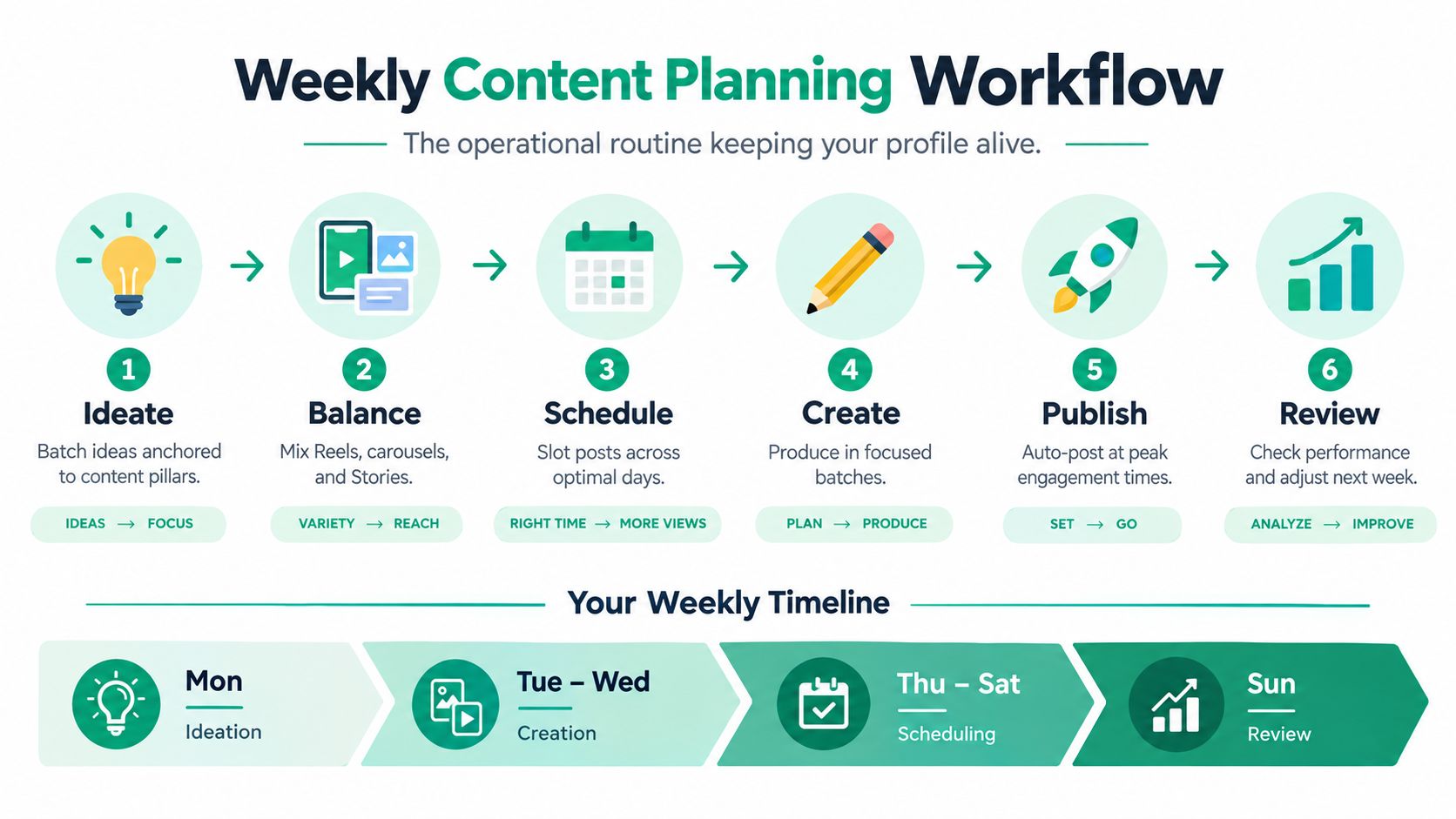
A solo operator can plan a working week without creating a production machine. Start by batching ideas around three or four pillars, such as education, proof, behind the scenes, and offers. Then assign formats based on the job each format does:
Reels: Reach people who don't know the account.
Carousels: Explain a process people may save or share.
Stories: Handle context, objections, polls, replies, and reminders.
Direct messages: Continue conversations started by content or Stories.
A useful weekly template might reserve one focused block for ideation, two creation blocks, a scheduling block, and a short review block. The exact timing depends on the operator, but the sequence matters. Don't write captions, design graphics, film videos, and answer DMs in the same distracted session.
A small business owner could spend one afternoon mapping a month of themes, then turn those themes into weekly batches. Each week should include Stories that refresh relevant Highlights, while pinned posts rotate when a campaign changes. That prevents the profile from advertising an old promotion while new content points somewhere else.
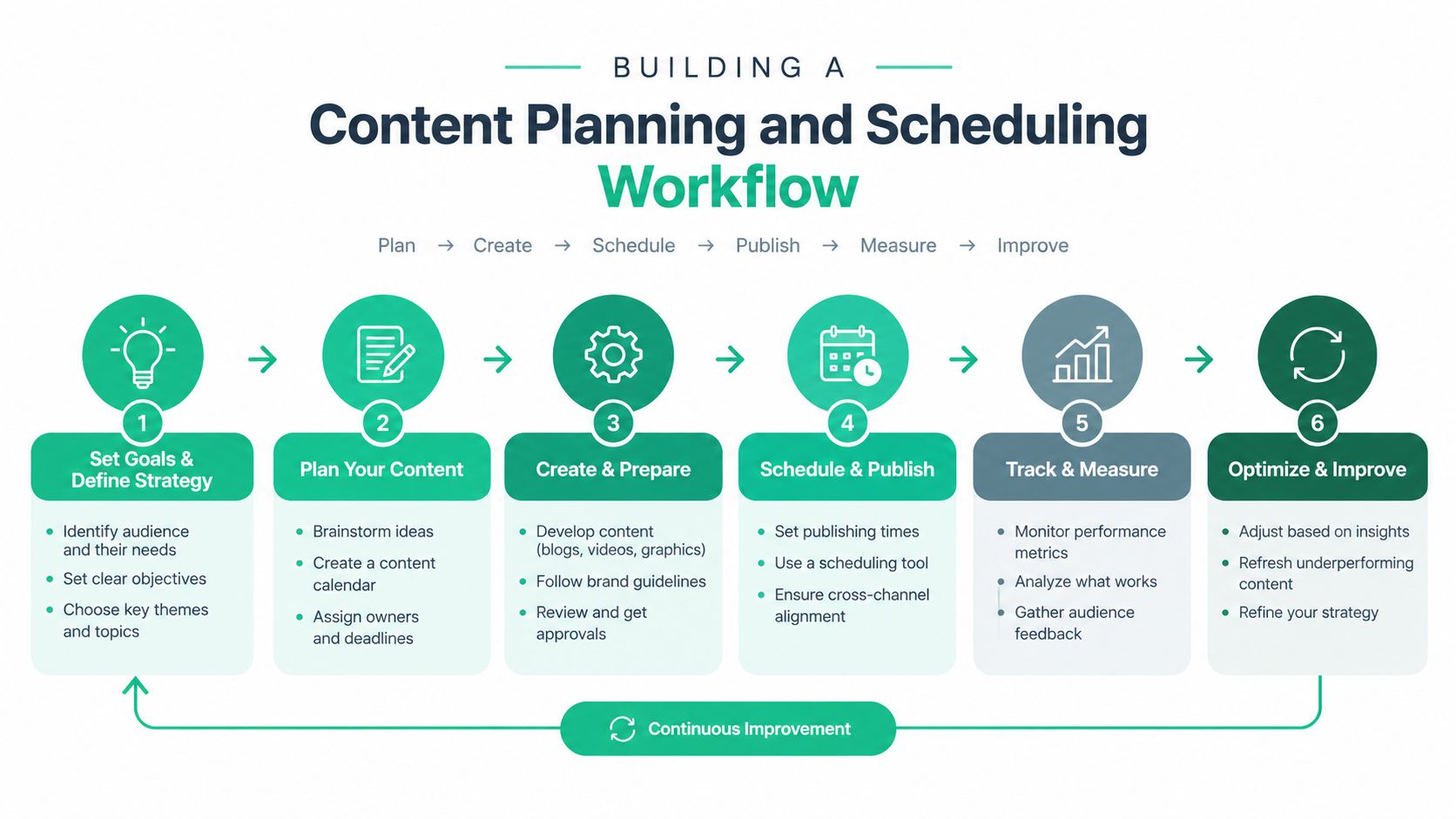
A monthly content planner for brands can help you map themes before individual posts consume your attention. For a reusable structure, keep an Instagram content calendar template with columns for pillar, format, hook, CTA, asset status, approval, and destination.
Schedule with the profile in mind
Before scheduling, check the profile as a visitor would. If the next week promotes a lead magnet, a service, and a product launch at the same time, decide which action has priority. Update the bio link, pinned post, and Story sequence so they reinforce that priority.
Use a simple pre-publish check:
Does the post belong to a current content pillar?
Does the CTA match the profile's main action?
Will the Story sequence support a Highlight or answer a likely objection?
Does the visual sequence make the grid easier to understand?
Has someone verified the selected account before publishing?
Scheduling reduces last-minute decisions, but it doesn't remove the need for daily checks. Trends, customer questions, stock changes, and campaign results can all justify a thoughtful adjustment.
Engagement Workflows That Turn Visitors Into Followers
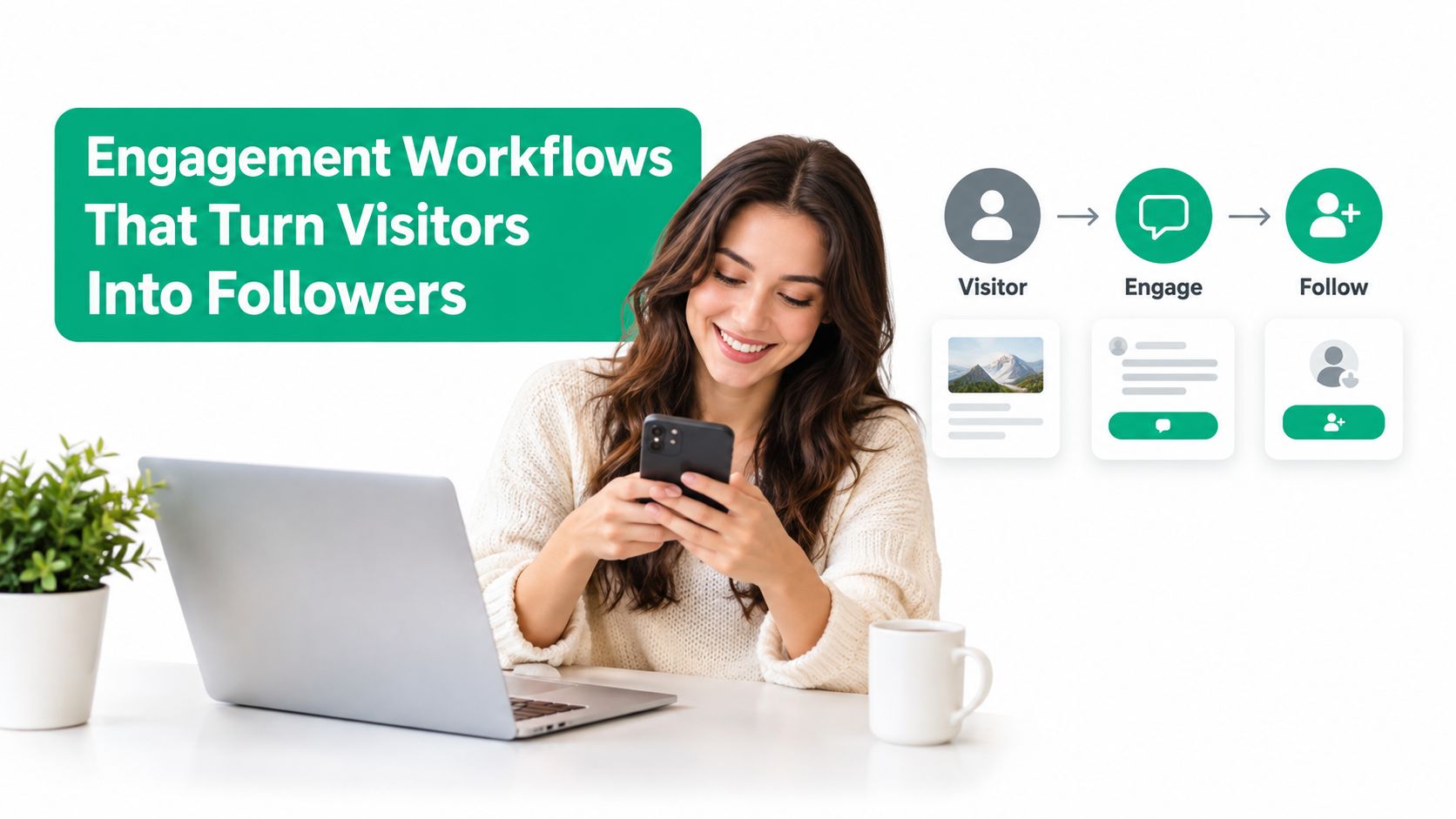
Publishing earns attention. Relevant interaction gives people a reason to inspect the profile and remember it. The engagement that converts tends to be specific: a useful reply to a comment, a thoughtful response to a Story, or a DM that continues a real conversation.
Use a time-boxed daily routine
A sustainable routine can fit into three short blocks:
Inbox block: Reply to comments, DMs, and Story responses that need a personal answer.
Discovery block: Visit accounts your target audience already follows and contribute relevant comments.
Community block: Follow up with people who asked questions, voted in a poll, or mentioned a recurring problem.
Don't turn the routine into indiscriminate liking or repetitive comments. Generic activity can look automated, waste attention, and create an unpleasant experience for the people you're trying to reach. Manual interaction should show that you understand the post, not merely that you found it.
The profile visit matters because the visitor is evaluating context. A creator who responds clearly to a question about pricing may send someone to a well-organized profile. A brand that answers a product-use question in Stories can turn a passive viewer into an active conversation. Those actions reinforce the promise shown in the bio.
Keep reach support separate from account control
Growth assistance can extend discovery, but it shouldn't replace profile ownership or judgment. If you use a service, check how it handles targeting, access, and interaction. Avoid tools that rely on fake followers or indiscriminate bot activity, since low-quality attention creates a poor audience signal and can put account activity at risk.
Gainsty is one option that combines AI-based audience targeting with human support and positions its service around organic Instagram growth without bots or fake followers. Whether you use it or rely entirely on manual work, keep the same governance principle: the account owner controls the voice, approvals, profile changes, and sensitive conversations.
Review engagement weekly. Look for the interactions that lead to profile visits, meaningful replies, and repeated community participation, then spend less time on actions that generate activity without relationship.
Reading Analytics and Running Simple A/B Tests
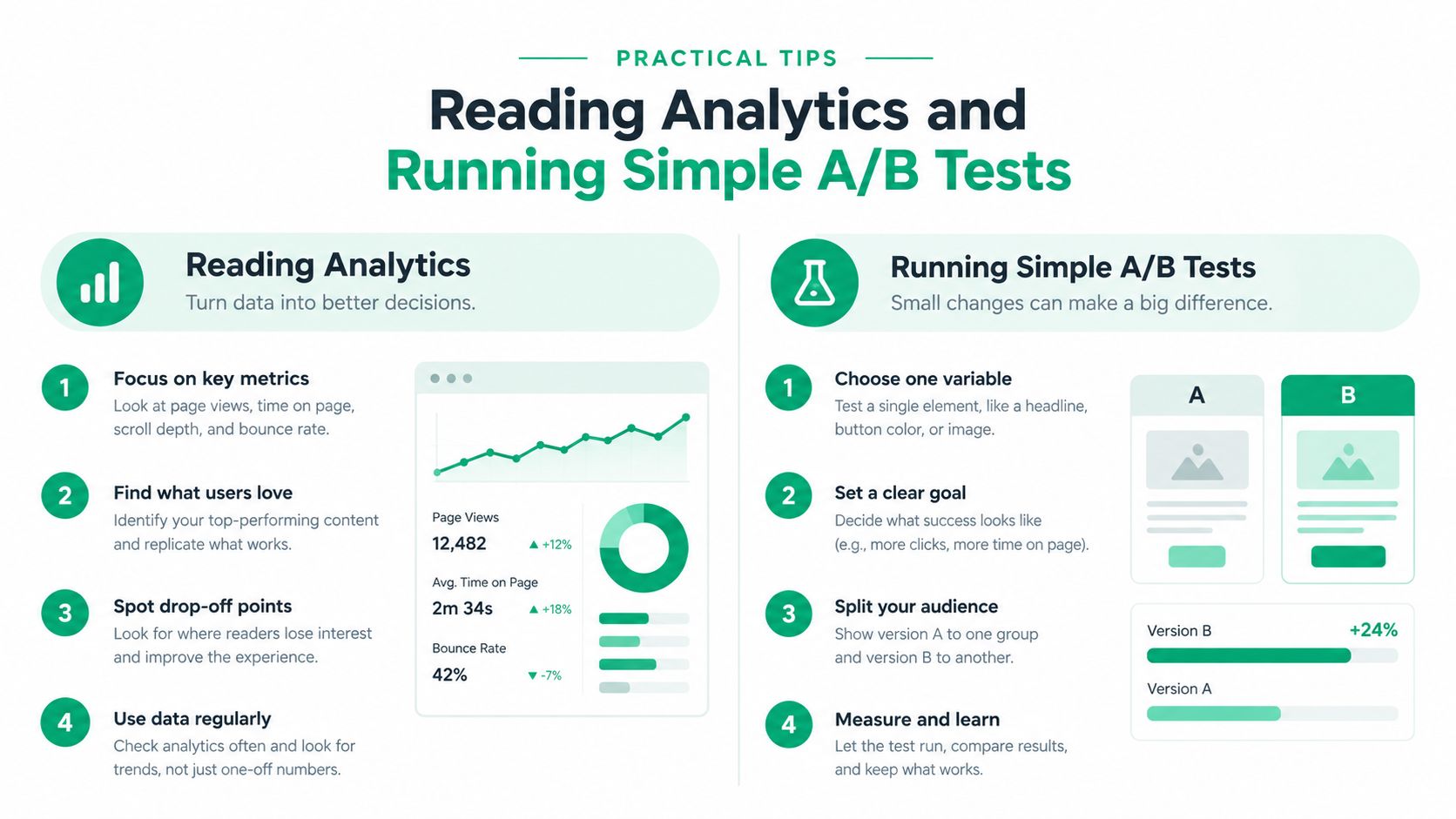
A profile can look polished and still lose visitors. Check what happens after someone lands on it, then use that evidence to decide whether the bio, grid, or content workflow needs a change. Instagram's native dashboard surfaces profile visits and follows directly, so record those numbers before testing.
Track the profile journey
Choose metrics that match the decision under review:
Profile visits: Show whether content or discovery activity creates curiosity.
Follows per visit: Indicate how clearly the profile converts that interest.
Reach: Helps separate distribution problems from profile problems.
Saves: Signal that a post offers useful information people may revisit.
Story completion: Shows whether a sequence holds attention through its final frame.
Use the Instagram analytics business guide to confirm how native reporting presents these measures, then keep the dashboard as the working reference. Interfaces and metric definitions can change, so record the reporting context with each review.
Set a baseline across a consistent review window and note the profile state at the start. Record the bio CTA, pinned posts, Highlight labels, link destination, and recent grid mix. Compare like with like. A launch post and a routine educational carousel answer different questions, and a profile change can affect results beyond the post that prompted it.
Test one variable at a time
A useful test changes one element, holds the rest steady, and has a defined review date. Test the bio CTA first, then a pinned post, Highlight cover, or publishing time. Changing the bio, grid order, link destination, and content pillars together produces noise and makes rollback difficult.
Keep a short testing log. For a bio CTA test, use your current follows per visit as the baseline, rewrite the action, then decide whether to keep, revise, or roll back the change. For a pinned post test, use current profile behavior as the baseline, replace the lead post, then compare results across the same review window. For a Highlight cover test, use current taps and replies as the baseline, improve labels or recognition, and keep the change only if navigation improves. For a posting time test, use typical reach and visits as the baseline, test another slot, and repeat before concluding.
Review results on a fixed cadence rather than reacting to every fluctuation. If a change improves profile visits but reduces follows per visit, it may be attracting the wrong attention. Keep the version that supports the account's conversion goal, document the decision, and schedule the next controlled test.
Delegating Profile Management Without Losing Control
A profile can look polished in the morning and still create problems by afternoon if several people can edit it without shared rules. Delegation improves publishing speed, specialist support, and response coverage, but it also increases the chance of an off-brand caption, an accidental profile edit, or an unanswered escalation.
A solo setup with supporting tools works best when one owner manages a focused offer. It gives strong control, but capacity is limited, and response coverage can be slower. An in-house team is a better fit for brands with recurring content and clearly defined roles. This model speeds up production, though it also requires approvals and shared standards. An agency can help when you manage multiple profiles or need specialized support. It brings broader expertise and more operational capacity, but direct oversight is usually lower.
Choose the arrangement around the actual bottleneck. Give editing and production to a teammate when content creation is slowing delivery. Keep positioning, offer, and profile decisions with the owner when those choices affect conversion. Delegate inbox coverage only with response boundaries and escalation rules.
Set change control before access
Instagram's support for switching between up to five accounts made managing several profiles from one device practical for creators, agencies, and brands, as described in this history of multiple Instagram accounts. Convenience does not provide governance. Use unmistakable account labels, require a publishing confirmation, and keep separate approval queues when one person handles several profiles.
Username changes are limited to twice every 14 days, so treat a rename as a scheduled release with a recorded rollback value. Before changing it, log the current username, proposed replacement, reason, owner, date, and recovery option. Apply the same review standard to the bio link, profile photo, category, and account type. A minor-looking edit can alter recognition, routing, or access to account features.
Use a handoff checklist:
Access: Use platform-supported permissions where available. Never send the owner's password through chat.
Brand voice: Provide approved vocabulary, examples, prohibited claims, and response boundaries.
Publishing: Require account confirmation, caption review, media approval, and a named final approver.
Escalation: Route complaints, legal questions, payment issues, security alerts, and creator conflicts to a named decision-maker.
Profile edits: Limit username, bio link, profile photo, category, and account-type changes to the owner or an authorized lead.
Reporting: Record edits, approvals, and unusual performance changes so later reviews have context.
Run access reviews whenever a teammate, agency, or role changes. Remove permissions when work ends, and keep one accountable owner for recovery details, brand positioning, and commitments that cannot be easily reversed. Delegates can execute the plan, answer routine messages, and prepare content. The owner still decides why the plan exists and when it should change.
Your Recurring Profile Management Routine
A profile becomes dependable when small actions happen on schedule. Use this operating rhythm:
Daily: Clear comments and DMs, respond to Story activity, and spend a focused block interacting with relevant accounts.
Weekly: Review the content pillars, batch ideas, prepare Reels and carousels, plan Stories, schedule approved content, and check pinned posts against the current priority.
Monthly: Review profile visits, follows per visit, reach, saves, and Story completion. Run one controlled test and record the result.
Quarterly: Audit the name field, bio, profile photo, Highlights, pinned posts, link destination, and visible grid sequence. Run an additional audit after a niche, campaign, or offer change.
Keep the system readable. Don't stack several profile changes at once, because your test results will become ambiguous. Document what changed and when, save the previous bio and grid plan, and keep a rollback path for username or account-type changes.
A short change log can include the date, editor, reason, affected element, expected outcome, and review date. That record turns profile management from personal memory into a team process. It also makes handoffs safer when someone else needs to publish or answer messages.
Start today with a visitor-level audit. Open the profile as if you've never seen it, read the name field and bio, inspect the first visible posts, tap the Highlights, and ask whether every element supports the same next action. Fix the single biggest mismatch, record the change, and schedule the next review instead of waiting for the profile to decay on its own.
If you want help combining profile review, audience targeting, and ongoing engagement support, visit Gainsty. Use it as one part of a governed Instagram workflow, while keeping your profile decisions, approvals, and brand voice under clear owner control.

.png&w=1920&q=75&dpl=dpl_34ZXCf12K5qjjdZjPn9snwDRADrB)






.png&w=750&q=75&dpl=dpl_34ZXCf12K5qjjdZjPn9snwDRADrB)