
Why Searching Instagram Comments Is a Game Changer

Instagram comments are so much more than just quick reactions. They're a live, unfiltered feed of what people really think. For anyone running a brand, managing a community, or building a personal identity, this space is a goldmine of customer feedback, competitor insights, and genuine user-generated content.
Knowing how to properly search Instagram comments isn't just a "nice-to-have" skill anymore—it's essential.
The way people use the platform has changed. Instagram is a powerful discovery engine now, and the numbers back it up. Recent data shows that a whopping 36% of users now turn to the platform to search for brands and information, treating it almost like they would Google. As The Graygency's analysis points out, this shift makes it crucial to understand what's being said in the comments to truly get a handle on what your audience wants.
Uncovering Hidden Opportunities
Think of every comment thread as a free, real-time focus group. When you actively search through these conversations, you start to spot opportunities that would otherwise be completely invisible.
It’s about being proactive. You can:
Spot emerging trends by catching recurring questions or product requests before they blow up.
Keep an eye on your brand reputation by finding mentions—good and bad—even on your competitors' posts.
Discover potential collaborators when you see creators or influencers who are genuinely engaging with what you do.
Gather raw customer feedback that can directly inform your next product or service update.
For instance, a skincare brand could search its comments for terms like "acne" or "dry skin" to get direct feedback on how well its products are working. A local coffee shop could look for mentions of its new cold brew to see what the regulars are saying.
Being able to navigate these conversations is a massive advantage. It turns passive social media monitoring into an active strategy for growth, engagement, and market intelligence.
Ultimately, getting good at searching comments lets you listen at scale, connect with your audience on a much deeper level, and make smart, data-driven decisions that push your brand forward.
Sometimes you just need to find one specific comment, and you need to find it now. You don't have time to log into a fancy social media suite or set up a new tool.
Maybe you're a community manager who remembers seeing a killer question about an upcoming launch but can't remember who asked. Or you're a creator who promised to DM a link to someone in the comments. In these moments, you don’t need a complex dashboard—you just need a fast, direct way to pinpoint that one interaction.
When you're in a pinch, a couple of old-school manual tricks can be surprisingly effective. They take a bit of patience, especially on posts with a ton of engagement, but they work.
The Browser "Find on Page" Trick
The most reliable way to hunt down a comment manually is by using your desktop browser's built-in "Find on Page" feature. Think of it as a search-and-rescue mission for a specific word or username buried in a sea of comments.
The process itself is simple, but there's one critical step you absolutely cannot skip.
First, pull up the specific Instagram post on your desktop. Before you do anything else, you have to load all the comments. Keep clicking that little "plus" icon or the "view all comments" link until the page stops loading new ones. If you miss this step, your search will only scan the handful of comments that are visible by default, which is rarely enough.
Once every comment is loaded, hit Ctrl+F on a Windows machine or Cmd+F on a Mac. A small search bar will pop up, usually in the corner of your browser window. Now, just type in the keyword, phrase, or username you're looking for.
As you type, your browser will instantly highlight every single match it finds. You can then just click through the results to find the exact comment you need. This is perfect for tracking down things like:
A specific product name ("Did anyone try the new serum?")
A question ("How do I find the tutorial?")
A particular user’s handle to see everything they've said on that post
Pro Tip: This method is a lifesaver for running quick giveaways. If you asked people to comment with a specific phrase or hashtag to enter, just load all the comments, search for it, and you'll have your list of eligible participants in seconds.
In-App Navigation and Filters
When you're away from your computer, you can still do a manual search right inside the Instagram app, though it's not quite as direct.
On posts with massive engagement, the app’s comment filtering options can help cut through some of the noise. If the feature is available for your account, you can sometimes tap the filter option to sort comments by keywords, which can help bubble relevant conversations to the top.
Otherwise, you're left with good old-fashioned scrolling. Your best bet is to just scroll through the thread while keeping an eye out for the specific user's profile picture or the keyword you're hunting for. It's not as slick as a CTRL+F search, but it’s a workable solution when you're on the go and need to find something fast.
Using Third-Party Tools for Advanced Searches
When hitting Ctrl+F on your browser feels like searching for a needle in a haystack, it's time to bring in the heavy hitters. Third-party social media management tools are the answer when manual methods just don't cut it anymore.
These platforms turn the chaotic stream of Instagram comments into a structured, searchable database. They’re built for efficiency, saving you countless hours of mindless scrolling and spot-checking.
Streamlining Comment Management
Think of tools like Sprout Social, Hootsuite, and Agorapulse. They go way beyond simple keyword finding. They give you a unified inbox where all your comments, DMs, and mentions are consolidated in one clean interface.
This allows you to search across your entire account history, not just one post at a time. It’s the difference between inspecting a single tree and getting a satellite view of the entire forest.
This centralized approach comes with some game-changing advantages:
Keyword Tracking: Set up alerts for specific words, brand mentions, or even competitor names. You'll get instant notifications whenever they pop up in your comments.
Sentiment Analysis: Many of these platforms use AI to gauge the emotional tone of comments. They can automatically flag them as positive, negative, or neutral, helping you prioritize urgent issues and spot delighted customers.
User Mention Monitoring: Easily track every time your handle is mentioned, ensuring you never miss a chance to engage with your community or address a concern.
For a deeper dive into the different platforms out there, a detailed social listening tools comparison can be incredibly helpful. These resources break down features and pricing to help you find the perfect fit for your needs.
Here’s a simple way to think about when to leap from manual to automated tools.
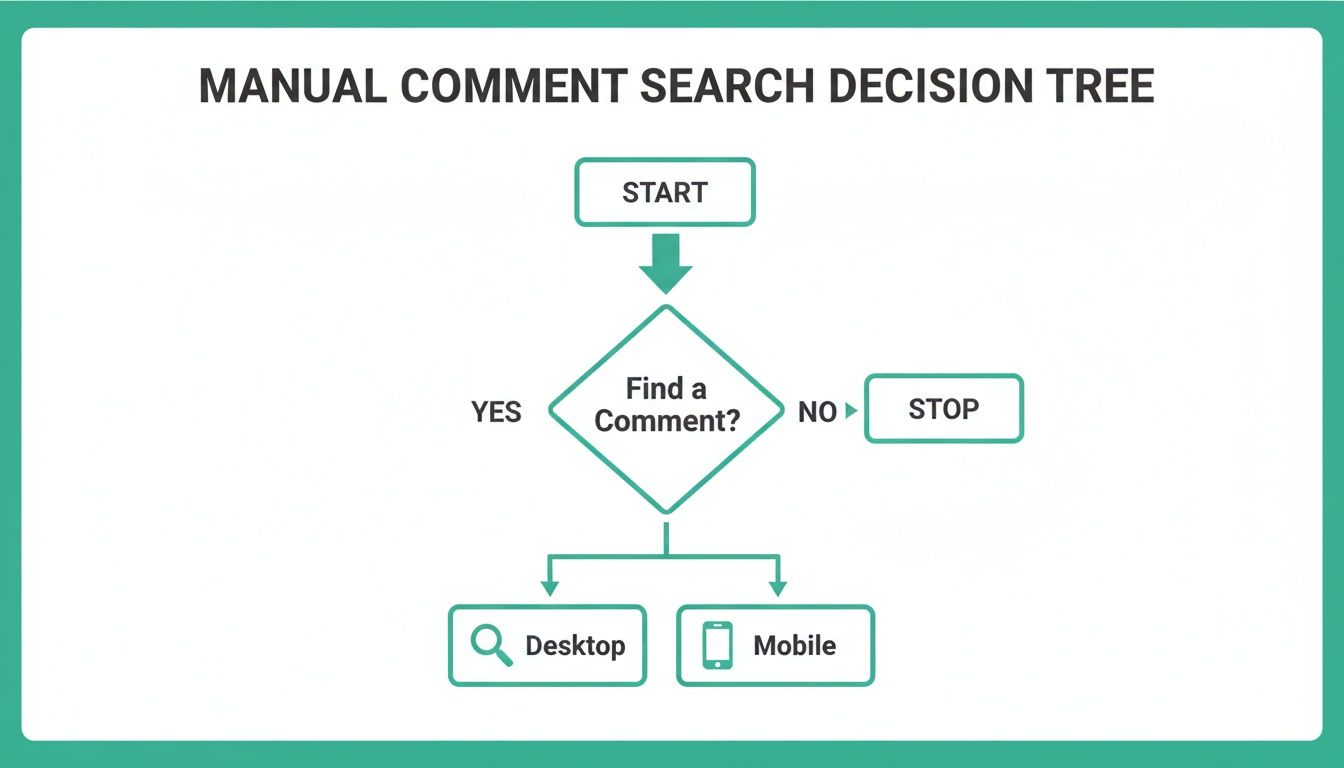
This flowchart makes it clear: while manual searches are fine for a quick, one-off task, any recurring or large-scale need points directly toward a more powerful, dedicated solution.
Comparison of Top Social Media Management Tools
Choosing the right tool can feel overwhelming. To simplify things, here’s a quick breakdown of some of the top contenders and who they're best suited for.
Sprout Social – Offers a Smart Inbox with advanced filtering and keyword monitoring.
Ideal for teams and agencies that need powerful analytics and collaboration tools. It is positioned at a premium price point.
Hootsuite – Uses unified streams to monitor keywords and mentions in real time.
Best for small to medium-sized businesses managing multiple social profiles. Pricing is typically mid-range.
Agorapulse – Features an Inbox Assistant with automated moderation and saved replies.
Great for businesses focused on customer service and community management. It also falls into the mid-range price category.
Brand24 – Provides real-time mention tracking paired with advanced sentiment analysis.
Ideal for brands prioritizing reputation management and PR. Pricing varies depending on the plan.
Ultimately, the best tool is the one that aligns with your specific goals, whether that's customer support, lead generation, or brand monitoring. Most offer free trials, so it's worth taking them for a spin.
Turning Data Into Actionable Intelligence
The real magic of these tools isn't just finding comments—it's turning that raw data into strategic insights. This is more critical than ever, especially considering how user behavior has shifted.
Instagram is now the 6th most-searched term on Google, pulling in a staggering 414 million monthly queries. On top of that, 36% of people now use the app itself as a primary search tool, digging through comments for unfiltered opinions on brands and products. This trend really picked up steam after 2024, when AI recommendations started pushing comment-heavy posts higher in search results.
By analyzing comment trends, you can identify your most engaged followers, pinpoint common customer service issues, and even source user-generated content ideas. It’s about being proactive rather than reactive.
Imagine a marketing team for a fashion brand. They could use a tool to search for comments containing "where can I buy this" and tag them for their sales team to follow up on. Or a software company could monitor for "bug report" and "feature request" to create a direct feedback loop for their product developers.
The applications are practically endless and offer a clear competitive advantage. For more on this, check out our guide on the best Instagram analytics tools to see how data can truly shape your strategy.
A Developer's Approach with the Instagram Graph API

If you've outgrown the off-the-shelf tools and need to manage comment data at a massive scale, it's time to look under the hood. For developers and data-driven marketers, the Instagram Graph API is the ultimate key to the kingdom.
This is a totally different ballgame. Think of it as having a direct pipeline into your Instagram account’s backend. Instead of manually scrolling or relying on someone else's dashboard, you can build your own custom applications to systematically fetch, filter, and search in Instagram comments based on your exact needs.
Getting Started with the API
Before you start writing code, there are a few hoops to jump through. Meta doesn't just hand out API access to everyone; it's designed for professional use, and you'll need to have your ducks in a row.
Here’s the required setup:
An Instagram Business or Creator account. Personal profiles won't cut it.
A Facebook Page that's properly linked to that Instagram account.
A Meta Developer App, which is where you'll get your access tokens.
This initial setup is all about ensuring that only legitimate businesses and creators can programmatically access data. It's a critical layer of security and privacy. Once you're configured, you can start making API calls to pull comment data from your own posts.
The possibilities here are huge. Imagine a large e-commerce brand building a custom dashboard that flags every comment mentioning "shipping" or "restock" across thousands of posts. That data can be automatically routed to their customer support or logistics teams in real time.
What the Graph API Unlocks
Using the API lets you move beyond simple monitoring and into some seriously sophisticated data analysis. You can build systems to perform large-scale sentiment analysis, tracking how customer mood shifts during a product launch. You could even integrate comment data directly into your CRM, linking a user's social interactions to their customer profile.
The real power of the API is in automation and integration. It lets you create custom workflows that fit your business needs perfectly, something a pre-built tool can rarely offer.
Let's say you're running a contest where users have to comment with a specific hashtag. With the API, you could write a script that automatically fetches every single qualifying comment, weeds out any duplicates, and even randomly selects a winner—all without a single manual click.
Understanding the Limitations
Working with the API isn't a free-for-all, though. It’s crucial to know the rules of the road to avoid getting your access shut off.
First, Meta imposes strict rate limits, which cap the number of API calls you can make in a given timeframe. If you get too aggressive and exceed these limits, you'll find your access temporarily blocked. It's their way of preventing abuse and ensuring stability.
Privacy is another massive consideration. The API is designed so you can only retrieve comments on your own media. You can't just point it at a competitor's account or a random public post and start scraping their comments. This is a hard line in the sand that protects user privacy and keeps the API's use ethical.
Knowing these boundaries is just as important as knowing what data you can pull. For a deeper dive into what you can track, our guide on how Instagram insights are explained offers some valuable context. Ultimately, this programmatic method is a powerful way to search in Instagram comments, but it demands real technical skill and a solid grasp of its capabilities and constraints.
Engaging with the Comments You Find

Finding the right comments is just the starting line. The real magic, the stuff that builds a loyal community, happens in how you respond. Every comment you uncover is an open door, and turning your ability to search in Instagram comments into a powerful engagement engine is what separates a passive account from a thriving one.
Your game plan for responding needs to be flexible. A glowing review calls for a genuine, personalized thank you. A technical question needs a clear, helpful answer. Jumping on both types of comments quickly and with a consistent brand voice shows your audience that you're not just broadcasting—you're actually listening.
Prioritizing and Categorizing Your Responses
Let's be real: not all comments are created equal. Trying to use a one-size-fits-all reply strategy is a recipe for burnout. The trick is to start categorizing the comments you find. This streamlines your workflow and makes sure the most critical ones get attention first.
Think of it in simple buckets:
Urgent Issues: This is your top priority. We're talking customer complaints, reports of service problems, or negative feedback that could blow up. Always address these publicly and professionally, then offer to slide into the DMs to sort it out privately.
Questions: This bucket covers everything from product inquiries to requests for more details. Answering these doesn't just help the person who asked; it creates a mini-FAQ for anyone else scrolling by with the same question.
Positive Feedback: This is the low-hanging fruit for community building. Acknowledge the praise, thank people for their support, and think about pinning truly exceptional comments to spread the good vibes.
This kind of structured approach means you're not just reacting—you're strategically managing conversations. If you really want to get this right, you need to master community management on social media for better engagement and build a space where people want to hang out.
Turning Commenters into Followers
Every single interaction is a chance to turn a casual commenter into a dedicated follower. When you find someone who is consistently engaging or asking really thoughtful questions, you need to go the extra mile. A simple, "Thanks so much for the great question! So glad to have you as part of our community," can make a huge difference.
The goal of engagement isn't just to talk; it's to create connections. Responding thoughtfully turns a simple comment into a memorable interaction, encouraging people to stick around for more.
This is especially critical when you look at how different content types perform. Searching through comments reveals a goldmine of data. For instance, Reels tend to generate the most comments across all account sizes because the short-form video format just naturally prompts a response.
Here's another interesting tidbit: posts with captions over 100 words actually receive 23% more comments. It just goes to show that crafting a thoughtful caption can be the spark that ignites these valuable conversations. By responding effectively, you're telling that person their effort was worth it and reinforcing the value of being part of your community.
For a deeper dive into boosting these interactions, you might find our guide on Instagram engagement strategies really useful.
Got Questions About Searching Comments? We’ve Got Answers
So, you're trying to dig through Instagram comments to find something specific. If you’ve been at it for a while, you’ve probably hit a few walls. It’s a common frustration, and you’re not alone. Let's break down some of the most frequent questions people have when they try to search in Instagram comments and give you the straight-up answers.
Can I Search for All Comments from a Specific User on Instagram?
This is a big one. You want to find every comment a specific person has left on your posts, maybe to identify a super-fan or just to track a conversation.
Unfortunately, there's no magic button for this inside the Instagram app. It just doesn't have a feature to search for all comments by a single user across your entire account.
But you're not totally stuck. If you're looking at a single post with a ton of comments, you can pull it up in a desktop browser, let all the comments load (this can take a minute), and then hit Ctrl+F (or Cmd+F on Mac). Just type in the person's username, and your browser will highlight every comment they've made on that specific post. It's a workaround, not a solution, but it helps in a pinch. For a broader search, you'd need a heavy-duty social listening tool, and even those can be limited by Instagram's API.
Does Instagram Let You Search Comments by Date?
Another common headache. You ran a campaign last Tuesday and want to see all the comments that came in that day. Can you filter by date?
The short answer is no. Instagram’s built-in tools don’t allow you to search or filter comments by a specific date range. Your comments are pretty much stuck in two views: newest first or "top" comments, as decided by the algorithm.
This is where the pros turn to the Instagram Graph API. A developer can pull comment data that includes the timestamp for every single comment, making it possible to sort and filter them by date. But for the average user without coding skills, this functionality is out of reach directly within the app.
Is It Possible to Find My Own Comments on Other People's Posts?
Ever leave a comment on someone else's post and then want to find it again later? It feels like it should be simple, but it’s one of the platform’s biggest blind spots.
Sadly, Instagram doesn’t give you a way to see a clean, consolidated history of all the comments you've left on other accounts. Your activity feed might show a few recent ones, but it’s not a searchable archive.
If you want to find a specific comment you made, you have to remember which post it was on and go back to it manually. It’s one of the most requested features, but for now, there's no shortcut.
Ready to start growing your instagram audience? Gainsty uses advanced AI and expert strategies to help you gain real, engaged followers organically. Grow your Instagram brand safely and effectively at Gainsty

.png&w=1920&q=75&dpl=dpl_34ZXCf12K5qjjdZjPn9snwDRADrB)








.png&w=750&q=75&dpl=dpl_34ZXCf12K5qjjdZjPn9snwDRADrB)