.jpg&w=1920&q=75&dpl=dpl_D59Qa4oJ5cFQ7dZDLQ1JPQVnqHSs)
Your Starting Guide to Peak Instagram Posting Times
You’ve poured time into creating amazing content, writing the perfect caption, and finding just the right hashtags. But if you hit “publish” when your audience is asleep or stuck in meetings, all that hard work might go unnoticed. The real goal is to get your content in front of your followers when they're actively scrolling and ready to engage.
It's a bit like opening a coffee shop. You wouldn't open your doors at midnight in a business district; you'd want to catch the morning rush. Posting on Instagram works the same way. When you post during peak hours, you get an immediate burst of attention. That initial flood of likes and comments signals to the Instagram algorithm that your content is valuable, which can help push it to an even wider audience.
General High-Engagement Windows
While your perfect posting times will be unique to your account, broad industry data gives us a fantastic starting point. These benchmarks are based on common human behavior—like the morning scroll, the midday work break, and the evening unwind.
In fact, one analysis of over 9.6 million Instagram posts found that the evening hours between 6 PM and 11 PM consistently delivered the strongest engagement. You can dig into the full study on Buffer's blog for more details.
Think of this data as your initial roadmap. It gives you a clear direction to start testing and see what works for your specific followers.
Key Takeaway: Aligning your posts with these proven time slots gives your content an immediate advantage. You're tapping into widespread user habits, which boosts the odds of getting those crucial initial likes, comments, and shares.
To get you started, here is a summary of peak engagement times based on aggregated data. This provides a strategic starting point for your posting schedule.
General Best Times to Post on Instagram (Local Time)
On Monday, engagement is strongest between 11 AM and 1 PM, as the week is just getting started, and people often scroll during their lunch break for a quick distraction.
On Tuesday, high engagement typically occurs from 10 AM to 2 PM, when the workweek is in full swing, and users check social media during short breaks.
On Wednesday, the best window is 11 AM to 1 PM, as the mid-week slump sets in and social media becomes a welcome escape.
On Thursday, engagement remains strong between 10 AM and 2 PM, since people are beginning to plan for the weekend while still actively browsing throughout the workday.
On Friday, posting between 10 AM and 1 PM works well because users are still active earlier in the day, though attention tends to drop off as the evening approaches.
On Saturday, the ideal time is 9 AM to 11 AM, catching users in the morning before they head out for weekend activities.
On Sunday, engagement peaks in the evening from 7 PM to 9 PM, when people are relaxing, winding down, and doing one last scroll before the new week begins.
Remember, these are all based on your local time zone and should be treated as a launchpad. In the next sections, we'll dive into how you can pinpoint the exact times your specific audience is most active.
So, Why Don't Generic Posting Times Work for Everyone?
Those industry-wide “best times to post” you see everywhere? They’re a great starting point, but that's all they are—a starting point. Think of them like a national weather forecast. It tells you it’ll be sunny in California, but it won’t tell you about the specific fog rolling into your neighborhood in San Francisco.
Relying solely on these benchmarks is a bit like that. You get a general idea, but you miss the crucial details about your specific audience. To really nail your Instagram timing and see real growth, you have to stop generalizing and start personalizing. Your perfect schedule is built on three pillars, and each one is completely unique to your account.
Your Audience Has Its Own Daily Rhythm
This is the big one. The most important factor is simply when your followers are actually on their phones. Are they scrolling while sipping their morning coffee? Checking in during their lunch break? Or are they night owls, winding down with a final scroll before bed?
Think about it this way: if you run an Instagram account for a specialty coffee roaster, your people are probably early risers. A stunning photo of a fresh pour-over at 7 AM is going to hit them right when they’re craving it most.
On the other hand, what if you're a video game streamer? Your community likely comes alive late at night. Dropping a post at 10 PM to announce a surprise stream will get way more traction than a post at noon when they're at work or school.
Here's the bottom line: Using a generic posting time is like a radio station playing heavy metal during the "smooth jazz" hour. You're just not speaking to your audience when they're actually tuned in.
Every Niche Marches to a Different Beat
Just like people, every industry has its own unique pulse online. The way people browse in the B2B tech world is worlds apart from how they engage with beauty brands. This rhythm is key to making your content feel relevant, not random.
Let's look at a few examples:
B2B Companies: A marketing agency will likely see the most engagement on weekdays, probably between 11 AM and 2 PM. This is when professionals are at their desks, taking a mental break and catching up on industry news.
Retail & Fashion: A clothing boutique, however, will probably see engagement soar on Friday evenings and Saturday afternoons. That’s when people are shifting into a weekend mindset, planning outfits, and are ready to shop.
Travel & Hospitality: Hotels and travel agencies often win on Sundays. People are relaxing, dreaming about their next getaway, and are far more open to a little vacation inspiration.
When your posts align with the natural flow of your industry, they feel like part of the conversation, not an interruption.
Don't Forget About Time Zones
If your audience isn't all in one place, posting based on a single time zone will leave a lot of people out. A post at 8 PM in New York is a perfectly reasonable 5 PM in Los Angeles. But for your followers in London, it's 1 AM—and your content will be long buried by the time they wake up.
When you have followers scattered across the globe, you have to get a bit more strategic. You can't be online 24/7, but you can pinpoint where your biggest pockets of followers live. Dive into your Instagram Insights and see which cities and countries top the list.
If you have a huge following in both North America and Europe, for instance, you might want to schedule two key posts a day to catch the peak engagement times for both regions. It’s all about meeting your people where they are, no matter what their clock says.
This is great as a starting point, but let's be real—generalized data will only get you so far. The real magic happens when you stop looking at industry-wide trends and start digging into your audience's behavior.
Think of it this way: industry benchmarks are like a generic, one-size-fits-all t-shirt. Your personal Instagram Insights, on the other hand, are like a custom-tailored suit. It just fits better because it was made specifically for you.
The best part? You already have access to this custom-tailoring tool. It’s called Instagram Insights, and it's completely free. You just have to know where to find it and how to read the story it’s telling you.
Unlocking Your Data with Instagram Insights
First things first, you'll need an Instagram Business or Creator account to get to this goldmine of data. If you’re still on a personal profile, making the switch is quick, free, and opens up a whole suite of tools you'll need to grow.
Once you're set up, finding out when your audience is online is pretty straightforward.
Here’s exactly where to go:
Go to your Profile Page: Tap the “hamburger” menu (the three horizontal lines) in the top-right corner.
Select 'Insights': This takes you to your Professional Dashboard, the command center for your account's performance.
Tap 'Total Followers': This is where you'll find all the juicy details about who follows you.
Scroll to the Bottom: Keep going all the way down, and you’ll see a chart labeled 'Most Active Times.'
This chart is your personalized roadmap. It breaks down, hour-by-hour and day-by-day, when your followers were scrolling through Instagram over the past week.
Key Insight: See those dark blue bars on the chart? Those are your golden hours. The darker the bar, the more of your followers are online and ready to see your content.
If you want to get a better handle on all the metrics available, you can learn more about how Instagram Insights works. Understanding the bigger picture helps you make smarter decisions beyond just picking a posting time.
Turning Charts into a Smart Schedule
Okay, you've found the chart. Now what? At first glance, it might look like a bunch of blue blocks, but it’s actually a very simple guide to your audience's daily routine. Your job is to spot the patterns and pinpoint those peak activity windows.
Let’s look at an example.
The screenshot above is a perfect example of a typical 'Most Active Times' chart. You can see how the activity starts low in the morning and builds up, usually hitting a high point in the evening.
From this chart, you can easily pull out your top three to five posting slots. For instance, you might notice a huge spike on Wednesdays at 6 PM, another one on Thursdays around 3 PM, and a final surge on Fridays at 9 PM. Boom. Those are your prime-time slots—the moments when the largest chunk of your audience is actively looking for something new.
Creating Your First Data-Driven Schedule
With your peak times in hand, it's time to build your first personalized content schedule. The goal isn't to post every single time there's a flicker of activity. It’s about being strategic and consistent within your best windows.
Here’s a simple way to approach it:
Find Your Top 3 Days: Scan the chart for the three days with the darkest blue bars overall. These are your VIP days, perfect for your most important content.
Pinpoint Peak Hours on Those Days: For each of those top days, find the specific 1-2 hour window where activity is at its absolute highest. Maybe on Tuesday, that sweet spot is from 5 PM to 7 PM.
Post Just Before the Peak: Here’s a pro tip. The Instagram algorithm needs a moment to get your post into circulation. Try posting 15-30 minutes before that peak hour hits. This gets your content indexed and ready to ride the wave of users logging on.
Don't Forget Secondary Times: Look for smaller spikes or “shoulder hours” around your main peaks. These are fantastic opportunities for less-critical content, like behind-the-scenes stories or quick updates.
By following this process, you're officially moving from guesswork to a data-backed strategy. Checking your insights and tweaking your schedule is one of the most powerful things you can do to boost your organic reach. Just remember to pop in and check this data once a month, as your audience's habits can (and will) change over time.
Decoding Niche and Global Posting Schedules
Your audience isn't a single, uniform group. They're a diverse community of individuals scattered across different time zones, working in various industries, and living completely different daily lives. This is why a one-size-fits-all posting schedule will always fall flat—it's guaranteed to miss huge chunks of your followers. To really get your content seen, you have to think both thematically and geographically.
Think about it this way: a local coffee shop’s peak hours are nothing like a nightclub's. The same logic applies to your Instagram content. A B2B consultant sharing industry insights at 11 a.m. on a Tuesday catches professionals right as they're taking a mid-morning break, a perfect time for work-related content.
But a travel blogger posting a stunning sunset Reel at 8 p.m. on a Sunday? They’re connecting with an audience that's relaxing and dreaming about their next vacation. It’s the same platform, but a totally different mindset. Aligning your content's purpose with your audience's daily rhythm is what makes it hit home.
Industry-Specific Posting Times
Different industries operate on completely different clocks. To make sure your posts feel like a welcome update instead of a random interruption, you need to understand the unique beat of your specific field.
To give you a head start, here’s a look at some common industry posting patterns.
Optimal Instagram Posting Times by Industry
For B2B services, the primary audience is professionals and executives, and the best time to post is between 9 a.m. and 1 p.m., from Tuesday to Thursday, when people are most active during the workday.
In real estate, where the audience includes homebuyers and investors, engagement tends to peak around 10 a.m. on Saturdays and again at 3 p.m. on Wednesdays or Thursdays, when people have time to browse listings and market insights.
For e-commerce and retail, shoppers are most responsive from 12 p.m. to 2 p.m. and 7 p.m. to 9 p.m. on weekdays, aligning with lunch breaks and evening downtime.
In the healthcare industry, content performs best between 8 a.m. and 11 a.m., early in the work week, when patients and wellness-focused users are planning appointments and routines.
For travel and tourism, targeting adventurers and vacation planners works best at 8 p.m. to 10 p.m. on Sundays and around 1 p.m. on Fridays, when people are dreaming about upcoming trips and weekend getaways.
These times aren't magic, but they are based on typical human behavior. People search for professional advice during the workday, dream about houses mid-week, and plan their getaways over the weekend. Use these as a solid starting point.
Navigating Global Time Zones and Cultures
If your followers are spread across the globe, posting on a single local schedule means you’re leaving a ton of engagement on the table. A post that crushes it in New York might be a total ghost in London if you don't account for the time difference.
You have to consider the daily routines in your key regions. For example, audiences in Europe often have different commute and leisure times than those in North America. Global data often highlights prime windows like 7 p.m. to 9 p.m. as a powerful slot for watch time, when relaxed users are happy to watch a full Reel.
On the flip side, early mornings from 5 a.m. to 7 a.m. can be a low-competition goldmine for catching users in Asia-Pacific markets like India or Singapore, where early commutes drive social media checks.
The good news? You don't have to guess. Instagram itself gives you the data you need to figure this out.
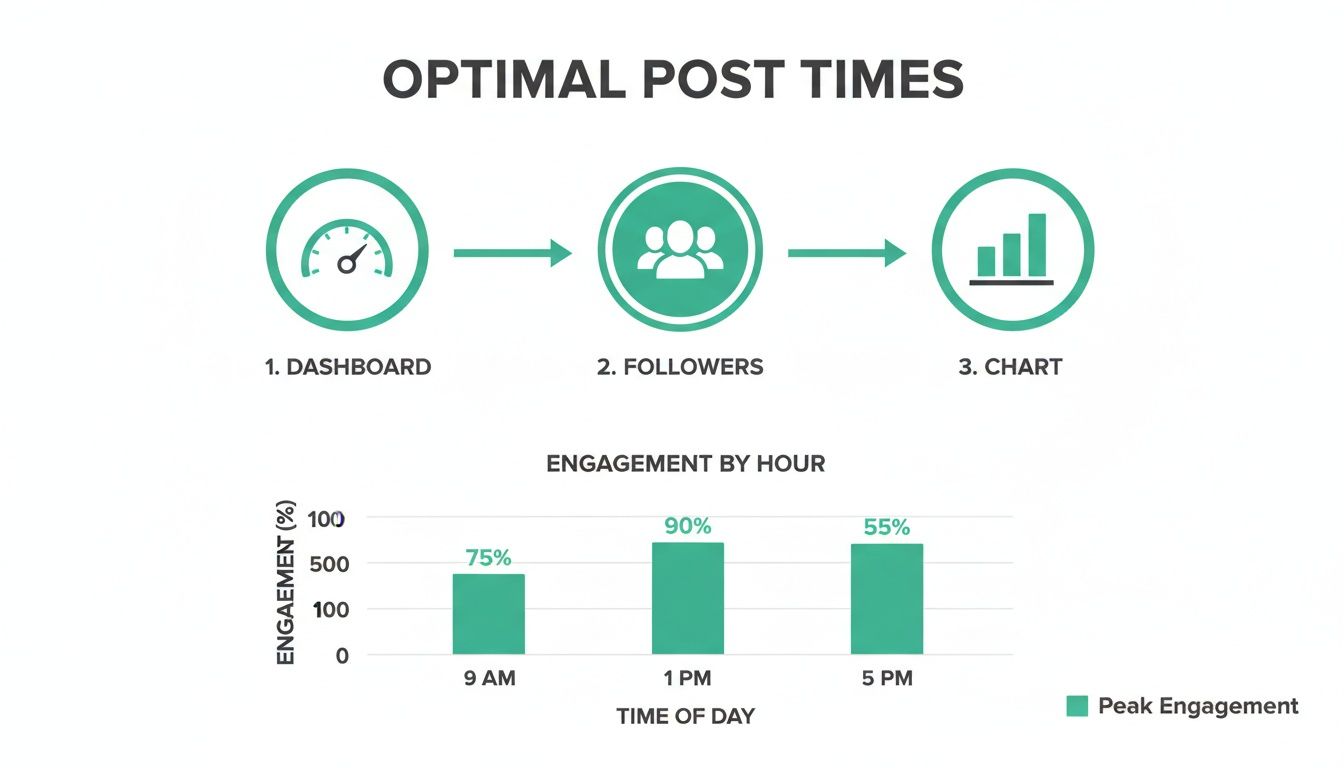
This simple process—checking your dashboard, analyzing follower activity, and looking at the charts—is the most reliable way to find your personal best times to post.
Putting It All Together for a Cohesive Strategy
So, how do you build a schedule that works for everyone? It starts with mapping out where your audience lives and what their daily habits likely are.
Pro Tip: Don't just post at the peak hour. Try posting 30 minutes before the spike in activity begins. This gives the algorithm time to index your content, so it’s ready to be served to that big wave of users logging on.
Let's say you have big follower bases in New York and London. Posting at 2 p.m. EST is a fantastic compromise. It catches the American lunch crowd and the Londoners who are winding down their workday around 7 p.m. GMT. Knowing your Instagram audience demographics is the key to making these smart, strategic decisions.
When you layer your industry insights over this geographical data, you start to build a posting schedule that feels personal and timely to every follower, no matter where they are in the world.
Putting Your Schedule to the Test with A/B Testing
Okay, so your Instagram Insights have pointed you toward some promising times to post. Think of this as your educated guess—a solid starting point based on real data. But a guess is still a guess.
Now it's time to prove it. This is where A/B testing comes in, letting you swap out hopeful theories for hard evidence.
A/B testing (or split testing) is just a simple way of comparing two things to see which one works better. In our case, we're pitting two different posting times against each other. It’s like a taste test for your schedule—you’re offering the same content at two different times to see when your audience is most ready to dig in.
This disciplined approach takes the guesswork out of your strategy. Instead of just hoping a new time slot will boost your engagement, you'll have actual data to back up your decisions.
How to Set Up a Clean A/B Test
The golden rule of A/B testing is to only change one thing at a time. For this experiment, one thing is the posting time. Everything else—your content format, caption style, and hashtags—needs to stay as consistent as possible. Otherwise, you won't know whether it was the time or something else that made the difference.
Here’s a simple framework to get started:
Pick Your Two Time Slots: First, choose a time that's already a top performer according to your Insights (we’ll call this Test A). Then, pick a new contender you want to try out—maybe a secondary peak you noticed or a time that industry benchmarks suggest (this is Test B).
Create Similar Content: You need two posts that are nearly identical in format and appeal. Think of two high-quality lifestyle photos or two Reels with a similar vibe. Don't test a photo against a reel; the format difference will mess up your results.
Schedule them a Week Apart: Post your Test A content at its time during week one. The next week, on the exact same day, post your Test B content at its designated time. Spacing them out like this ensures they aren't competing for your audience's attention.
Of course, once you’ve identified these potential time slots, you’ll need an efficient way to get your posts live. Learning how to schedule posts on Instagram can be a huge time-saver, whether you use the native scheduler or a third-party tool.
What to Measure: Tracking the Right Metrics
To crown a winner, you have to know what you’re looking for. When it comes to post timing, the most important metrics are the ones that measure immediate engagement. The Instagram algorithm loves content that gets a quick burst of interaction right out of the gate.
Focus on tracking these key performance indicators (KPIs) for the first few hours after you post:
Likes: The quickest sign of whether your content resonates.
Comments: A fantastic signal that you've started a conversation.
Saves: Shows your content is valuable enough for people to come back to.
Reach: The total number of unique accounts that saw your post.
Crucial Insight: That first hour after you hit "Publish" is everything. Strong engagement in this "golden hour" tells the algorithm that your post is a hit and that it should show it to more people.
The easiest way to keep all this straight is with a simple spreadsheet. It doesn't need to be fancy—just a few columns to log your results so you can spot patterns over a few weeks.
A Simple A/B Testing Log
On Monday, Oct 7, a photo posted at 6 PM received 152 likes, 18 comments, 25 saves, and reached 1,200 people within the first two hours. In comparison, on Monday, Oct 14, a photo posted later at 9 PM performed significantly better, generating 210 likes, 29 comments, 41 saves, and a higher reach of 1,850 in the same time frame—suggesting that later evening posting drove stronger early engagement.
After running this test for a few weeks, you’ll have clear, actionable data showing exactly which time slots get the best results from your audience. If you want to dive even deeper, a full guide to using Instagram analytics for business growth can help. This is how you turn a good schedule into a truly powerful one.
Beyond Timing: Strategies to Maximize Your Post's Reach
Figuring out the perfect time to post on Instagram is a huge win, but it’s really just one piece of the puzzle. Think of it like a launchpad for a rocket. A great launchpad gives you a solid start, but you still need a powerful engine and the right fuel to get into orbit.
In the same way, even the most perfectly timed post will fall flat if the content itself isn't compelling. Your other efforts—like writing killer captions and using smart hashtags—are the engine that actually propels your content forward. When you nail these tactics and combine them with an optimized schedule, you've got a powerful formula for earning organic reach and genuine engagement.
Beyond just tweaking your schedule, it's worth exploring other proven strategies to improve social media engagement and really boost your post reach.
Write Captions That Start a Conversation
A great caption does more than just describe what’s in the photo or video; it invites your audience into a real dialogue. The whole point is to stop the scroll and get a response, which tells the Instagram algorithm that your content is worth showing to more people.
Instead of just stating the obvious, give these approaches a try:
Ask a direct question: Don't just say, “Here’s our new product.” Instead, ask, “What's the first thing you would do with our new product?”
Share a story: Give people a peek behind the curtain with a short, relatable anecdote. It makes your brand feel more human.
Use a strong call to action (CTA): Tell your followers exactly what you want them to do next, like “Tag a friend who needs this” or “Save this post for later.”
This simple shift turns passive viewers into active participants, which is the secret sauce for boosting your visibility.
Harness the Power of Strategic Hashtags
Hashtags are basically signposts that guide new audiences to your content. A smart hashtag strategy doesn't just rely on the most popular tags; it mixes broad, high-traffic tags with smaller, niche-specific ones to cast a wider, more effective net.
Key Takeaway: The goal is to use a mix of hashtags that helps you show up in both big, trending conversations and highly targeted communities. Avoid using only mega-popular tags, because your post will get buried in seconds.
For example, a local coffee shop could use a tiered approach like this:
Broad: #coffeelover (millions of posts, for general visibility)
Specific: #specialtycoffee (more targeted, for true connoisseurs)
Local: #chicagocoffeeshops (reaches a nearby, relevant audience)
This layered strategy helps you connect with different segments of your potential audience all at once.
Engage Immediately to Boost Visibility
That first hour after you post is often called the “golden hour” for a good reason. Quick engagement signals to the Instagram algorithm that your post is a winner, which prompts it to push your content out to a wider audience.
Get into the habit of sticking around for at least 30 minutes after posting to reply to every single comment. Not only does this build a strong community feel, but it also encourages more comments, creating a positive feedback loop that the algorithm absolutely loves. Time and time again, data show that posts with high initial interaction see much better long-term performance, no matter the niche.
Answering Your Instagram Timing Questions
It's one thing to know the general rules, but when you start digging into your strategy, the real questions pop up. It's totally normal to wonder about the little details as you fine-tune your approach.
Let’s tackle some of the most common questions I hear. Think of this as the final check-in before you launch your content, giving you the confidence that you're setting every post up for success.
Do Reels and Feed Posts Have Different Best Times?
Yes, and it's a great question. You should absolutely think about them differently. The best time to post depends on the mindset your audience is in when they’re scrolling, and people watch Reels for different reasons than they look at feed posts.
Reels: This is pure entertainment time. Think about when you unwind—evenings (7 PM to 10 PM) and weekends are prime time for Reels. People are kicking back, looking for a laugh or something cool to watch, not necessarily to learn.
Feed Posts: Carousels, infographics, and beautiful photos often do best during breaks in the day. Think commute times (7 AM to 9 AM) and lunch breaks (12 PM to 2 PM). Your followers are often looking for a quick dose of inspiration or information they can consume easily.
The proof is in your data. Dive into your Instagram Insights and look at your Reels and post analytics separately. The numbers will tell you exactly when your audience is most active for each format.
How Often Should I Adjust My Posting Schedule?
I recommend giving your schedule a health check monthly. Audience habits aren't set in stone. They shift with the seasons, holidays, and just the general rhythm of life. A monthly review is the sweet spot—it helps you catch new trends without getting whiplashed by a single slow day.
> The exception? If you've just launched a big campaign, started targeting a new demographic, or made a major pivot in your content, you'll want to check in more often. For the first month of a big change, I'd peek at the analytics weekly to make sure you're on the right track.
What if My Audience Spans Multiple Time Zones?
This is a common challenge for accounts with a global reach. If you have followers from New York to London to Sydney, posting on a single time zone’s schedule means you’re leaving a huge chunk of your audience out.
You’ve got a couple of solid options here:
Focus on Your Core Audience: Pop open your Instagram Insights and find where the majority of your followers live. Center your posting schedule around the peak times for that dominant time zone. It’s the simplest way to reach the most people.
Find the “Golden Hour” Overlap: Get a little strategic and look for times that work for multiple regions at once. For example, posting at 4 PM EST (New York) happens to be 9 PM GMT in London. That’s a fantastic window to catch North Americans in their afternoon slump and Europeans as they settle in for the evening.
Honestly, a good scheduling tool is a lifesaver here. It lets you cover all your bases and reach your entire community without having to wake up at 3 AM to do it.
Ready to stop guessing and start growing? Gainsty uses advanced AI and real Instagram expertise to pinpoint your unique audience and drive authentic follower growth. Get started today and see the difference a data-backed strategy can make. Find out more about how Gainsty works.

.png&w=1920&q=75&dpl=dpl_D59Qa4oJ5cFQ7dZDLQ1JPQVnqHSs)





.png&w=750&q=75&dpl=dpl_D59Qa4oJ5cFQ7dZDLQ1JPQVnqHSs)