Choosing an Export Method for Your Account
For a spreadsheet-ready file, start with Meta Business Suite if you manage a professional account. Standard Instagram Insights screens are useful for checking performance, but reading a dashboard or taking a screenshot isn't the same as exporting a dataset. Eligible accounts may also have a subscription-based spreadsheet export, so don't assume every account has identical controls.
Instagram export routes compared
For a quick check of recent posts, a professional business or creator account can use Instagram app Insights. It shows on-screen dashboards within the native reporting window, but it does not provide a standard dataset file.
If you need a monthly spreadsheet report, Meta Business Suite can export content-level CSV data for supported formats when your professional account has export access. The history you can download depends on the available reporting window. Eligible public accounts with a Meta One subscription may also be able to export content insights as CSV with an extended lookback, useful for older comparisons when you have no archive.
For custom pipelines or agency reporting, an app with the required Insights permissions can pull raw account-level and media-level JSON for a professional account. Historical coverage depends on endpoint availability and the snapshots you have stored. Third-party connectors offer scheduled sheets or CSV files after account authorization; check both the tool's retention policy and source availability before relying on them for automatic reports.
The foundational distinction is metrics versus people. Meta's account Insights documentation describes authenticated measurement requests using an account ID, requested metrics, a period, and optional since and until boundaries. Media reporting uses separate requests for individual content objects. These are measurement exports, not unrestricted follower identities or personal activity logs.
Choose for the reporting job
Use Business Suite for an occasional downloadable report. Choose the API when you need control over collection, transformations, and storage, not because you expect it to recover any historical value you request.
A connector saves implementation work, but you still need to inspect its permissions, supported fields, refresh behavior, and retention policy. Compare those requirements against Instagram analytics tools before committing to a subscription.
Selection rule: Choose the simplest route that preserves the fields and history your next report will require.
Test a sample export before building a template around it. Account type, content format, reporting period, and API version can affect which fields arrive. A polished dashboard won't fix an export that never contained the measurement you needed.
How to Export Instagram Insights to CSV
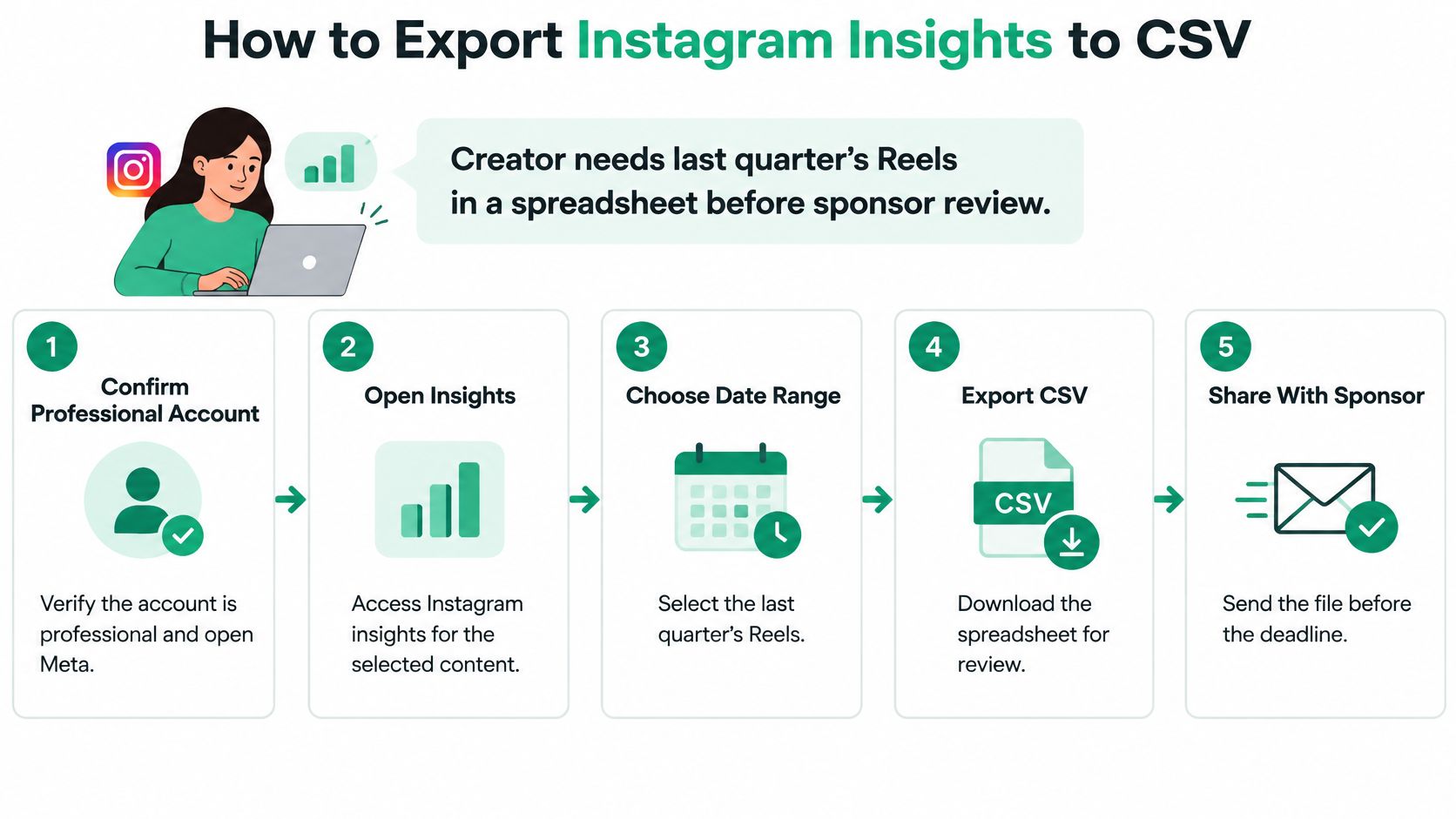
Say a creator needs last quarter's Reels in a spreadsheet before a sponsor review. The task sounds straightforward, but selecting a publication period doesn't necessarily mean every requested insight remains available.
Meta's spreadsheet-export help states that eligible public Instagram accounts with a Meta One subscription can look back beyond 90 days and export content-level insights for Reels, posts, and Stories as CSV. Treat that boundary as a reason to check access before promising an older report, not as proof that every account has the same retention entitlement.
Download the correct content report
Confirm the account and access. Make sure the Instagram account is professional, then open Meta Business Suite and select it in the account switcher. Check the username rather than relying on a familiar profile image, especially when a Facebook Page sits beside it.
Open Insights, then find the content reporting view. Select the formats your review needs, checking whether Stories require a separate selection or export.
Set the reporting dates deliberately. Confirm the available window in your account, and distinguish content published during the period from performance recorded during the period. Those selections can answer different questions.
Find the export or sharing control and choose the CSV or spreadsheet option available to you. Menu labels change, so follow the wording on screen rather than expecting an exact button name.
Inspect the downloaded columns. Look for publication time, views, reach, likes, comments, saves, shares, followers gained, duration, and permalink where supported. Don't assume a missing field means the content generated no activity.
Resolve older-history requirements before sending the report. Check whether the account qualifies for extended access. If it doesn't, preserve the available export now and establish a recurring archive rather than promising a reconstruction.
Check the file before sharing it
Open the CSV in Excel or Google Sheets and confirm that timestamps parse as dates, counts remain numeric, and permalinks lead to the expected content. Preserve identifiers as text if your spreadsheet tries to reformat them.
For a simple content summary, aim for a row per content item. If the export includes breakdowns or repeated observations, keep those dimensions visible instead of deleting apparent duplicates immediately.
Save an untouched download separately from your working sheet. Use a filename containing the account, reporting period, and retrieval date, so a colleague can distinguish a fresh export from an older snapshot.
Blank expected fields deserve investigation, not cosmetic cleanup. Add an availability note before sharing the sponsor-facing version, and remove technical columns only from that presentation copy. Waiting until the review deadline to discover an unavailable reporting period leaves you with fewer options than archiving routinely.
Reading the Columns in Your Export
For a reach-based engagement rate, use (likes + comments + saves + shares) ÷ reach × 100. Label that calculation explicitly because another report may use followers or views as its denominator. If reach is unavailable or zero, leave the rate undefined rather than forcing a result.
Core export columns and how to read them
Reach counts the unique accounts that saw your content. It helps you gauge audience size and can serve as the denominator for an engagement rate, but one account may generate multiple views. Views count plays or displays according to the content format's definition, making them useful for assessing consumption and exposure. They are not automatically equivalent to legacy impressions, which count displays and may be useful for comparing older posts. Do not splice impressions directly into a views trend.
Likes and comments show direct reactions and replies. They indicate immediate response, though response quality matters as well as volume. Saves can suggest reference value or evergreen usefulness, but they do not prove that someone took action later. Shares help you assess distribution and discovery; keep attribution windows aligned when comparing them. Followers gained shows follows attributed to content, so retain the attribution rules when judging each post's growth contribution.
Engagement rate expresses defined interactions as a percentage of reach. It helps compare posts with different audience sizes only if you keep the numerator and denominator consistent.
Protect the trend line
Meta's integration update describes the transition toward views, with impressions deprecated for media created on or after July 2, 2024, while older media can continue returning impressions. That creates a reporting break, not a clean rename.
Keep the raw impressions and views fields. Add a standardized reporting field only with a documented mapping, retaining the original metric name, definition, API version, publication date, and attribution window. Don't restate historical dashboards as views unless you can defend the conversion.
A larger views total doesn't automatically mean the audience grew. Check whether the measurement changed before celebrating the increase.
For editorial decisions, rank evergreen posts by saves per reach and assess discovery with shares and attributed follows per post. Compare like formats and observation windows; a mature tutorial and a newly published Reel haven't had equal opportunities to accumulate activity.
Use a consistent Instagram performance metrics dictionary to keep those decisions repeatable. If reach looks high but views look unexpectedly low, verify format definitions, collection timing, and delivery scope before calling the content a failure.
Fixing Missing, Zero, and Duplicate Data
A recent post shows a blank cell, and someone concludes it flopped. That conclusion is premature: an empty response isn't evidence of zero performance.
Meta's API changelog documents changes to insights access and breakdowns, reinforcing why object type, permissions, collection timing, and API behavior belong in your checks. Delayed insights and limited Story availability make completeness especially important.
Export symptoms, likely causes, and fixes
If recent posts show blank or zero metrics, insights may be delayed or collected too early. Check the response status, then export again after the observation window closes. Missing or incomplete Stories may reflect limited Story insight availability; collect them while they are available and exclude partial records from rankings.
An isolated date full of zeros may mean a transformation replaced nulls with zero. Check the raw values and restore their unavailable status. If an export stops before your requested period, confirm the reporting window and account eligibility, then preserve the data you can access. For metrics missing on a small account, record the metric-specific eligibility restriction rather than inventing a substitute.
Duplicate rows for a post can result from pagination overlap or repeated retrieval. Check the reporting grain before removing them. If totals disagree with the app, align timezone, reporting scope, freshness, and metric definitions before comparing the figures.
Diagnose before editing
For apparent duplicates, compare media ID, metric, breakdown, observation interval, and retrieval timestamp. The same post can legitimately appear in separate daily observations or audience breakdowns. Deduplicating on media ID alone can erase valid records.
For mismatched totals, check timezone conversion first, then reporting scope and metric definitions. Also avoid adding post-level unique reach figures and expecting the sum to equal account-level unique reach, because audiences can overlap.
If your workflow combines API exports with scraped material, compare scraped data quality checks from Scrappey to identify where validation should happen. Keep the collection methods distinguishable so you can trace a discrepancy to its source.
Missing-data rule: Preserve a missing value with a reason. Don't fill it with zero just to make a chart render.
Store freshness state and completeness status beside the metric. A Story record still being collected shouldn't outrank or underperform completed records merely because your spreadsheet treats partial observations as final.
Automating Exports and Keeping Your History
A downloaded file preserves an observation, not a reporting system. For recurring analysis, use a versioned extraction, transformation, and loading pipeline that lets you reproduce how each published value was produced.
Meta's media Insights documentation describes metric-specific access restrictions, including unavailable metrics for accounts with fewer than 100 followers and online-followers availability limited to the most recent 30 days. Build eligibility checks into collection rather than treating every successful request as a complete dataset.

Build a traceable pipeline
Authenticate with the required Insights permissions. Confirm whether your app's features require Advanced Access or App Review. A connection that works for a development account may not establish production access for every account you manage.
Pull account-level and media-level measurements separately. Their endpoints expose different metric sets, so keep extraction logic distinct rather than forcing both responses into an identical structure.
Store the raw JSON and request context. Retain API version, retrieval timestamp, account ID, media ID where applicable, and the UTC-normalized reporting interval. That context lets you distinguish a changed response from a changed spreadsheet formula.
Change into a stable reporting schema without overwriting raw fields. Store unavailable values as nulls with an explicit reason, and version the mapping whenever a metric's meaning or availability changes.
Reconcile before publishing. Compare transformed totals against the source response for each account-day, using a documented discrepancy threshold. Investigate pagination, duplicate observations, timezone conversion, and mapping changes before releasing the CSV or warehouse table.
I would start with strict reconciliation for directly copied counts and a separate tolerance policy for calculated or rounded fields. Don't label an internal alert threshold as a platform accuracy guarantee.
Schedule for recovery, not just convenience
Collect after the reporting day closes. A morning run is a practical starting point, but schedule later refreshes for metrics that are still settling.
Request explicit windows. Use supported
sinceanduntilboundaries rather than letting a moving default period determine what your archive contains.Control request volume. Batch supported operations, pace requests, and handle rate-limit responses with retries rather than repeatedly restarting a historical pull.
Preserve revisions. Keep retrieval timestamps so updated observations don't replace the evidence used in a previous report.
Version the dictionary. Store field definitions and transformation rules beside the exports, not only inside a dashboard.
Connect the validated output to a social media analytics report template only after those checks pass. Presentation should consume approved measurements, not become the place where someone manually repairs them.
Privacy, Limits and Account Access
Insights exports provide aggregate account and content measurements. They aren't a way to identify individual viewers or retrieve the names of people who saved a post.
Use this access checklist before sharing files or authorizing a connector:
Restrict the archive folder. Performance exports reveal publishing patterns and campaign strategy, even when they contain no audience names.
Share a finished reporting sheet rather than emailing raw JSON. Raw responses can expose internal identifiers and collection details that colleagues don't need.
Grant the minimum necessary access. Use appropriate reporting roles and authorization controls instead of sharing an account password; review connected apps and revoke unused access.
Keep access tokens out of spreadsheets, screenshots, and support tickets. A leaked token can permit unauthorized requests within its granted scope.
Reject misleading collection promises. A tool advertising personal activity logs or unrestricted follower identities isn't describing a standard Insights export.
Verify operational limits
API request caps require pacing, error handling, and retry logic. Running outside your team's busy hours may simplify operations, but it doesn't exempt requests from platform limits.
Record when someone last checked permissions, retention rules, and endpoint requirements in the data dictionary. Assign an owner to that review so a platform change doesn't remain unnoticed until the next reporting deadline.
Set Up Your Export Routine This Week
Keep the first pass small enough to finish in an afternoon. You need a defensible baseline and a repeatable habit, not an elaborate dashboard.
Choose your route. Match the export method to account access, technical capacity, and the history your reporting requires.
Export the available baseline and save the untouched download in a dated folder. Keep the reporting period separate from the download date in the filename.
Create a short data dictionary. Record account ID, export date, API version where available, metric definitions, and any known availability restrictions.
Spot-check a stable post against the app under matching reporting conditions. Compare views, reach, and likes, then investigate differences rather than adjusting the spreadsheet to look correct.
Set recurring archive reminders. Include a separate review whenever Meta changes an Insights metric your report uses.
Record completion and unresolved issues in a small export log. That gives the next person a clear starting point if collection fails.
Your first reliable archive is more useful than a sophisticated report whose inputs you can't explain.
Preserve the original file, the checked working version, and the notes together. When a check fails, diagnose the collection or transformation step instead of editing the final number by hand.
Our free Instagram analysis tool requires only a public Instagram username, with no login. Visit Gainsty for a public-profile analysis alongside your export routine, while keeping your authenticated Insights archive as the record behind your performance reports.