Why You Are Facing a Follow Block on Instagram
When you find yourself unable to follow new accounts, it’s not just a random glitch. It’s a very intentional, calculated response from Instagram's algorithm designed to keep the platform genuine. Any behavior that looks unnatural or overly aggressive gets flagged.
This temporary restriction, formally known as an “action block,” is Instagram’s way of tapping you on the shoulder and saying, “Hey, slow down a bit.” It’s a protective measure to stop spam and maintain the quality of interactions for everyone.
The heart of the matter is almost always speed and volume. The algorithm sees rapid, repetitive actions as non-human, triggering a temporary suspension of that feature to shield the community from potential spam.
Getting a handle on these invisible rules is the secret to staying out of trouble. Instagram has hourly and daily caps on actions like following, liking, and commenting, which are available behind the scenes. While they don't publish the exact numbers, experienced users have a pretty good idea of where the lines are.
To make it easier, here's a quick way to diagnose potential issues with your account.
Quick Diagnosis of Your Instagram Follow Block
Use this list to quickly identify why you might be seeing the 'can't follow' error and understand what to expect.
Stories
You can use native GIPHY stickers or pin GIFs directly to moving objects in your video stories. This is great for adding personality, highlighting calls-to-action, or creating dynamic, attention-grabbing scenes. Engagement is typically high because Stories are interactive and visually appealing.
Feed Posts
For feed posts, you can convert a GIF into a looping video (MP4) and upload it. This works best for high-quality branded animations, meme-style content, or product showcases. Engagement potential is moderate to high, as looping videos catch attention but require followers to pause and watch.
Reels
GIFs can be converted to video or added as GIF-style stickers in Reels. This is effective for quick visual gags, adding reactions, or enhancing storytelling in short-form content. Engagement is generally high since Reels are prioritized by the algorithm for discovery.
Direct Messages (DMs)
You can use the native GIPHY keyboard to send GIFs in DMs. This method is ideal for building relationships, expressing emotion, and personalizing communication. Engagement is high for community interactions, as GIFs make messages more relatable and memorable.
Knowing the cause helps you figure out how long you'll need to wait and what behaviors to change moving forward.
Understanding Instagram's Activity Limits
These limits aren't a one-size-fits-all deal. Key factors like your account's age, its follower count, and your typical activity levels all play a massive role. A brand-new account, for example, is on a much tighter leash than an established profile with years of authentic engagement. Blowing past these invisible thresholds is the fastest way to get your follow button put on ice.
For newer accounts (less than six months old), a safe bet is sticking to 50-100 follows per day. Pushing it to 150 is risky. Established accounts can often get away with 150-200 per day. The moment you start following more than 10-20 accounts per hour, you're asking for a temporary action block that usually lasts 24-48 hours. Keep making the same mistake, and you risk a shadowban that can gut your reach by up to 70%. You can discover more insights about Instagram's follow limits and how to stay in the clear.
Pinpointing the Exact Cause of Your Follow Restriction
So, you've hit a wall and can't follow anyone on Instagram. Before you can fix it, you need to play detective. This isn't usually a random bug; it's Instagram's system responding to a specific trigger, and our job is to figure out what that was.
Your first clue is often the error message itself. Are you seeing a big, scary “Action Blocked” pop-up, maybe with an expiration date? Or is it a vague “Try Again Later” message that disappears without a trace? Each one points down a different path.
Think about what you were doing right before it happened. Were you on a following spree, trying to connect with several new accounts at once? It's a classic move for new businesses or anyone trying to grow fast, but to Instagram's algorithm, it looks like spam.
Review Your Recent Account Activity
A quick self-audit is the best way to get to the bottom of this. You have to look at your actions through Instagram's eyes. What seems like harmless networking to you can easily look like aggressive, bot-like behavior to an automated system.
Let’s get specific. Ask yourself these questions:
How fast were you following? If you followed more than 20-30 accounts within an hour, you likely tripped a wire. The system sees that as unnatural.
Were you playing the follow-unfollow game? Rapidly unfollowing a ton of accounts, especially after a recent follow binge, is a massive red flag. Instagram has been cracking down on this for years.
Are third-party apps connected to your account? Think about any apps you use for tracking unfollowers, scheduling posts, or getting analytics. Occasionally, these tools work in the background, taking actions that violate Instagram's rules and getting you blocked without you even knowing it.
This quick decision tree can help you figure out if you're dealing with an official penalty or just a temporary glitch.
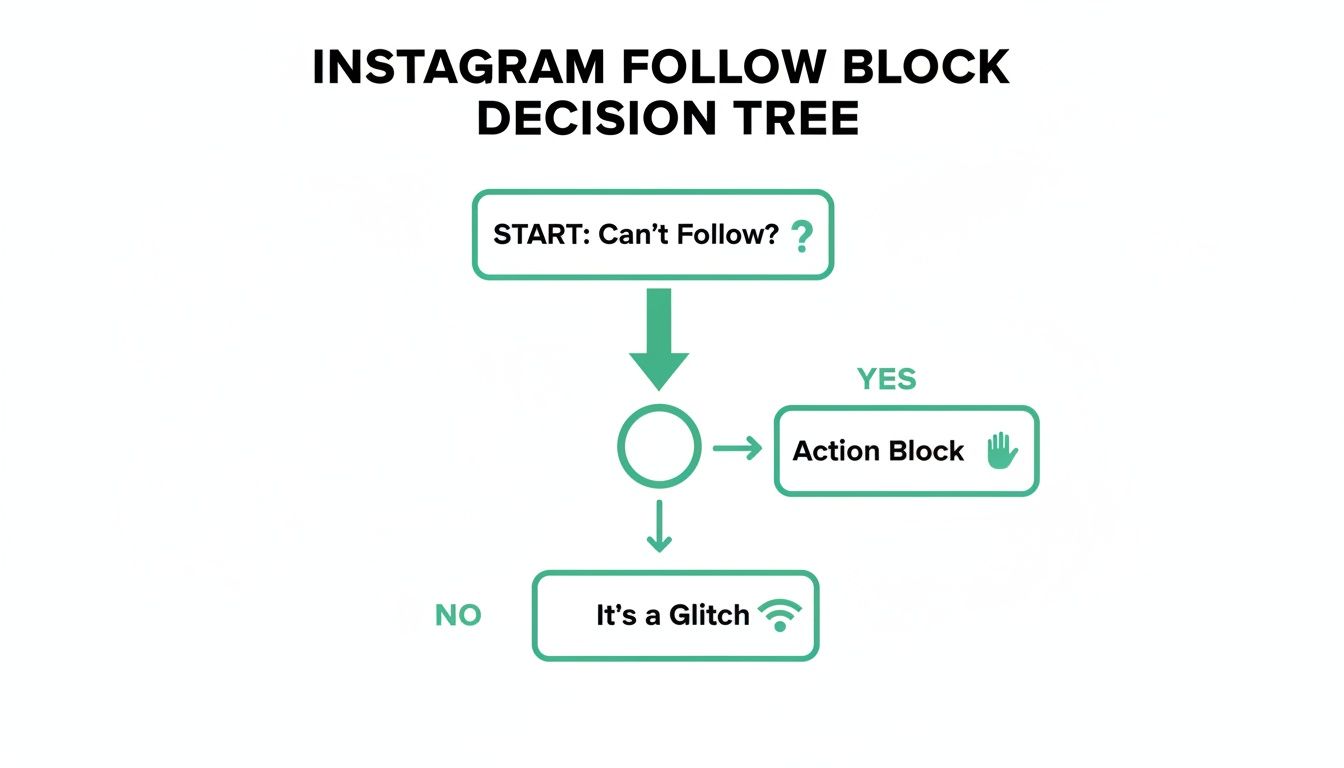
As you can see, the first thing is to determine whether Instagram has intentionally blocked you or if a simple technical issue is getting in the way.
Check Your Official Account Status
Guessing will only get you so far. Luckily, Instagram has a built-in tool that shows you exactly where you stand. It's the most reliable way to confirm if you're actually in trouble.
To check it, go to your Profile, tap the menu icon (the three horizontal lines), and then navigate to Settings and privacy > Account Status.
Think of this section as your official report card with Instagram. It will clearly state if your account has any active restrictions or if content has been removed for rule violations. If you've been formally blocked, you'll almost certainly see a note about it here.
If your Account Status is all clear, you can breathe a little easier. The problem is probably less severe—maybe a temporary bug, a network hiccup, or you just bumped up against an unwritten daily limit that doesn't trigger a formal warning. These limits can be tricky, and understanding them is crucial. To get a better handle on them, refer to our deep dive on the Instagram follow limit per day to see how quickly those clicks can add up.
Differentiating Hard Limits from Soft Blocks
Not all follow restrictions are the same. It's important to know whether you're dealing with a temporary slap on the wrist (a soft block) or a permanent platform rule (a hard limit).
A soft block is essentially a time-out. It’s Instagram’s way of saying, “Hey, slow down.” These usually last 24-48 hours and are the most common type of restriction. In most cases, the only fix you need is patience.
A hard limit, on the other hand, is a fixed rule built into the platform. The biggest one is the 7,500 following cap. No account, regardless of who you are, is allowed to follow more than 7,500 people. If you’ve hit this ceiling, it’s not a penalty—it’s just the limit. The only way to follow new accounts is to start unfollowing others.
Figuring out which of these you're up against is the first real step toward getting back to normal.
Your Immediate Fixes to Get Back to Following
Alright, so you've got a good idea of why Instagram has put you in time-out. Now for the action plan. We'll start with the most immediate, practical steps you can take to get things back to normal, beginning with the simplest (and surprisingly effective) one: just wait.
Seriously, the absolute first thing you should do is give your account a complete cool-down. Stop trying to follow people. Don't even tap the button to “test” if it's working again. This is crucial because it signals to Instagram's automated system that you're hitting the brakes.
Trying to follow accounts while you're under a temporary block is like telling the algorithm you haven't gotten the message. Every failed attempt can look like more spammy behavior, which might just make the restriction last even longer.
A 24 to 48-hour pause is the gold standard here. Use this time to browse your feed, watch Stories, or answer DMs, but steer clear of any aggressive activity. For most temporary action blocks, this waiting period is all it takes for them to expire on their own.
Your Basic Troubleshooting Checklist
Once your account has had a chance to breathe, it’s a good idea to run through a quick tech checklist. Occasionally, the culprit isn't a penalty at all but a pesky app glitch or a bad connection. These simple steps can often clear up common bugs that feel exactly like a follow block.
First, try logging out of your Instagram account completely and then logging back in. It sounds basic, but this simple action often resets the connection between your device and Instagram's servers, clearing up minor hiccups.
Next up, clear the app's cache. Think of this as tidying up the app’s digital workspace by getting rid of old, temporary files that might be causing it to act up.
For Android users: Navigate to Settings > Apps > Instagram > Storage and tap Clear Cache. Don't worry, this won't touch your photos, DMs, or profile info.
For iPhone users: iOS is a bit different; it doesn't have a simple “clear cache” button. The best way to do it is to delete the app and then reinstall it from the App Store. All your account data is safe on Instagram's servers and will be right there when you log back in.
Doing this ensures you’re using a clean, fresh version of the app. If you're still running into trouble, it's a good idea to learn how to check your Instagram account status to see if there are any official platform updates about your account.
Ruling Out Network and App Version Issues
If clearing the cache didn’t do the trick, the problem might not even be with your account or device—it could be your connection. A spotty Wi-Fi network can sometimes trigger connection errors that stop actions like following from going through.
Here's a quick test: switch from your Wi-Fi network to your cellular data. If you can suddenly follow someone on 4G or 5G, you’ve found your culprit. It was your internet, not an Instagram penalty. For more ideas on sorting out tech snags, you can find helpful resources like these quick troubleshooting tips from Short Genius.
Finally, make sure your Instagram app is actually up to date. Developers are constantly pushing out updates to patch bugs. An outdated version of the app could easily have a known issue that’s keeping you from following new accounts.
Just pop over to the Google Play Store or Apple App Store and see if there's an update waiting for Instagram. Installing the latest version gives you all the most recent bug fixes and often resolves these kinds of stubborn problems quickly.
Advanced Solutions for Stubborn Follow Blocks
So, you’ve waited patiently for 48 hours, you've tried all the basic fixes, and still… nothing. If you're still hitting that wall, it’s a strong sign the problem is more than just a temporary glitch. A persistent follow block often points to a more profound issue with your account's security or a more serious flag on your profile that needs your attention.
It's time to stop just troubleshooting and start performing a full account audit. These stubborn restrictions are incredibly frustrating, especially when you know you’re playing by the rules. Let's dig into the more advanced steps that can help you finally figure out why Instagram won't let you follow people.
Conduct a Third-Party App Audit
One of the most common culprits I see for recurring follow blocks is a connected third-party app. You might have authorized it one year ago to track followers, analyze your stats, or schedule a few posts, and then completely forgot about it. While many are perfectly safe, some use aggressive tactics to access your data or perform background actions that get your account flagged without you even knowing.
It’s time to do some digital spring cleaning and revoke access for any service that isn't essential.
Here’s how to find and remove them:
Head to your profile and tap the menu icon (the three horizontal lines).
Go into Settings and privacy, then tap Apps and websites.
You'll see a list of every active service with access to your Instagram account.
Review this list carefully. If you see an app you don't recognize or no longer use, tap on it and hit Remove. Be ruthless here—if it’s not a well-known, trusted service, it's safer to just get rid of it.
Disconnecting these apps prevents them from continuing any spammy-looking behavior that’s keeping your follow button on lockdown.
Report the Problem Directly to Instagram
If your account is clean of suspicious apps and you’re still blocked, your next best move is to contact support. You probably won't get a personal reply, but submitting a report flags your account for review by their internal systems and, occasionally, a real person. The key here is to be clear, concise, and polite.
You can do this right inside the app using the “Report a Problem” feature.
Pro Tip: The best way to get Instagram's attention is to trigger the error first. Try to follow someone, wait for the "Action Blocked" pop-up, and then immediately shake your phone. This brings up the reporting tool and often attaches a screenshot and diagnostic data, giving the support team the exact context they need.
Simple Reporting Template
When you explain the issue, just stick to the facts. Here’s a simple template you can adapt:
“Hello, my account seems to be blocked from following other users. I have not used any automation tools or violated community guidelines. I believe this is an error and would appreciate it if you could review my account. Thank you.”
This kind of message is professional, gets straight to the point, and shows you understand the rules.
Change Your Password to Reset Security
Occasionally, the simplest solution is the most effective. A password change acts as a powerful security reset. If your account was compromised in any way (even a minor one), this single action immediately invalidates all existing login sessions on other devices or through sketchy apps.
When you reset your password, Instagram logs you out everywhere. This forces a completely fresh start and can often clear out persistent bugs or flags tied to your old session. Just make sure you choose a strong, unique password you haven't used anywhere else. It’s a crucial step for both fixing your current follow block and protecting your account down the road.
If you suspect you're dealing with a more serious ban, you may need to learn more about how to get unbanned on Instagram to understand the full appeals process.
Building a Follow Strategy That Prevents Future Blocks
Getting out of a follow block is a great feeling, but the real win is building an account that never gets blocked in the first place. This requires a shift in mindset—moving away from quick fixes and focusing on long-term account health. The best strategy is one that looks natural, human, and valuable to Instagram's algorithm.
It helps to stop seeing Instagram's limits as a penalty and start seeing them as guardrails. They exist to encourage genuine community building. Rapid, impersonal following is a short-term tactic that leads to exactly these kinds of headaches. The secret to avoiding future blocks is to act like a real person, not an automated script.
It all boils down to being more intentional with every tap and swipe. The goal is to grow an actual community, not just chase a vanity metric.
Adopt a Warm-Up and Cool-Down Approach
Think of your Instagram activity like a workout. You wouldn't just jump into a full sprint without stretching, right? The same logic applies here. If your account has been quiet for a while—or you're just coming off a restriction—you need to ease back into it.
Start with low-intensity activities. For a day or two, just focus on watching Stories, replying to a few DMs, and leaving thoughtful comments on posts from people you already follow. Once you've re-established that baseline of gentle engagement, you can slowly start following a few new accounts.
This tells the algorithm that a human is back at the controls. On the flip side, a “cool down” is just as crucial. After a session where you've followed a handful of new accounts, switch gears and go back to simple browsing and light engagement.
Spread Your Followers Throughout the Day
One of the biggest red flags for Instagram is a sudden burst of activity. Following 50 people in ten minutes screams “bot.” But following those same 50 people over the course of an entire day? That just looks like normal, human behavior.
To stay under the radar, you need to develop a more organic rhythm. Here’s a simple way to do it:
Morning Check-in: As you’re having your coffee, find and follow 5-10 interesting accounts.
Lunch Break: Discover another 5-10 accounts to connect with while you have a spare moment.
Evening Wind-down: Follow a final 5-10 profiles as you’re relaxing for the day.
This approach keeps your hourly follow rate incredibly low, making it almost impossible to trigger an automated block. It’s a small adjustment that entirely changes how Instagram's algorithm perceives your account. For anyone looking to build a real audience, exploring different Instagram growth strategies can offer more insights into these kinds of sustainable practices.
The goal is to make your growth look like a byproduct of genuine platform use, not the sole objective. When your follows are spaced out between authentic interactions, your account appears healthy and valuable to Instagram.
Prioritize Quality Engagement Over Quantity
Ultimately, the most powerful way to prevent a follow block is to focus on what Instagram truly values: meaningful engagement. The algorithm rewards real interaction far more than it does a simple follow.
Before you hit that “Follow” button, take an extra 30 seconds. A thoughtful comment on a post or a quick reply to a story is a high-value action. It shows you're actually interested in connecting, not just collecting followers.
Actionable Engagement Tips
Comment with Substance: Ditch the generic “Great post!” and ask a question or share a thought that proves you paid attention to the caption or video.
Reply to Stories: This is a direct line to someone's DMs. A genuine reaction to a story can be more memorable than a dozen likes.
Engage with Your Existing Followers: Don't neglect the community you've already built. Responding to comments on your content signals to Instagram that you're an active and engaged account owner.
When you make real engagement the foundation of your strategy, following becomes a natural side effect of your activity, not a risky primary action. This approach keeps your account safe and helps you build a much stronger and more loyal community over time.
Did You Get Questions About Instagram Follow Blocks? We've Got Answers
Even after trying a few fixes, it’s completely normal to have lingering questions when you're stuck and can't follow anyone on Instagram. Let's tackle some of the most common ones I hear all the time to clear up any confusion.
How Long Does a Follow Block Actually Last?
For a first-time, minor slip-up, you're usually looking at a 24 to 48-hour “cool-down” period. Think of it as Instagram putting your account in a brief time-out to stop what it thinks is spammy activity.
But here’s the thing: that duration isn't set in stone. If you’ve been flagged for going on a following spree before, the block can easily stretch to several days or even a full week. Instagram's system gets stricter with repeat offenders.
My best advice? Be patient. The second you see that "Action Blocked" pop-up, stop everything. No following, no liking, nothing. Give it at least 48 hours. Trying to test the limits will only make it worse.
Will a VPN Help Me Get Around an Instagram Follow Block?
It's a clever thought, but unfortunately, using a VPN rarely works for this problem. The restriction is tied to your account's behavior, not your IP address. Instagram's algorithm flagged you for following too many accounts too fast, and that history is attached to your profile.
A VPN can change your IP address, sure, but it can't erase the actions that got you flagged. In fact, jumping between different locations with a VPN can sometimes look suspicious to Instagram and might even trigger more security checks. It's much better to fix the root cause—your follow habits—than to try to hide where you are.
Is the 7,500 Following Limit a Real Thing?
Yes, it's 100% real. Every single Instagram account has a hard cap of following 7,500 other accounts. This isn't a temporary penalty; it's a permanent platform rule designed to keep the network healthy and cut down on spam. It doesn’t matter whether you have ten followers or ten million—the limit is the same for everyone.
Once you hit that magic number, the follow button will simply stop working for you. The only way to follow new people is to go back and unfollow some accounts to get your count below 7,500. There are no secret workarounds for this one. If you’re close to that number and can't follow anyone, you've found your culprit.
Could I get permanently banned for getting follow-blocked?
A single, one-off follow block won’t get your account deleted. But don't ignore it. Instagram's penalty system is tiered, and repeated warnings will definitely increase the risk to your account. The first couple of blocks are just a tap on the shoulder—a warning to change your ways.
If you keep up the aggressive following of those initial blocks, the consequences get more serious. Here’s how it usually plays out:
Longer Blocks: Instead of 24-48 hours, you might get locked out for a week or even longer.
Shadowbanning: This is a sneaky one. Your account might get “shadowbanned,” where Instagram throttles your reach without telling you. Your posts suddenly won't show up on hashtag pages or the Explore tab for anyone who doesn't follow you.
Permanent Suspension: Keep ignoring the warnings, and eventually, Instagram may just disable your account for good for repeatedly breaking the rules.
Take that first block seriously. It's your cue to shift to a more natural, organic growth strategy and protect the account you've worked so hard to build.
Ready to grow your Instagram following without ever risking another block? Gainsty uses advanced AI and expert strategies to attract real, engaged followers organically. Our service is 100% safe, authentic, and designed for long-term account health. Start growing with Gainsty today!
.png&w=1920&q=75&dpl=dpl_D59Qa4oJ5cFQ7dZDLQ1JPQVnqHSs)




.png&w=750&q=75&dpl=dpl_D59Qa4oJ5cFQ7dZDLQ1JPQVnqHSs)