.jpg&w=1920&q=75&dpl=dpl_D59Qa4oJ5cFQ7dZDLQ1JPQVnqHSs)
Is Your Instagram Account Really Shadowbanned?
When your posts are getting next to no traction, it's easy to jump to the worst conclusion. The term "shadowban" gets thrown around a lot, and it basically means Instagram is hiding your content from a wider audience without telling you. Your posts won't pop up on the Explore page or in hashtag feeds for new people, essentially putting your account in a digital time-out.
But hold on. A dip in performance isn't always a shadowban. It’s super important to rule out other common issues before you panic.
Here are a few things that might be happening instead:
Algorithm Mood Swings: Instagram is always tweaking its algorithm. One week it loves Reels, the next it might be prioritizing carousel posts. If you haven't adapted your strategy, you might just be on the wrong side of a recent update.
Audience Burnout: Let's be real, sometimes your audience just gets tired of the same old thing. A drop in engagement could be their way of telling you it's time to shake up your content.
A More Crowded Room: Maybe your niche has just gotten more competitive. More creators mean more noise, making it tougher to grab and hold attention.
Differentiating Symptoms from Normal Fluctuations
A real shadowban feels different from a bad week. The dead giveaway is a sudden, catastrophic drop in reach from non-followers. I'm talking about going from thousands of impressions from hashtags one day to virtually zero the next.
Creators who've experienced this report seeing their reach collapse by 50–90% overnight. It's a dramatic nosedive, not a gentle dip. Understanding these potential restrictions often ties back to the broader world of social media content moderation, which is how platforms like Instagram enforce their community guidelines.
To help you tell the difference, I've put together a quick reference table. It's designed to help you distinguish between a potential shadowban and the normal ebbs and flows of the platform.
Shadowban Symptoms vs Normal Fluctuations
Hashtag reach drops: A potential shadowban indicator is when reach from hashtags suddenly falls to near zero across multiple new posts. This may be a normal fluctuation if only one or two posts underperform or if the decline occurs gradually (for example, a 10–20% decrease over several weeks).
Engagement falls: A sharp and sudden decrease in likes and comments from non-followers can indicate a shadowban. However, it may be a normal variation if engagement from your existing followers is also declining, which could point to content fatigue or a broader algorithm update.
New follower growth stalls: An abrupt halt in new follower acquisition despite consistent posting may signal a shadowban. This can also be a normal trend if follower growth has been slowing over time as the account matures or the niche becomes increasingly saturated.
Content not appearing in searches: If your posts do not appear at all in hashtag search results when viewed from an account that does not follow you, this may indicate a shadowban. Alternatively, the content may simply be buried deep within a highly competitive hashtag feed containing millions of posts.
Think of it this way: a shadowban is like being muted in a crowded room. Your existing friends can still hear you if they walk right up to you (visit your profile), but no one new can discover you.
The most telling sign of a shadowban isn't just a decrease in likes from your followers; it's the complete disappearance of your content from discovery channels like hashtag pages and the Explore feed for users who aren't connected to you.
This is the key distinction. A normal fluctuation might see your likes dip by 20%, but a shadowban will often show your non-follower reach flatlining entirely. Your loyal audience can still find your content by going directly to your profile, but your ability to grow is effectively frozen. Recognizing these specific signs is the crucial first step in figuring out what's really going on with your account.
Think you’ve been shadowbanned on Instagram? Moving from that sinking gut feeling to a confirmed diagnosis is your first and most critical step. Instead of guessing, you need a clear, methodical way to test your account’s visibility.
By running a few specific checks, you can gather the hard evidence needed to understand exactly what’s happening with your reach. Forget those shady third-party tools that put your account at risk. We're going to use Instagram's own features and some simple, logical tests to get a definitive answer.
Think of yourself as a detective looking for clues. Each test we run will provide another piece of the puzzle.
This flowchart breaks down the core process into three simple actions: post, check, and analyze.
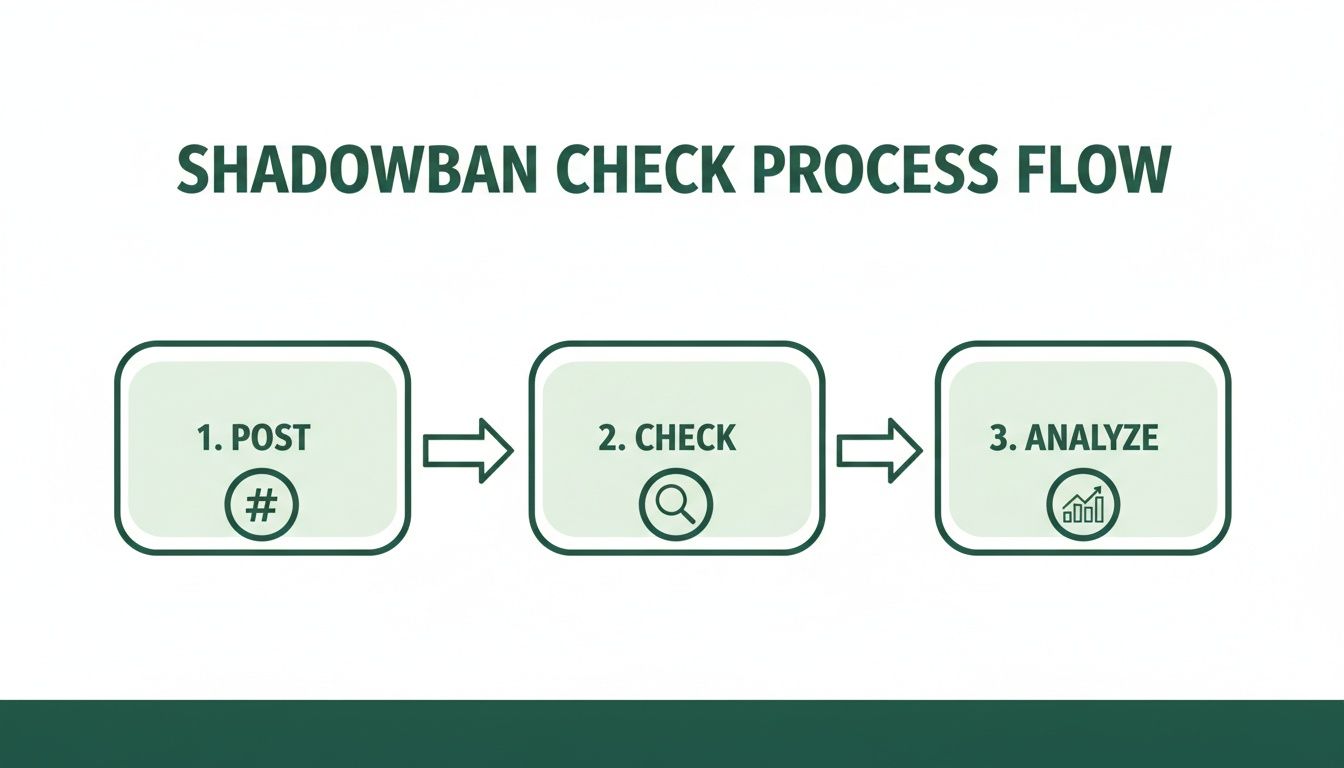
Let's walk through how to put this into practice.
The Manual Hashtag Visibility Test
This is the classic, most reliable method for an Instagram shadowban test. It's designed to answer one crucial question: Is your content actually visible to people who don't already follow you? A shadowban’s primary purpose is to suppress your posts from discovery feeds, and this test checks that function directly.
Here’s how to do it right:
Create a New Post. Publish a fresh piece of content—a standard feed post or a Reel will work perfectly.
Use a Unique Hashtag. In the caption, include a mix of your usual relevant hashtags, but add one that is unique and has zero posts. Think of something like #YourBrandTestJuly2024 or a random combination of words no one else would have used.
Check From an Unaffiliated Account. This is the most important part. You must check for the post from a different account that does not follow you. Ask a friend, use a second business account, or log in on a totally different device. Just logging out and back in on the same phone won't work, as Instagram’s system might still recognize you and show you your own content.
Search for Your Unique Hashtag. From that external account, search for the unique hashtag you created. If your post appears under the "Recent" tab, you are almost certainly not shadowbanned. If it’s nowhere to be found after a few minutes, that’s a strong sign your reach is being restricted.
Expert Tip: Don't use hyper-competitive hashtags like #travel or #fitness for this test. Your post will be buried in seconds, giving you a false negative. The unique, low-competition hashtag is the key to getting an accurate result.
Check Your Official Account Status
Thankfully, Instagram has become more transparent about account restrictions. The platform's "Account Status" feature is now your first official stop for a health check.
This is a huge deal. Before, we were all just guessing. Now, you can get a direct answer from the source. The duration of shadowbans can vary wildly, from 2-7 days for minor issues to 30 days or longer for more serious ones. In fact, some research shows that one in four shadowbanned users remained restricted even after 30 days.
To check your status, just follow this path:
Navigate to your profile and tap the menu icon (☰) in the top right.
Go to "Settings and Privacy."
Scroll down and tap "Account Status."
This dashboard will tell you two critical things:
Removed Content: It shows if any of your content has been taken down for violating Community Guidelines.
Recommendation Status: This is the big one. It will explicitly state if your content is eligible to be recommended on surfaces like the Explore page and hashtag feeds. If you see a warning that says your account or content "may not be recommended," you have your answer.
Dive Deep into Your Instagram Insights
Your account analytics hold the final clues. While a hashtag test reveals if you’re hidden, your Insights show the impact of being hidden. You’ll need a Creator or Business account to access this data.
Go to a few recent posts that you feel have underperformed and tap View Insights. Scroll down to the "Reach" section and look closely at the breakdown of where your impressions came from.
The metric you need to zero in on is Reach from Non-Followers.
A healthy, growing account will typically see a significant portion of its reach—often 40% or more—coming from sources like hashtags and the Explore page. If you see that this number has suddenly collapsed to less than 5% across multiple recent posts, it’s undeniable proof that the algorithm has stopped showing your content to new audiences.
This sudden, drastic drop is the statistical fingerprint of a shadowban. To get a better handle on what these numbers mean, you can learn more about interpreting Instagram Insights.
To make sure you're covering all your bases, use this simple checklist.
Instagram Shadowban Test Checklist
Follow this checklist to systematically test your account for shadowbanning, covering all key diagnostic methods.
Hashtag visibility test: Create a post using a unique hashtag, then ask a friend who does not follow your account to search for that hashtag. A confirmation sign of a potential issue is when your post does not appear in the “Recent” tab for that unique hashtag.
Account status check: Navigate to Settings > Account Status and review both the “Recommendation” and “Removed Content” sections. A potential confirmation sign is the presence of a yellow or red warning indicating that your content or account is not eligible for recommendation.
Instagram Insights analysis: Open Insights for several recent posts and examine the reach source breakdown. A confirmation sign is when the percentage of reach from non-followers has suddenly dropped to near zero, such as below 5%.
By methodically working through these tests, you can move past the uncertainty and get a clear picture of your account's standing. This allows you to stop guessing and start forming a real plan to fix the problem.
Interpreting Your Test Results to Avoid False Positives
So, you’ve run the tests. You’re staring at hashtag search results, maybe an Account Status warning, and a screen full of numbers from your Insights. The most important thing to do right now is to take a breath and look at everything together.
It's tempting to see one underperforming post and immediately think, "I'm shadowbanned!" But that kind of panic can send you down a rabbit hole, trying to fix a problem you don't actually have. Before you declare your account restricted, let's rule out the usual suspects that often masquerade as a shadowban.
Distinguishing a Shadowban from Normal Performance Dips
A genuine shadowban is a very specific thing: Instagram is actively hiding your content from people who don't follow you. But a lot of other things can look and feel the same. Understanding these "false positives" is key to figuring out what’s really going on.
Here are a few common scenarios that tank your reach but aren't a shadowban:
Algorithm Adjustments: Instagram is always tweaking its algorithm. One day, it might be pushing carousels, and the next, it’s all about 30-second Reels. If your reach drops, it might just be that the platform is prioritizing a content format you aren't using as much. It’s not a penalty; it’s a pivot.
Content Just Didn't Land: Let's be honest—not every post is a home run. Sometimes, a post just doesn't resonate. Maybe the topic was off, the visual wasn't thumb-stopping, or the caption didn't connect. A few duds are a normal part of creating content, not a sign of suppression.
Audience Fatigue: If you’ve been serving up the same style of content for months, your audience might just be getting a little bored. A dip in engagement from your own followers is often a signal to shake things up and get creative, not a sign that you’re being hidden.
A shadowban primarily torpedoes your reach to non-followers. If your engagement drop is coming from your existing follower base, too, the problem is far more likely your content strategy or a platform-wide algorithm change.
Think of it this way: if your loyal fans are still liking and commenting as usual, but your non-follower reach has completely flatlined, that’s a much stronger signal of a potential shadowban.
Analyzing the Bigger Picture
One data point is a clue; a pattern is evidence. A real shadowban isn't a slight dip—it's a drastic and sustained collapse in visibility that you can't ignore. To be sure, you have to connect the dots between all the tests you ran.
Let’s break down what a false alarm looks like compared to a confirmed problem.
Using a popular hashtag: You may use a hashtag such as #travelblogger, search for it, and find that your post does not appear at all. In reality, this usually means your content was quickly buried due to the extremely high volume of new posts. This reflects intense competition rather than any form of restriction or ban.
Post-viral slump: After one Reel achieves viral reach, subsequent posts may return to more typical performance levels. This does not indicate a penalty; it simply represents a return to your normal baseline, as viral performance is an exception rather than a sustained standard.
A confirmed shadowban: If your unique hashtag test fails, your Account Status displays a recommendation warning, and your non-follower reach remains near 0% for an entire week, this combination of independent signals strongly indicates that your account is actively restricted.
Don't let a single bad post send you into a panic. The whole point of running an Instagram shadowban test is to build a solid case from several pieces of corroborating evidence. When your hashtag test, Account Status, and Insights all scream the same thing—a severe block on non-follower reach—then you can move forward with confidence and start working on a fix.
Your Action Plan to Lift a Shadowban
If you've run the tests and you're pretty sure you’ve been shadowbanned, the absolute worst thing you can do is panic. Don't start frantically deleting posts or changing your bio—that kind of erratic behavior can dig you into an even deeper hole with the algorithm.
Instead, take a deep breath. We're going to walk through a clear, methodical plan to get your account back in good standing and show Instagram you're one of the good guys.
Think of this as a reset. It's about systematically finding and fixing the potential red flags while proving your account adds real value to the community.
Step 1: Hit the Brakes for 48 Hours
First things first: stop everything. No posting, no commenting, no liking, no following. Just log out on all your devices and let the account sit dormant for at least 48 to 72 hours.
Why? Because if your account is currently flagged, any new activity just reinforces the algorithm’s suspicion. This “cool-down” period acts as a circuit breaker, giving those temporary flags a chance to reset. It gives you a much cleaner slate to work with when you come back.
This pause also serves as one last diagnostic check. If you're completely logged out but friends say they’re seeing new activity from you, that's your smoking gun. Your account has been compromised, which is a very common trigger for a shadowban.
Step 2: Become a Detective on Your Own Feed
While your account is cooling down, it's time to do a deep-dive audit. Your mission is to hunt down and eliminate anything that Instagram's algorithm might see as spammy or low-quality. Focus your energy on the last 10-15 posts you made before your reach tanked—that's usually where the problem lies.
Here’s your checklist:
Banned & Broken Hashtags: Go through every single hashtag you've used recently. If you search for one and Instagram shows a message saying posts are hidden, you've found a banned tag. Get it out of your caption immediately. You'd be surprised what gets flagged; even innocent tags
#pushupshave been temporarily banned before.Repetitive Hashtag Blocks: Are you guilty of copying and pasting the same block of 30 hashtags on every single post? That’s a massive red flag for spam. Go back and edit those posts. Your hashtags should always be tailored and highly relevant to the specific image or video.
Borderline Content: Now, be honest with yourself. Have you posted anything that skirts the edge of the rules, even if it doesn't seem like an outright violation? Think controversial memes, content with copyrighted music, or anything that could be considered sensitive. Instead of deleting them, just use the "Archive" feature to hide them for now.
Step 3: Make Your Comeback Count
After your 48-hour break, you can’t just go back to business as usual. Your first few posts are critical for sending the right signals to the algorithm.
Start with your best stuff. Post a high-value carousel that people will want to save or a Reel that asks a genuine question to get a real conversation started. The goal is engagement that matters—saves, shares, and thoughtful comments.
Once you post, stick around for the next hour. Reply to every comment personally. This active, authentic engagement shows Instagram that you're building a real community, not just chasing vanity metrics. For a deeper dive, this guide on how to fix an Instagram shadowban has some great additional strategies.
Pro Tip: Instagram chief Adam Mosseri has confirmed it: put your hashtags in the main caption, not the first comment. The algorithm gives preference to hashtags in the caption for categorizing and distributing your content. It’s a small change that can make a real difference.
Step 4: Report the Problem (The Right Way)
While you'll never get an Instagram support agent on the phone, you should still officially report the issue. This creates a paper trail and can trigger an internal review, especially if your account was flagged by a system error.
Here's exactly how to do it:
Navigate to Settings > Help > Report a Problem.
Choose the option that fits best, usually "Something isn't working."
Keep your message short, professional, and to the point. Crucially, do not use the word "shadowban."
Just state the facts clearly. Try something like this: "My recent posts are not showing up under hashtag searches for users who do not follow me. My engagement and reach have dropped significantly as a result. I've reviewed the Community Guidelines, and I believe my account is in full compliance. Could you please look into this?"
This four-step process—pause, audit, re-engage strategically, and report—is the most reliable way to fix the root cause of a shadowban and get your account's visibility restored.
Preventing Future Shadowbans with Smart Growth Tactics
Alright, so you’ve rescued your account from the shadows. Now what? The next step is all about playing smart so you never end up there again. Staying off Instagram's radar isn't about being timid—it’s about adopting a sustainable growth mindset that the platform is actually built to reward.
True, lasting success on Instagram comes from authentic engagement and killer content, not from trying to game the system with cheap tricks.
This proactive approach does more than just keep you out of Instagram jail; it builds a genuinely loyal community that actually cares about what you're creating. To make sure you're set up for the long haul, understanding and implementing effective Instagram marketing strategies is key to maintaining visibility and fostering that genuine growth.
Nail Your Hashtag Hygiene
Hashtags are your bridge to new audiences, but using them the wrong way is one of the fastest tickets to getting flagged. Think of your hashtag strategy as a precision tool, not a sledgehammer.
The days of mindlessly copying and pasting the same block of 30 generic tags are over. Seriously. That kind of behavior screams "spam!" to the algorithm. Instead, you need to curate a fresh, relevant set of hashtags for every single post.
Your ideal hashtag mix should be a thoughtful blend:
Niche-Specific Tags: Get super-specific to your industry or community (think #handmadepottery, not just #art).
Content-Specific Tags: Use tags that describe what's literally in the image or video (like #ceramicmug or #wheelthrown).
Community Tags: Find and use the hashtags your ideal followers are already using to join their conversations.
Before you use any hashtag, do a quick five-second search for it on Instagram. If you see a warning that the posts are hidden, that tag is either banned or broken. Using it is like willingly walking into a trap.
Your goal isn't to reach everyone; it's to reach the right people. A handful of highly relevant hashtags will always beat a wall of generic, spammy ones in the long run.
Create Content the Algorithm Loves
At the end of the day, Instagram wants one thing: to keep people on the app for as long as possible. The algorithm is designed to find and push content that does exactly that. So, your content strategy needs to be laser-focused on creating posts that people genuinely want to engage with.
This means shifting your focus to formats that encourage deeper interaction than just a simple "like."
Saves: Are you creating educational carousels, handy tutorials, or inspiring quotes people will want to save and come back to? Saves are a massive signal of high-value content.
Shares: Post relatable memes, compelling stories, or stunning visuals that make people want to hit that share button and send it to their friends.
Comments: Don't be afraid to ask direct questions in your captions and Reels. Sparking a real conversation shows the algorithm that your content is a community builder.
When you focus on these metrics, you're aligning your goals directly with Instagram's. And to really stay ahead, you have to keep up with how the platform is changing. You can learn more by checking out the latest Instagram algorithm updates and tweaking your strategy as you go.
Focus on Real Engagement and Community
The line between authentic interaction and spammy behavior is brighter than you’d think, and the algorithm is getting scarily good at spotting robotic patterns. Things like mass-following, dropping generic "Nice post!" comments, or using engagement pods are all high-risk activities.
Instead, commit to building a real community. Spend 15-20 minutes right after you post responding thoughtfully to every comment. Go visit the profiles of your most engaged followers and leave a genuine comment on their stuff.
This isn't just good advice; it's essential. The platform's AI has become incredibly efficient, now proactively identifying 92% of violations before a user even reports them. With Instagram removing roughly 1.2 million fake accounts daily, the message is crystal clear: the system rewards real human interaction and penalizes anything that looks fake.
Ultimately, preventing another shadowban isn't about some secret hack. It's about playing the long game. Focus on providing real value, building genuine relationships, and respecting the rules of the platform. This approach not only protects your account but also builds a stronger, more resilient brand over time.
Still Have Questions About Instagram Shadowbans?
It's totally normal to feel a bit lost when you suspect a shadowban. Even after you've run the tests, you're probably wondering what it all means for your account's health, how long this will last, and what you should (and shouldn't) do next. Let's clear up some of the most common questions I hear from creators.
How Long Does an Instagram Shadowban Actually Last?
This is the million-dollar question, and unfortunately, Instagram doesn't give a straight answer. Based on what I've seen with clients and in the community, the duration really comes down to the reason you were flagged.
If it's a minor slip-up, like accidentally using a hashtag that got temporarily banned, you might see things return to normal in just a few days or a week. But for more serious or repeated issues—like consistent spam-like activity—you could be looking at a shadowban that sticks around for two weeks or more. I've even seen cases where visibility was suppressed for a full 30 days.
The best advice? Don't just sit and wait. Start your recovery plan right away. Pinpoint the likely cause, take a short break from posting to let things cool off, and come back with a focus on creating genuinely valuable content that plays by the rules.
Are Third-Party Analytics Apps Going to Get Me Shadowbanned?
This is where you have to be really careful. Not all third-party apps are a problem, but it's crucial to understand the difference.
Apps that simply analyze your data with "read-only" permissions are generally safe. Think of tools that just pull your stats to give you deeper insights into your performance. They aren't acting on your behalf.
The real danger comes from any app that automates actions on your account. This includes auto-posting, auto-following, auto-unfollowing, or auto-commenting. These activities are a massive red flag for Instagram and a direct violation of their Terms of Use. It's one of the fastest ways to get hit with a shadowban or an action block.
My rule of thumb is this: only connect your account to well-known, reputable analytics tools. Make it a habit to periodically review which apps have access to your Instagram and immediately cut off anything that promises to automate your engagement for you.
Can I Fix a Shadowban by Switching My Account Type?
I see this one pop up a lot, but switching your account between Business, Creator, and Personal is not a magic fix. A shadowban is tied to your account's behavior—the content you’ve shared and the actions you've taken—not the label on your profile.
That said, having a Business or Creator account is non-negotiable for diagnosing and preventing problems. Why? Because these are the only account types that give you access to Instagram Insights. That’s where you can track your reach from non-followers and see how your hashtags are performing—the exact data you need to spot a shadowban in the first place.
So, while flipping the switch won't lift a penalty, the tools you get are essential for keeping your account healthy in the long run.
Is Buying Followers a Guaranteed Way to Get Shadowbanned?
Let me be blunt: yes. Buying followers, likes, or comments is like walking into Instagram's headquarters with a giant sign that says "Please penalize my account." These services are built entirely on bots and fake accounts, which is a massive violation of the platform's rules against inauthentic behavior.
Instagram's systems are incredibly sophisticated now and are constantly purging millions of these fake accounts.
When you buy engagement, you're not just risking a shadowban; you're destroying your credibility, killing your real engagement rate, and putting your account at risk of being permanently deleted. There are no shortcuts. Sustainable growth only comes from an organic strategy built on attracting a real, interested audience.
Ready to grow your Instagram brand the right way and avoid the risk of shadowbans? Gainsty uses advanced AI and expert strategies to help you gain real, engaged followers organically. Forget the bots and build a genuine community. Start your organic growth journey with Gainsty today!
.png&w=1920&q=75&dpl=dpl_D59Qa4oJ5cFQ7dZDLQ1JPQVnqHSs)




.png&w=750&q=75&dpl=dpl_D59Qa4oJ5cFQ7dZDLQ1JPQVnqHSs)