A New Era for Instagram Story Length
Remember the days when your videos would get awkwardly sliced into quarter-minute chunks? Thankfully, those are over. Instagram finally realized that telling a good story—whether it's a quick tutorial or a behind-the-scenes look—often takes more than a few seconds.
Now, you can upload a single video file up to a minute long, and it plays seamlessly. No more jarring cuts. This simple change makes it significantly easier to share content that requires a bit more space to connect with your audience.
Why This 60-Second Update Is a Big Deal
Extending the time limit wasn't just a minor tweak; it was a strategic move that fundamentally changes how we can use Stories. It allows you to build a real narrative arc in one clip, which is huge for keeping people watching. Before, every 15-second cut was a potential exit point for your viewers.
With the longer format, you can:
Actually, tell a full story. Think about unboxing a product or sharing a quick recipe—you can now show the whole process without a single interruption.
Boost your engagement. A smooth, continuous video is far more immersive. It pulls viewers in and keeps them watching long enough to interact with any polls or question stickers you add.
Simplify your workflow. You no longer have to waste time meticulously editing your videos into perfect 15-second bites. This makes the whole content creation process feel a lot less tedious.
Since 2023, Instagram has allowed these 60-second uninterrupted videos, a massive leap from the original limit. With over 500 million people watching Stories every single day, getting this longer format right is essential for anyone serious about growth. If you want to see just how massive the audience is, you should check out some current Instagram Stories statistics.
This shift empowers creators to move beyond quick snippets and embrace mini-narratives. Think of it as evolving from a single sentence to a full paragraph—the potential for expression is vastly greater.
If you’re ready to go beyond the basics, this guide will walk you through the advanced strategies and creative workarounds that will make your content pop and keep your audience hooked from start to finish.
Your Toolkit for Posting Longer Stories
Instagram's native 60-second Story segments are a huge step up from the old 15-second limit, but let's be real—sometimes your story just needs more room to breathe. Maybe you’re walking through a detailed DIY tutorial or sharing a raw, behind-the-scenes moment that can’t be rushed.
Fortunately, you’re not stuck. There are a handful of great techniques to get your longer videos onto your Stories, from old-school manual methods to slick apps and a few clever workarounds using Instagram's own features.
Manually Segmenting Your Video for Precision
This is the most direct approach, and it gives you absolute control over your narrative. By manually splitting your video into 60-second chunks, you get to decide exactly where each segment starts and ends. This is a game-changer when you need a cut to land right after a punchline or at a natural pause in your speech, rather than wherever an app decides the one-minute mark is.
Most smartphones have trimming tools built right into the photo gallery or camera roll. All you have to do is make a few copies of your original video and trim each one to a specific interval—the first from 0:00 to 1:00, the second from 1:00 to 2:00, and so on.
A hands-on approach like this really shines when:
Pacing is everything. For a tutorial or a gripping story, you need each clip to end in a way that makes viewers want to tap for the next one.
You need to clean things up. Trimming by hand lets you snip out those little "ums" or awkward pauses between your main points.
You'd rather not install another app. This method keeps your workflow simple and avoids giving data permissions to third-party software.
The real win with manual segmenting is the creative control. You're not just chopping up a video; you're crafting a multi-part narrative where every single cut feels deliberate and pulls the viewer seamlessly into the next frame.
Using Third-Party Apps for Speed and Convenience
If slicing up videos by hand sounds like a chore, you're in luck. A bunch of apps are built specifically to do the heavy lifting for you. Tools like CutStory, StorySplitter, or InShot can take your long video and automatically slice it into perfect 60-second segments, all ready to upload.
These apps are massive time-savers. You just import your video, and the software exports the clips in the correct order right back to your camera roll. It takes all the guesswork and repetitive tapping out of the equation.
Many of these apps do more than just split videos. If you're looking to up your game, checking out a guide to the best Instagram video editing apps can introduce you to cool features like custom transitions, unique filters, and text overlays that will make your content stand out.
Of course, there’s usually a catch. The best features often require a subscription, and the free versions might stick a watermark on your video. Still, for anyone who regularly posts longer content, the small investment is often worth the efficiency you get back.
Leveraging Other Instagram Features
Sometimes, the smartest way to share a long video isn't by chopping it up for Stories at all. Instagram's own ecosystem has a couple of clever workarounds for presenting longer content.
Share a Reel to Your Story: This is my personal favorite. Reels can now be up to 15 minutes long. Once you publish a Reel, just hit the "Share" icon and add it to your Story. Your followers will see a preview they can tap to watch the whole thing. It's a fantastic way to drive traffic to your more permanent content using the urgency of a 24-hour Story.
Build a Narrative with Story Highlights: Individual Stories might vanish, but Highlights are forever (or at least until you delete them). You can string together a series of 60-second clips into a single, cohesive Highlight on your profile. This is perfect for creating things like an extended product demo, a recap of a live event, or a multi-part Q&A that your audience can watch anytime.
As Instagram continues to lean heavily into video, getting comfortable with creating and optimizing it is non-negotiable. For those serious about growth, mastering Instagram video advertising can offer powerful insights that apply just as well to your organic content. By mixing and matching these different methods, you can create a flexible and powerful content plan that breaks free of the 60-second barrier.
So, you've mastered posting Instagram Stories longer than 15 seconds. That’s the easy part. The real challenge? Making sure people actually watch all the way through.
Just because you can post a full minute doesn't mean your audience will stick around. A punchy, 45-second tutorial will almost always beat a rambling 90-second vlog. It’s not about the length; it's about the value you pack into every single second. Your job is to make every frame count.
The First Three Seconds are Everything
You have a tiny window—maybe three seconds—to stop someone from tapping to the next Story. Your hook has to be instant and irresistible. Forget the slow, artsy intros. Get straight to the point.
Try one of these hooks to grab attention immediately:
Ask a pointed question. Think, "Are you making this common mistake with your houseplants?"
Show the final result first. Start with a shot of the gorgeous finished cake or the breathtaking travel view before you show the journey.
Use bold text overlays. A simple "You Won't Believe This..." or "Wait For It..." is a classic for a reason. It builds instant curiosity.
That opening moment sets the expectation for everything that follows. A weak start signals a boring story, and your viewers will be gone in a flash.
A strong hook is more than just a gimmick; it’s a promise. It tells the viewer that sticking around will be worth their time, whether they'll be entertained, learn something, or see something amazing.
Keep Them Engaged with Interactive Stickers
Once you've got their attention, you have to hold it. Longer Stories can easily turn into a passive experience, and that's when fingers start tapping away. The best way to break that spell is by using Instagram’s built-in interactive stickers.
Dropping a poll, quiz, or question sticker at a key moment wakes the viewer up. For instance, in a recipe video, you could add a poll that asks, "Sweet or savory?" This simple action makes them an active participant, not just a passive viewer, which makes them more invested in the outcome.
Placement is crucial here. Don’t just throw a sticker at the end. Use it to emphasize a point or build suspense right in the middle of your video. The data backs this up—while engagement varies, stories between 15 to 30 seconds tend to have the best retention. For anything longer, adding interactive elements is non-negotiable. If you want to dive deeper into the numbers, check out Metricool's research on Instagram Story length and engagement.
Matching your content's length to its purpose is a pro move. Some ideas work best as quick hits, while others need more time to breathe.
Optimal Instagram Story Length by Content Type
This quick guide can help you figure out the sweet spot for your videos to keep your audience hooked.
• Quick Tips & Hacks:
These should be about 15–20 seconds long. Get straight to the value, use fast cuts, and add bold text overlays to keep attention.
• Behind-the-Scenes:
Aim for 30–45 seconds. Show personality and authenticity, and use a question sticker to ask viewers what they want to see next.
• Product Demos:
Keep these 45–60 seconds. Highlight the “wow” factor early, and include a poll to ask viewers about their feature preferences.
• Tutorials:
These can be 60 seconds or longer. Break the process into clear, simple steps, and add a quiz sticker to boost engagement and help viewers remember the content.
Ultimately, the goal is to respect your viewer's time by delivering a tight, engaging, and valuable piece of content, no matter the length.
Give Your Story a Clear Beginning, Middle, and End
Every great video tells a story, even a 60-second one. A simple tutorial has a clear narrative: the problem (beginning), the process (middle), and the solution (end). When you structure your longer Story this way, you give viewers a reason to stick around to see what happens next. You can learn more about how to do this effectively by exploring these powerful visual storytelling techniques.
And don't forget about sound and text! Captions are essential, as a huge number of people watch Stories with the sound off. Mastering how to caption videos ensures your message always gets through. Combine a killer hook, interactive elements, and a solid narrative, and you'll have a Story that keeps people watching from start to finish.
Pacing Your Narrative Across Multiple Clips
When you post an instagram story longer than 15 seconds, you're not just chopping up a video. You're crafting a sequence, a mini-story that needs to feel deliberate and connected. The goal is to guide viewers from one clip to the next so smoothly that it feels like a single, engaging experience.
Think of your story as a three-act play. If you're showing off a new recipe, the first 60-second segment might introduce the ingredients and the prep. The next could show the cooking process, and the final clip could be the big reveal—the finished dish—ending with a call to action to try the recipe themselves. This kind of pacing keeps people invested and tapping for more.
Navigating the Critical Drop-Off Zone
You have to know where your audience is most likely to bail. It’s a harsh truth, but the first few clips are a make-or-break moment. Data from a study of over 161,000 brand stories shows a massive drop-off between the first and third clips. That's where you lose people.
But here’s the good news: if you can get them past that initial hurdle, engagement usually stabilizes for the next several clips. The research, which you can dig into through these Instagram story benchmarks on Socialinsider.io, shows that a strong start is everything.
So, how do you keep them hooked? Your first few clips absolutely must deliver. Use a cliffhanger, ask a provocative question, or create a visual transition that pulls them into the next frame. You have to give them a reason to keep watching.
This is the basic flow you want to aim for.
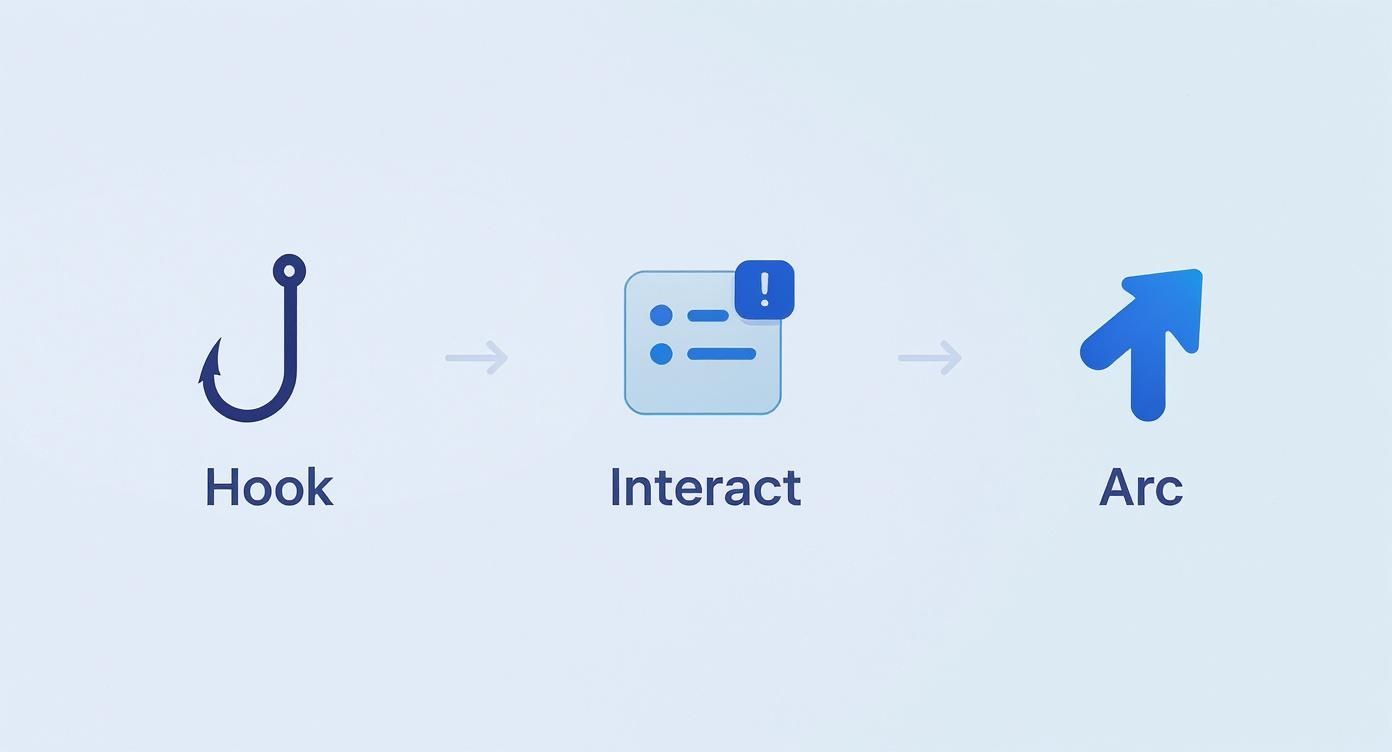
It all comes down to a strong hook, some interactive elements to keep them engaged, and a clear narrative that takes them on a journey.
Practical Pacing Strategies
Let's break this down with a real-world example. Say a travel vlogger wants to share a 3-minute tour of a hidden beach. Instead of one long, potentially boring video, they can break it into three 60-second clips that build excitement.
Clip 1 (0:00-1:00): The Hook and the Journey. Start with a breathtaking shot of the beach itself. Then, immediately cut back to the start of the hike or path leading to it. This creates an instant question: "How do I get there?" End the clip with a text overlay teasing, "Almost there... You won't believe the view."
Clip 2 (1:00-2:00): The Big Reveal. This segment shows the final approach and the full panoramic view of the beach. It’s the payoff. Halfway through, they could drop a poll sticker: "Would you hike 20 minutes for this?" This simple interaction resets the viewer's attention.
Clip 3 (2:00-3:00): The Details and CTA. Now, get into the cool details—the clear water, the unique rock formations. End the whole sequence with a question sticker asking, "Where should I explore next?" or a link sticker to a blog post with a map and more details about the location.
By deliberately structuring your clips, you're not just sharing a video; you're creating a guided tour. Each part flows logically into the next, making it effortless and compelling for your audience to watch all the way to the end.
How to Fix Common Upload Problems
There's nothing more maddening than having the perfect video ready to go, only to have it get stuck during the upload. If you’re trying to post an instagram story longer than 15 seconds, these technical hiccups can completely throw off your schedule. But don’t worry—most of these common issues have surprisingly simple fixes.
Nine times out of ten, when a video gets stuck in that endless processing loop, your internet connection is the culprit. Instagram needs a really solid, stable signal to handle those larger files. Before you do anything else, try switching from your cellular data to a reliable Wi-Fi network. Sometimes, just toggling airplane mode on and off is enough to reset things and get the upload moving again.
Diagnosing Quality and Sync Issues
Another classic headache is when your beautiful, crisp video suddenly looks like it was filmed on a potato from 2005. This happens because Instagram compresses everything you upload to save space on its servers. If your original file isn't optimized, that compression can be brutal.
To get ahead of this, always record and export your video in the highest quality you can, aiming for 1080p.
Then there’s the out-of-sync audio problem—a dead giveaway of a frame rate issue. This usually happens when your video's frame rate doesn't play nicely with Instagram's preferences. Before you even start editing, make sure your project is set to a standard like 30 frames per second (FPS).
A quick "pre-flight check" on your video's format, resolution, and frame rate can prevent nearly all common upload errors. Think of it as setting your content up for success before it even leaves your camera roll.
Still stuck? It might be time to clear your app's cache. The Instagram app collects a lot of temporary data over time, which can eventually lead to bugs and sluggish performance.
On Android: Head to Settings > Apps > Instagram > Storage, then tap "Clear Cache."
On an iPhone: The easiest route is to offload the app. Go to Settings > General > iPhone Storage > Instagram > Offload App, and then simply reinstall it from the App Store.
This little bit of housekeeping gets rid of the junk files without touching your account info and often solves those stubborn upload freezes. If you want to really master video quality, check out this guide on how to upload high-quality videos to Instagram.
By keeping an eye on your connection, file specs, and app health, you can sidestep most upload issues and get your longer stories live without the frustration.
Still have a few questions floating around about how to post longer Instagram Stories? Let's clear things up with some quick answers to the questions I get asked most often.
What's the Real Maximum Length for an Instagram Story?
These days, a single Instagram Story clip can run for a full 60 seconds. The old 15-second limit is a thing of the past.
If you try to upload a video that's longer than one minute, Instagram will automatically chop it up into 60-second segments for you. You can then publish them back-to-back to tell a longer, more complete story.
Do I Risk Losing Engagement with Longer Stories?
Not at all, as long as your content is actually good. Attention spans can indeed be short, but if your story is engaging and provides value, people will stick around.
The trick is to have a strong hook in the first few seconds. We've all seen the data—the biggest drop-off in viewers happens within the first 1-3 story frames. If you don't grab them immediately, a longer video will just give them more time to swipe away.
A longer story isn’t automatically better. It’s just a bigger canvas. Your success comes down to using that extra time to deliver more value, not just more filler.
When Should I Use a Reel vs. a Story for a Long Video?
This is a fantastic question, and it really boils down to what you want to achieve with your video. They're built for different jobs.
Stories are for connection. Think of them for timely, in-the-moment content aimed at your current followers. They feel personal, they're interactive, and they disappear in 24 hours. Perfect for behind-the-scenes glimpses, Q&As, or daily check-ins.
Reels are for discovery. This is where you put the polished, entertaining, or educational videos that you want new people to find. Reels live on the Explore page and the Reels tab, giving them a much longer lifespan and the potential to reach a much wider audience.
My favorite move? Share your new Reel directly to your Story. You get the best of both worlds: the urgency of a Story pushes your current followers to your more permanent, discoverable Reel. It's a simple way to maximize your reach.
Ready to stop guessing and start growing? Gainsty uses a powerful mix of AI and real Instagram expertise to attract genuine, engaged followers who love what you do. See how we can elevate your organic growth at https://www.gainsty.com.
.png&w=1920&q=75&dpl=dpl_34ZXCf12K5qjjdZjPn9snwDRADrB)




.png&w=750&q=75&dpl=dpl_34ZXCf12K5qjjdZjPn9snwDRADrB)