Why Manual Social Media Management is Holding You Back
Are you still setting alarms on your phone to post to Instagram? Or maybe you're trying to cobble together engagement stats from five different apps. If so, you're not alone—that’s how most small businesses start.
Picture this: a local bakery owner spends a couple of hours every single morning. They manually post the daily specials, jump over to Facebook to answer DMs, then check Instagram comments, all while trying to guess which posts are actually driving foot traffic. By Friday, they’ve sunk an entire workday into social media chores with no real data to show for it. This isn't just inefficient; it's a major roadblock to growth.

The Real Price of Juggling It All
The hours you lose are just the beginning. The true cost of managing everything by hand is the lost opportunity.
When you’re stuck in the weeds of daily posting, you can’t think strategically. Your brand messaging becomes inconsistent, customer questions get missed, and you lose out on valuable data that could sharpen your entire marketing plan. The conversation is no longer about just "saving time." It's about gaining a competitive edge, especially with high-impact strategies like video marketing for small businesses.
The biggest win with dedicated software is that it shifts your focus from doing social media to strategizing it. You stop being just a content poster and start being a brand builder.
Making this leap from manual work to smart automation isn't just a small trend—it’s a massive industry shift. The global social media management software market is expected to explode from roughly USD 29.93 billion in 2025 to a staggering USD 171.62 billion by 2033. This tells you one thing: businesses now see these tools as essential, not just a nice-to-have. Discover more insights about this market expansion.
How the Right Tools Unlock Growth
Modern software is so much more than a simple post scheduler. Think of it as your command center for everything social.
Get Real, Data-Backed Insights: Stop guessing. See exactly who your audience is, the best times to post, and which content truly resonates.
Manage Everything in One Place: Handle comments, DMs, and mentions from all your accounts in a single inbox. Nothing falls through the cracks.
Keep Your Brand Voice Consistent: Plan all your content in a shared calendar to ensure your messaging is always cohesive and on-point.
This is where a specialized tool like Gainsty really shines. Basic schedulers are fine, but Gainsty brings AI-powered strategy to the table to actively drive organic growth, which is a game-changer on a competitive platform like Instagram. It goes beyond simple management and acts as a true partner in building an engaged community.
Ready to see what’s out there? Our guide to the best social media management tools is a great place to start your search.
Figuring Out Which Features You Actually Need
The world of social media management software is crowded. Every tool out there promises to be the magic bullet for your business, and it's easy to get lost in a sea of feature lists and flashy demos. So, how do you cut through the noise?
The secret is to stop looking at what the software can do and start focusing on what you need it to do.
Let’s get real for a moment. A local bakery trying to get more people through the door has completely different social media needs than a B2B software company trying to generate leads. The bakery needs to build a local community, while the software company is focused on thought leadership and driving webinar sign-ups. Your goals dictate the tools you need.
The Must-Haves for Any Small Business
No matter what industry you're in, a few core features are non-negotiable. These are the essentials that will immediately save you time and bring some sanity back to your week.
Content Scheduling: This is the big one. Being able to plan and schedule your posts in advance across different platforms is a game-changer. It ensures you're showing up consistently, even when you're swamped with the day-to-day of running a business.
A Unified Inbox: Toggling between Instagram DMs, Facebook comments, and LinkedIn messages is a nightmare. A unified inbox pulls all those conversations into one place, so you can respond quickly and never miss a chance to connect with a customer.
Basic Analytics: You can't know if your efforts are working without data. Your tool needs to give you a clear, simple look at the basics: follower growth, engagement rates (likes, comments, shares), and how many people your posts are reaching.
These three features are the foundation. They solve the most immediate problems most small businesses face. Many of the best free social media management tools out there do a great job of covering these basics.
Advanced Features for When You're Ready to Grow
Once you've nailed the fundamentals, it's time to look at features that don't just manage your social media but actively help you grow. These are the tools that give you a deeper understanding of your audience and market.
Think about adding these to your toolkit as you scale:
Social Listening: This is like having a digital ear to the ground. It lets you track mentions of your brand, your competitors, and key industry terms. You can spot customer service issues before they blow up, find potential leads, and get a real sense of what people think about your brand.
Team Collaboration Tools: As soon as you bring on help—whether it’s a VA or a new marketing hire—you need a way to work together. Collaboration features let you assign tasks, create approval workflows for posts, and leave internal notes so everyone stays on the same page.
In-Depth Analytics: This goes way beyond likes and comments. Advanced analytics can show you who's clicking through to your website, which social campaigns are actually leading to sales, and detailed demographics about your audience. This is how you start proving the ROI of your social media spend.
To help you decide what you need now versus what you might need later, here's a quick checklist.
Essential vs. Advanced Software Features Checklist
Use this list to map out your current needs and identify the features that will support your future growth. It's a simple way to avoid paying for powerful tools you won't use for another year.
Publishing: For startups, post-scheduling is an essential feature to maintain consistency. As brands grow, advanced capabilities such as AI content generation and smart queues become valuable enhancements. The key benefit of publishing tools is time savings and consistent content delivery.
Engagement: A unified inbox is essential for startups to manage messages and comments efficiently. More advanced growth-stage features include automated chatbots and sentiment analysis. These tools improve response time and help protect and manage brand reputation.
Analytics: Startups benefit from access to basic post metrics to track performance. As growth accelerates, competitive analysis and conversion tracking provide deeper insights. The primary benefit is the ability to measure performance accurately and demonstrate return on investment.
Collaboration: A single user login may suffice for early-stage teams. As organizations expand, team roles and approval workflows become critical. These features streamline collaboration while ensuring consistency in brand voice and messaging.
Listening: Basic keyword alerts are essential for startups to monitor brand mentions. Advanced capabilities such as trend spotting and influencer identification support growth. The key benefit is uncovering new opportunities while safeguarding overall brand health.
The goal isn't to find a tool with every single feature. It's about finding one that solves your biggest headaches today while giving you a clear path to upgrade as your business—and your strategy—evolves.
Don't get pressured into buying an all-in-one suite from day one. Start with the essentials, and choose a tool that can grow with you.
Why Platform-Specific Tools Are a Secret Weapon
Here’s a hard truth most generic schedulers won't tell you: a one-size-fits-all strategy doesn't work. What gets you engagement on LinkedIn will get you crickets on Instagram. This is where specialized tools can make all the difference.
For instance, almost any tool can schedule a post to Instagram. But very few can actually help you grow on Instagram. The platform's algorithm is all about real engagement and community building, something a simple scheduler just can't replicate.
This is exactly the problem a service like Gainsty was built to solve. It’s not just another scheduler. It combines expert human strategy with smart AI designed specifically for Instagram organic growth. While other tools are just pushing content out, Gainsty is busy engaging with your target audience, joining relevant conversations, and building a community of authentic followers. It's a service that provides the human touch at scale—a feature you won't find on a typical software checklist.
Ultimately, choosing your software isn't about finding the tool with the most bells and whistles. It's about finding the one that directly supports your most important growth channel. If Instagram is where your customers are, a specialized growth tool isn't a luxury; it's a necessity.
A Practical Framework for Choosing the Right Tool
Picking the right social media management software feels like a massive decision for a small business, because it is. The right platform can put your growth on the fast track, but the wrong one quickly becomes an expensive, frustrating headache. To choose with confidence, you need a clear game plan that goes way beyond a simple feature checklist.
It all starts with getting crystal clear on what success actually looks like for your business. Are you trying to build brand awareness and just get your name in front of more people? Or is your real goal to generate qualified leads and drive traffic back to your website? Maybe you're laser-focused on building a tight-knit community around your brand.
Each of these goals demands a different set of tools and tactics. A business hunting for leads needs top-notch analytics and conversion tracking. A brand building a community, on the other hand, will live and die by its unified inbox and engagement features.
Setting a Realistic Budget
Once you know what you're aiming for, it’s time to talk money. Social media software pricing is all over the map, from free plans for basic scheduling to enterprise platforms that cost hundreds of dollars every month. For a small business, the sweet spot is somewhere between affordable and powerful.
Free Plans: These are perfect for just getting your feet wet. You can usually schedule posts for a couple of accounts, but don't expect much in the way of meaningful analytics or support.
Entry-Level Paid Plans ($15-$50/month): This is where most solopreneurs and small teams land. You’ll unlock better analytics, connect more accounts, and often get a unified inbox to manage conversations.
Growth-Focused Plans ($50-$150/month): When you start scaling, you’ll need more firepower. Think team collaboration tools, deep-dive reporting, and advanced features like social listening.
It's also crucial to think beyond the monthly fee and consider the value you’re getting back. A service like Gainsty, for example, isn't just a piece of software; it's a managed growth strategy for Instagram. You're investing in tangible results—like real follower growth and engagement—not just another tool. As you look at your options, checking out the top social media automation tools can give you a better feel for what's out there.
How to Run an Effective Software Trial
Nearly every platform offers a free trial, and this is your golden ticket to see if a tool truly fits your day-to-day workflow. Don't just click around the dashboard. Put it through its paces with real-world tasks. A 7 to 14-day trial is usually plenty of time to get a solid gut feeling.
Here’s how to make the most of it:
Use Your Actual Content: Don't use dummy posts. Schedule a full week of your real content to see how the platform handles your specific formats and if any quirks pop up.
Test Your Must-Have Features: Whatever you identified as most important to your goals, test it relentlessly. If community management is your jam, live in the unified inbox. If analytics are everything, try to build a custom report.
Get Your Team Involved: If anyone else on your team will be using the tool, get them into the trial. Their feedback on how intuitive it is (or isn't) is priceless for a smooth rollout later.
Ping Customer Support: Seriously, ask a question—even a simple one. The speed and quality of their response tell you everything you need to know about the support you'll get when you're a paying customer.
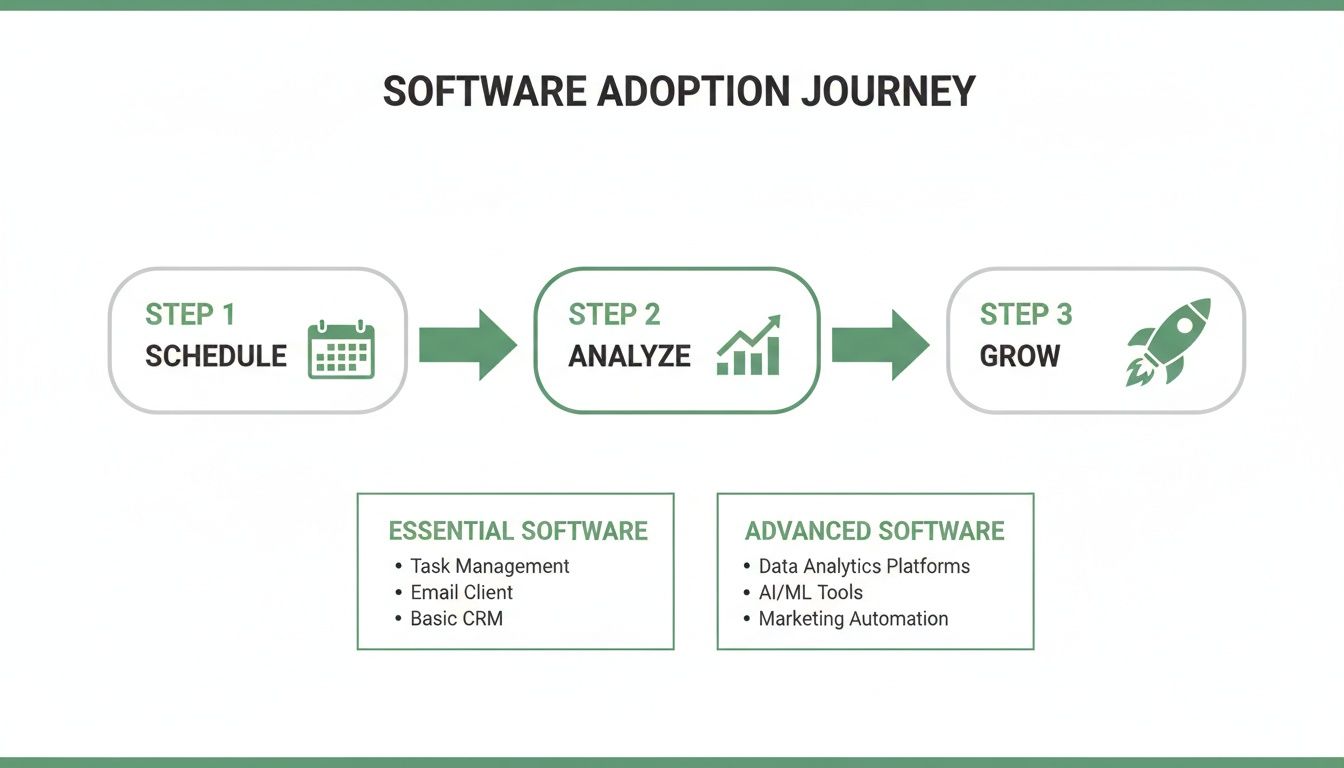
As you can see, the journey really is about mastering one stage before moving to the next. You have to get scheduling and analysis down before you can really focus on a sophisticated growth strategy.
Evaluating Vendors Beyond the Features
A long list of features doesn't automatically make a tool the right choice. The company behind the software is just as important. A platform can have every bell and whistle imaginable, but if it's a nightmare to use or you can't get a human to help you, it's worthless.
A user-friendly interface and responsive customer support are not just 'nice-to-haves'—they are essential features that directly impact your ability to get results.
When you're sizing up vendors, pay close attention to the user experience. Does the platform feel intuitive, or do you feel like you need a user manual just to find the post scheduler? A clean, logical design saves time and cuts down on frustration.
This is an area where a focused solution like Gainsty really shines. It provides a simple, results-oriented dashboard without the clutter of a hundred features you'll never touch. Plus, their commitment to 24/7 customer support means you always have an expert to turn to. That makes them feel more like a partner in your growth, not just another software subscription.
Getting Your New Software Up and Running
Picking the right social media management software is a great first step, but the real work—and the real payoff—begins with the setup. A powerful tool is only as good as the way you use it. A smooth start here can turn your new subscription from a simple scheduler into a genuine growth engine for your business.
This is where you translate features on a screen into real-world results. Think of this initial setup not just as a technical chore, but as the strategic foundation that aligns the tool with your business goals from day one.
Your Initial Setup Checklist
Getting started doesn't have to be a headache. If you focus on these core steps, you'll build a solid foundation that makes the tool an intuitive part of your daily routine.
The good news? Most modern platforms are cloud-based, which makes things infinitely easier. In fact, industry experts expect cloud deployment to dominate over 76% of the social media management market by 2026. For a small business owner, that means no complicated server installs—just a straightforward, secure setup right in your browser. You can dive deeper into the rise of cloud solutions in this market if you're curious.
Here’s a simple checklist to get you launched without a hitch:
Securely Connect Your Social Accounts: This is non-negotiable. Always use the official, authorized login process (often called OAuth). Never, ever give a third-party tool your direct password. It's the most critical step for protecting your brand's accounts.
Establish Team Roles and Permissions: If you have a VA, a marketing intern, or a business partner helping out, define their access levels right away. Decide who can publish content live versus who can only draft posts for you to approve.
Set Up Your Content Calendar: Start by blocking out key dates—think holidays, sales promotions, and industry events. Even a simple skeleton calendar provides a much-needed structure and helps you avoid that last-minute scramble for post ideas.
Configure Your Unified Inbox: How will you handle incoming messages? Set up filters or tags to organize DMs, comments, and mentions so you can prioritize what needs an immediate response.
Migrate Your Brand Assets: You probably won't move old scheduled posts, but you should absolutely upload your essential brand assets. Get your logos, color palettes, and go-to hashtags into the tool's media library for easy access.
Building Workflows That Actually Work
Software alone doesn't make you more efficient—smart workflows do. Without a clear process, even the best tool can create more confusion than clarity. The goal is to build simple, repeatable systems for your most common social media tasks.
Take a moment and think through the entire life of a single social media post. Who comes up with the idea? Who creates the graphic? Who writes the copy? And who gives it the final "go-ahead"? Mapping this out is the key to preventing bottlenecks and ensuring everyone knows what they're responsible for.
Your software should adapt to your workflow, not the other way around. If a process feels clunky inside the tool, it’s a red flag. It either means your process is too complicated or the tool isn't the right fit for how you work.
A simple, effective workflow could look something like this:
Ideation: A team member adds a quick content idea to a shared "Ideas" folder within the platform.
Creation: The content creator grabs an idea, designs the visual, writes the copy, and saves the whole thing as a draft.
Review: The business owner gets a notification to review the draft, leaving comments or edits directly on the post.
Scheduling: Once approved, the post is dropped into the calendar for the optimal time suggested by the platform's own data.
A Sample Workflow for Instagram Growth with Gainsty
Let's get practical. Imagine you're a small business owner using Gainsty to grow your Instagram account organically. Your main goal is to boost your follower count and engagement without being glued to your phone all day.
A specialized platform like Gainsty makes this happen by blending AI with real human expertise. Your workflow suddenly becomes less about tedious manual tasks and more about high-level strategic direction.
Here’s how it actually plays out:
The Strategy Session: You’ll kick things off with your Gainsty account manager to really nail down your target audience. You'll define their interests, the hashtags they use, and the competitor accounts they already follow. This initial input is crucial.
AI-Powered Engagement: With that strategy in place, Gainsty's AI gets to work. It performs thousands of targeted micro-interactions based on the profile you built, authentically engaging with potential followers and warming them up to your brand.
Your Content Focus: You continue to create and schedule your amazing content through a simple dashboard. The difference is that you can focus on quality, knowing the tool is handling the heavy lifting of audience growth and scheduling your posts for peak visibility.
Performance Review: Each week, you pop into your Gainsty dashboard to see the results. You can track new followers, see the lift in your engagement rate, and watch how your audience is evolving.
This approach completely changes the game. You're no longer the one doing the manual liking and following. You’re the strategist guiding an expert system. This frees you up to focus on what you do best: creating great content and running your business. This is the true power of implementing the right social media management software for small businesses—it doesn’t just manage your accounts; it actively grows them.
How to Measure the ROI of Your Social Media Software
Every dollar counts when you’re running a small business. You’ve invested time and money into a powerful new tool, but how do you actually know if that investment is paying off? Answering this question is the final, crucial step in making your social media management software a true asset rather than just another monthly expense.
It's tempting to get caught up in vanity metrics—the likes, shares, and follower counts that feel good but don't pay the bills. While these numbers can signal a healthy, growing brand, they don't tell the whole story. To prove real business value, you have to connect your social media efforts to tangible outcomes that hit your bottom line.

Moving Beyond Surface-Level Metrics
True return on investment (ROI) is measured in leads, sales, and customer retention. Your software's analytics dashboard is where you'll find these insights, but you have to know what to look for.
Start by shifting your focus from "How many people liked this post?" to "What did people do after seeing this post?" That simple change in perspective is the difference between tracking popularity and tracking performance. The real goal is to follow the user’s journey from their social feed all the way to a meaningful action on your website.
To do this right, you need to track a few core Key Performance Indicators (KPIs) that directly reflect business growth.
Key KPIs to Track for Real Business Impact
Your software's analytics should make it easy to pull these numbers. If you're digging around and can't find this data easily, it might be a red flag that your tool is more focused on scheduling than on delivering actual business intelligence.
Website Traffic from Social: How many people are clicking through from your social profiles to your website? This is your starting point—the first sign that your content is compelling enough to pull people into your world.
Lead Generation: Are people signing up for your newsletter, downloading a guide, or filling out a contact form? This is where you measure how well your content is generating potential customers.
Conversion Rate: Of all the traffic coming from social, what percentage takes a valuable action, like making a purchase? This is the ultimate test of whether your social media efforts are translating into revenue.
Customer Loyalty and Engagement: Are you building a community? Track things like repeat customer interactions and positive sentiment in comments to see if you're turning one-time buyers into loyal brand fans.
The most powerful ROI story isn't about going viral; it's about consistently turning followers into customers. Focus on the metrics that track that specific journey.
Building Reports That Tell a Story
Data is useless without context. Your final task is to use your software to build reports that clearly communicate the value of your social media efforts to anyone in your business, even those who aren't marketing-savvy. A good report doesn't just throw numbers on a page; it tells a compelling story.
Here’s what a story-driven report might look like:
Instagram clicks to site: Website clicks increased from 150 last month to 450 this month, reflecting a 200% rise in traffic driven by the new content strategy.
Newsletter sign-ups: Sign-ups grew from 10 to 35, representing a 250% increase in qualified leads generated from the improved social traffic.
Sales from social: Revenue attributed to social media increased from $200 to $850, resulting in an additional $650 in direct sales within a single month.
This kind of report makes the ROI crystal clear. It draws a direct line from social media activity to real financial results, making it easy to justify your software investment. For a deeper dive, you can learn more about how to calculate social media ROI and measure campaign success in our detailed guide.
This is precisely where a platform like Gainsty shows its true value. It moves beyond just managing your presence and actively fuels genuine organic growth on platforms like Instagram. By building an authentic, engaged audience through its AI and expert strategy, Gainsty creates a community that trusts your brand. That trust translates directly into higher click-through rates, more qualified leads, and, ultimately, more sales—the most important ROI of all.
Common Questions About Social Media Management Tools
Choosing a social media management tool is a big step for any small business. It's an investment of time and money, so it’s only natural to have a few questions before you dive in. Let's tackle some of the most common ones I hear from business owners.
Getting these answers straight from the start helps you pick a tool that works for you right now and can keep up as you grow.
How Much Should a Small Business Budget for This Software?
This is the million-dollar question, isn't it? The cost can swing from free all the way up to hundreds of dollars a month. Free tools can get you started with basic scheduling, but they usually fall short on the analytics and support you need to actually grow.
For most solopreneurs or very small teams, a budget of $15 to $50 a month is a great starting point. That range gets you access to some really powerful entry-level plans. Once you start bringing on team members or need more sophisticated reporting, expecting to pay $50 to $150 a month is more realistic.
But don't just think about the cost—think about the return.
A platform like Gainsty is a little different because it’s not just software; it's a managed service blending AI with real human oversight. In that case, you're not just buying a tool, you're investing in tangible outcomes like more followers and better engagement.
Can I Just Manage Social Media Myself Without Any Tools?
Sure, you can. But should you? Probably not. Managing everything by hand is a massive time sink. Imagine trying to keep track of posting schedules for three different platforms, digging for comments and DMs, and then trying to figure out what’s working by staring at a messy spreadsheet. It's a recipe for burnout.
Good software takes all that tedious work off your plate. It automates scheduling and gives you the hard data you need to stop guessing. For a platform as competitive as Instagram, trying to execute a real organic growth strategy without a dedicated tool is like trying to build a house with only a hammer. It’s just not practical.
What Is the Difference Between a Scheduler and a Full Suite?
This is a really important distinction to understand. A basic scheduler does one thing: it lets you line up your posts ahead of time. It's useful, but it's just one piece of the puzzle.
A full-blown management suite is your entire social media command center. Think of it as the difference between a bicycle and a car. Both get you somewhere, but one is equipped for a much longer, more complex journey.
A full suite typically gives you:
Advanced scheduling options for all your platforms.
A unified inbox to see all your comments and messages in one feed.
Deep-dive analytics and custom reports.
Tools to see what your competitors are up to.
Features for team collaboration, like approval workflows.
Some tools, like Gainsty, offer a unique hybrid. It combines scheduling support with a hands-on, AI-driven growth service designed specifically to get you results on Instagram.
How Long Until I See Results from New Software?
The time-saving benefits? You'll feel those almost instantly. The first week you don't have to manually post every day is a game-changer.
When it comes to seeing real growth—more followers, higher engagement—it depends on your strategy. With a solid content plan and consistent use of a good tool, you should start seeing a noticeable uptick in engagement within 30 to 60 days.
With a specialized service like Gainsty, that timeline can be much shorter. Because it uses a targeted, AI-powered approach to find your ideal audience, many users see a real jump in organic followers and engagement within just the first few weeks.
Ready to stop guessing and start growing? Gainsty combines powerful AI with expert strategy to build a real, engaged audience for your small business on Instagram. Start your journey to authentic growth today.

.png&w=1920&q=75&dpl=dpl_34ZXCf12K5qjjdZjPn9snwDRADrB)





.png&w=750&q=75&dpl=dpl_34ZXCf12K5qjjdZjPn9snwDRADrB)